0

Possible Duplicates:
Windows XP and RAM 3.5GB+
Is there way to enable 4 GB RAM in 32-bit Windows OS?

I installed 4GB of RAM on my Windows 7 Ultimate 32-bit (it used to have only 2GB).

But it says only 3GB usable, and I still often get a "Not enough memory" problem on Photoshop.
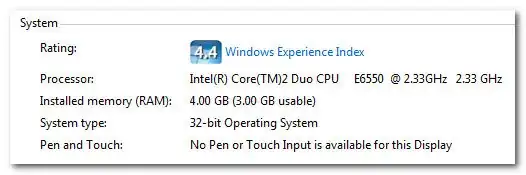
enter image description here

Is there any way to make it utilise the full 4GB?

Aximili
  • 533

5 Answers5

1

Quite simply, you can't use it, 32bit cannot access above 3gig due to limitations of the 32bit addressing, only 64bit OS with a 64bit CPU can access above this.

1

You have a 64 bits CPU, why did you bough a 32 bit operating system ?

You need Windows 7 64 bits and you can use much more memory and it will run faster.

Dragos
  • 1,497
0

Is there any way to make it utilise the full 4GB?

Install 64-bit Windows. In X86 Windows virtual address space for each 32-bit process limit 3Gb.

  • "Install 64 bit Windows" is the right answer but the 3 GB virtual address space limit has nothing to do with it. This is a limit on physical addresses, not virtual. – Jamie Hanrahan Aug 03 '14 at 19:14
0

See if PAE can help you:

How can I enable PAE on Windows 7 (32-bit) to support more than 3.5 GB of RAM?

  • 1
    PAE does not increase the addressable limits on Windows. Whilst PAE can, Windows goes out of its way to block that functionality. – Matthieu Cartier Jan 28 '11 at 11:08
  • This tool does it: http://www.unawave.de/windows-7-tipps/virusnote.html (Thanks to k00x and Breakthrough) – Aximili Feb 06 '11 at 11:57
0

32bit use above 3gig due to limitation of 32bit addressing; only a 64 bit os can unless you run a server edition with PAE. Do you have a x64 CPU?

Jacob
  • 1,654
  • 1
    This actually says the limit on x86 is 4GB http://msdn.microsoft.com/en-us/library/aa366778%28VS.85%29.aspx And a friend of mine can see 3.25GB out of his 4GB on his Windows 7 32-bit – Aximili Feb 05 '11 at 13:32
  • It's called the "3 GB barrier" but where it actually is depends on what PCI hardware you have using up physical address space. Put in a much smaller video card, you'll find you have more RAM usable. Larger video cards, or more of them, you'll get less RAM.

    I have one machine, a dual-socket Xeon monster with a video card on each node. Just to see what would happen I installed Win7 x86 on it before installing my real OS. It saw only 2 GB!

    – Jamie Hanrahan Aug 03 '14 at 19:17