You can call the executable that is contained within this IE plugin directly from the command line. It opens up the VM window just as usual, but without the need to go through the browser or use another remote desktop solution. It's called vmware-vmrc.exe
Locating the vmrc Exectuable
In order to do all that, you need to find the vmware-vmrc.exe file.
If installed through IE, I guess it's in Application Data\VMware Remote Console (Web) or something like that.
If installed in Firefox, search the Firefox profile for the VMware extension. Never mind that it doesn't actually work in FF, you could also install the extension in Firefox 2.0 or something and then extract it from the profile folder there.
Once you have located the vmware-vmrc.exe file, place it somewhere in your PATH. Either just add the IE plugin folder or copy it. Important: If you copy it, you need the whole contents of this folder (all dll files and executables), not just the vmware-vmrc.exe file.
I 7zipped the whole thing for you to download in case you can't find it. Can't promise though that it's the latest version that works on all systems.
Once you have it in the PATH, you can call it from anywhere without having to specify the full path.
Using vmrc
Call it like this:
vmware-vmrc.exe -h 127.0.0.1:8333 -u <user> -p <password> "[standard] machinename/file.vmx"
How to find out the name of your VM
"standard" is the name of the default container. The following two depend on the name of your virtual machine. It's the one you find under "Target" in the web interface. The vmrun documentation has an explanation of that on page 7.
In your case, it should be named something like "[standard] Ubuntu 64bit/somefile.vmx"
To find out the real name of the VM, you can run the following command
vmrun -T server -h https://127.0.0.1:8333/sdk -u <username> -p <password> list
This will list all the VMs you have in the correct format for the above command to pass. In your case it will be something like "[standard] Ubuntu 64bit/something.vmx". The vmrun should be somewhere in C:\Program Files\VMware\VMware VIX.
Automating everything
You could place the vmware-vmrc.exe line in a .bat file and then just call the batch file to avoid having to type this all manually. For example, you can create batch files for single virtual machines and put them on your Desktop. Then, just double click the files and the virtual machine window opens.
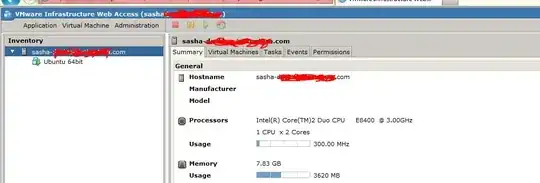


PATH, but the VM is still not found (that's the error message I am getting). Added a screenshot of my Web UI (might help). Tried to execute the following code:vmware-vmrc.exe -h 127.0.0.1:8333 -u sasha -p mypass "[standard] sasha.com/Ubuntu 64bit.vmx". I've found the file underC:\Virtual Machinesand the extension wasvmxf(tried this one but with a little luck as well). – Alexander Abramovich Jun 13 '11 at 12:38vmxfile, so it gives you something likeUbuntu 64bit/something.vmx. Your virtual machine has a folder name (which is "Ubuntu 64bit"), and inside that there's thevmxfile you need to specify. – slhck Jun 13 '11 at 13:29vmrunexited with the following message:Error: Malformed hostname parameter. For the given service provider, the hostname must be a URL, in the form https://<hostname>:<port>/sdk. There is no--helpor/?option, so it's kinda confusing. Thanks a lot! anyways :) – Alexander Abramovich Jun 13 '11 at 14:39". It should be exactly the same domain/IP as you use for the web interface. – slhck Jun 13 '11 at 14:44"C:\Program Files (x86)\VMware\VMware Server\vmrun.exe" vmrun -T server -h https://localhost:8333/sdk -u sasha -p mypassword list. Also triedlocalhostinstead of127.0.0.1. – Alexander Abramovich Jun 13 '11 at 14:53startcommand, so that thecmdprompt will be closed and only the VM window will remain opened. – Alexander Abramovich Jun 13 '11 at 14:55vmrc? Concerning thevmrunthing.. that's weird. It should work with theIP:portonly. I know it works because I'm using it that way. – slhck Jun 13 '11 at 15:02vmrunI believe it works on your machine. I guess something is wrong with mine. I'll open a separate question for that as well in case someone will know the answer (just curious). Thanks again! – Alexander Abramovich Jun 13 '11 at 15:05