In Visio 2010, how do you paste formats to objects inside a group? Attempting to paste formats to an object inside a group applies them to all objects in the group.
Asked
Active
Viewed 151 times

1 Answers
0
Right click on the group and click Format > Behavior

In the Behavior form in the Behavior tab, in the Group behavior section pay attention to the value of Selection. By default Visio sets this to Group First
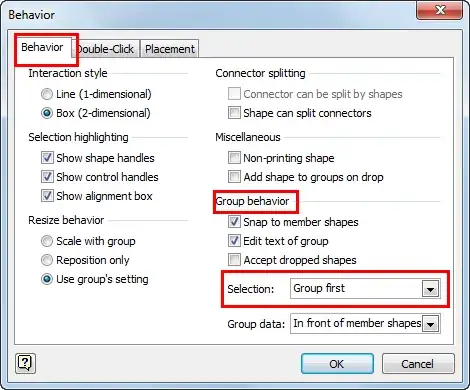
But there are three values you can choose from that determine how Visio will behave when you click on a shape.

Select Members first
Now when you use the Format Paint command when you click on a shape in that group, the formatting will be applied just to the shape you clicked on, instead of the entire group.

saveenr
- 1,514