2

Happens sometimes but frequently enough to be a pain in the bum. I press Del or Shift + Del but the file stays there. Then when I try to delete it again, it says that I need permission from the Admin. For it to be deleted, usually I have to restart my computer

List of things I've tried:

  • I have admin privileges
  • Hasn't happened since I reinstalled Windows and another form of this happened in my install before the last one
  • I tried takeown in cmd but it says ERROR: Access is denied
  • The files sometimes disappear by themselves after 2 mins or so
  • Refreshing the folder doesn't do anything
  • Unlocker doesn't work either. It asks me if I want to delete it the next boot

Windows 7 x64 Pro

HDD:

  • Fujitsu MHZ2320BH G2 ATA
  • 320 GB
  • 8MB Buffer
  • 5400 RPM
Oliver Salzburg
  • 87,539
  • 63
  • 263
  • 308
Alex
  • 1,026
  • What kind of file is it usually with? Video files? Update files? – Synetech Aug 15 '11 at 02:16
  • @Synetech inc., usually any files or folders. Sometimes I make some temporary folder for stuff and I just delete it later and also, I'm learning programming and I build and compile a lot to see if they work and this problem is making that impossible because the built exes are locked and it can't be deleted or cleaned or recompiled – Alex Aug 15 '11 at 02:21
  • Are you remembering to exit the compiled EXE? I have had it happen to me that a compilation failed and I realized that oops, the last copy is still running. – Synetech Aug 15 '11 at 02:24
  • Yes I always exit them. My compilations only fail when I make a mistake or if my compiler can't delete the files and recompile them – Alex Aug 15 '11 at 03:08
  • Without any specific errors or any specific cases, this is going to be impossible to solve. – surfasb Aug 15 '11 at 03:15
  • Do you have any shell-extensions that would do any extra processing of files? For example, MediaInfo is great because it gives some information on media files (go figure) in the status bar and/or tooltip, but to do so, it has to open the file and read some data. As a result, if you try to delete a file immediately after selecting it, the delete will fail because it’s still in use. Worse, if the file is corrupt, MediaInfo can spin in circles for a long time, trying to interpret the file, causing it to stay in use for some time. – Synetech Aug 15 '11 at 03:22
  • I have Eraser, Avast, and Unlocker in the context menu – Alex Aug 15 '11 at 03:31

3 Answers3

1

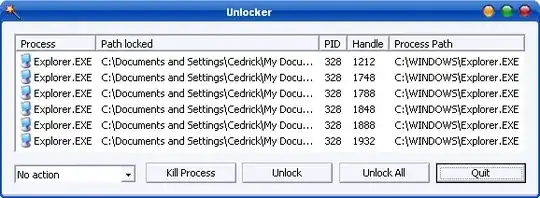
Try Unlocker, it determines which processes still have the file open and allows you to gain access to it.

enter image description here

Gareth
  • 18,809
soandos
  • 24,404
  • 28
  • 103
  • 134
  • Unlocker doesn't work. It says failed and asks me if I want to delete it during the next boot – Alex Aug 15 '11 at 02:03
  • This might sound odd, but are you sure its not deleted, and thats why you are getting accessed is denied? i.e can you open the file? – soandos Aug 15 '11 at 02:25
  • No they aren't deleted. 'Cause sometimes they're still there when I restart and after that they delete normally – Alex Aug 15 '11 at 03:09
1

Think the problem was caused by either the hard drive or Unlocker. Not sure what which but I'm leaning towards the hard drive.

I did a clean install of Windows 7 with a real format not a quick one. Afterwards, I installed everything I needed but was too lazy to install Unlocker. Now my computer's faster, more responsive, and files disappear immediately after I delete them (Or shortly after if it's a big file) either by pressing Shift + Del or just Del.

There's also no problems with repeatedly building, compiling and cleaning my programs

Alex
  • 1,026
  • 1
    +1 One of the shell extensions probably has caused weird Windows Explorer behavior, good that you found it. – Tamara Wijsman Aug 18 '11 at 19:19
  • Yep. I got rid of unlocker, and I haven't seen problems like this since, and it's been about half a year now – Alex Mar 21 '12 at 03:38
  • I don't really think these problems are related to Unlocker! I also had some deleting problems, but AFTER I installed Unlocker, I could at least identify the source of the file lockings - and possibly unlock these files. You could also have tried Process Explorer to try to identify the sources of the problems. As you said, you finally just reinstalled Windows, and your problems got solved - yes, a reinstall can solve many unexplored failures - but I don't think you should blame Unlocker so definitely,discouraging people from using it. – Sk8erPeter Apr 25 '12 at 16:26
  • @Sk8erPeter This is old. And yes the problem was caused by unlocker. I know because I haven't had problems like this for almost a year now and I stopped using unlocker. Like Tom suggested, it was probably a glitch with Unlocker's shell ext. that caused explorer to act weird – Alex Apr 26 '12 at 01:40
  • @AlexYan: yes, I know it's an old topic, but I just found this question.:) When you had this problem, you didn't try to just uninstall Unlocker first (and possibly get rid of its remainders), and see if it solves the problem - you gave up, and simply reinstalled the whole operating system, which can solve a lot of problems by itself. This way I don't think it's proven that the source of problems was related to Unlocker, which I'm using without such bugs for a long time past. Other SWs could also confuse Windows - so not using it since and not having problems don't mean Unlocker was culpable. – Sk8erPeter Apr 26 '12 at 09:18
  • @Sk8erPeter In the first install, I had the same problem, so I reinstalled to clear junk from old programs etc. Then I had the same problem, a few weeks later, I did another reinstall, and didn't install Unlocker. The problem was gone. I used Avast! free for both installs – Alex Apr 28 '12 at 00:29
1

For me it was only .exe files that couldn't get deleted. A quick Google search turned up this: Can't delete EXE files in Vista / Windows 7.

Re-enabling the Application Experience service solved this for me.

slhck
  • 228,104
jcai
  • 121