Short answer
It's impossible to guarantee a long timeframe because of entropy (also called death!). Digital data decay and dies, just like any other thing in the universe. But it can be slowed down.
There's currently no fail-proof and scientifically proven way to guarantee 30+ years of cold data archival. Some projects are aiming to do that, like the Rosetta Disks project of the Long Now museum, although they are still very costly and with a low data density (about 50 MB).
In the meantime, you can use scientifically proven resilient optical mediums for cold storage like Blu-ray Discs HTL type like Panasonic's, or archival grade DVD+R like Verbatim Gold Archival, and keep them in air-tight boxes in a soft spot (avoid high temperature) and out of the light.
Also be REDUNDANT: Make multiple copies of your data (at least 4), and compute hashes to check regularly that everything is alright, and every few years you should rewrite your data on new disks. Also, use a lot of error correcting codes, they will allow you to repair your corrupted data!
Long answer
Why are data corrupted with time? The answer lies in one word: entropy. This is one of the primary and unavoidable force of the universe, which makes systems become less and less ordered in time. Data corruption is exactly that: a disorder in bits order. So in other words, the Universe hates your data.
Fighting entropy is exactly like fighting death: you're not likely to succeed, ever. But, you can find ways to slow death, just like you can slow entropy. You can also trick entropy by repairing the corruptions (in other words: you cannot stop the corruptions, but you can repair after they happen if you took measures beforehand!). Just like anything about life and death, there's no magic bullet, nor one solution for all, and the best solutions require you to directly engage in the digital curation of your data. And even if you do everything correctly, you're not guaranteed to keep your data safe, you only maximize your chances.
Now for the good news: there are now quite efficient ways to keep your data, if you combine good quality storage mediums, and good archival/curation strategies: you should design for failure.
What are good curation strategies? Let's get one thing straight: most of the info you will find will be about backups, not about archival. The issue is that most folks will transfer their knowledge on backups strategies to archival, and thus a lot of myths are now commonly heard. Indeed, storing data for a few years (backup) and storing data for the longest time possible spanning decades at least (archival) are totally different goals, and thus require different tools and strategies.
Luckily, there are quite a lot of research and scientific results, so I advise to refer to those scientific papers rather than on forums or magazines. Here, I will summary some of my readings.
Also, be wary of claims and non independent scientific studies, claiming that such or such storage medium is perfect. Remember the famous BBC Domesday project: «Digital Domesday Book lasts 15 years not 1000». Always double check the studies with really independent papers, and if there's none, always assume the storage medium is not good for archival.
Let's clarify what you are looking for (from your question):
Long-term archival: you want to keep copies of your sensible, irreproducible "personal" data. Archiving is fundamentally different than a backup, as well explained here: backups are for dynamic technical data that regularly get updated and thus need to be refreshed into backups (ie, OS, work folders layout, etc.), whereas archives are static data that you would likely write only once and just read from time to time. Archives are for intemporal data, usually personal.
Cold storage: you want to avoid maintenance of your archived data as much as possible. This is a BIG constraint, as it means that the medium must use components and a writing methodology that stay stable for a very long time, without any manipulation from your part, and without requiring any connection to a computer or electrical supply.
To ease our analysis, let's first study cold storage solutions, and then long-term archival strategies.
Cold storage mediums
We defined above what a good cold storage medium should be: it should retain data for a long time without any manipulation required (that's why it's called "cold": you can just store it in a closet and you do not need to plug it into a computer to maintain data).
Paper may seem like the most resilient storage medium on earth, because we often find very old manuscript from ancient ages. However, paper suffers from major drawbacks: first, the data density is very low (cannot store more than ~100 KB on a paper, even with tiny characters and computer tools), and it degrades over time without any way to monitor it: paper, just like hard drives, suffer from silent corruption. But whereas you can monitor silent corruptions on digital data, you cannot on paper. For example, you cannot guarantee that a picture will retain the same colors over only a decade: the colors will degrade, and you have no way to find what were the original colors. Of course, you can curate your pictures if you are a pro at image restoration, but this is highly time consuming, whereas with digital data, you can automate this curation and restoration process.
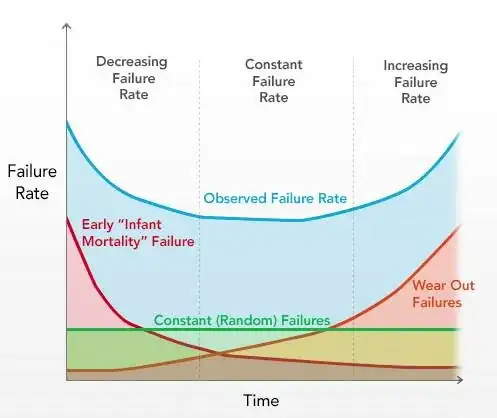
Hard Drives (HDDs) are known to have an average life span of 3 to 8 years: they do not just degrade over time, they are guaranteed to eventually die (ie: inaccessible). The following curves show this tendency for all HDDs to die at a staggering rate:
Bathtub curve showing the evolution of HDD failure rate given the error type (also applicable to any engineered device):
Curve showing HDD failure rate, all error types merged:
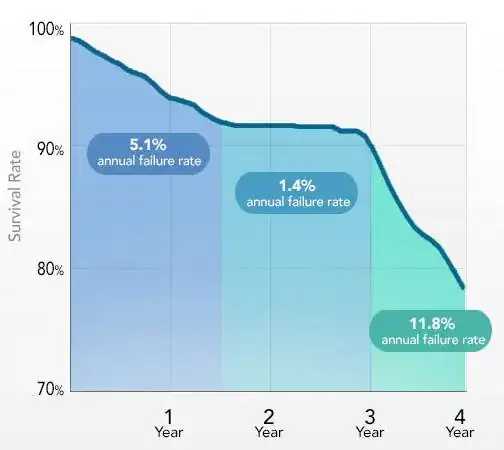
Source: Backblaze
You can see that there are 3 types of HDDs relatively to their failure: the rapidly dying ones (eg: manufacturing error, bad quality HDDs, head failure, etc.), the constant dying rate ones (good manufacturing, they die for various "normal" reasons, this is the case for most HDDs), and finally the robust ones that live a bit longer than most of HDDs and eventually die soon after the "normal ones" (eg: lucky HDDs, not-too-much used, ideal environmental conditions, etc..). Thus, you are guaranteed that your HDD will die.
Why HDDs die so often? I mean, the data is written on a magnetic disk, and the magnetic field can last decades before fading away. The reason they die is because the storage medium (magnetic disk) and the reading hardware (electronic board+spinning head) are coupled: they cannot be dissociated, you can't just extract the magnetic disk and read it with another head, because first the electronic board (which convert the physical data into digital) is different for almost each HDD (even of the same brand and reference, it depends on the originating factory), and the internal mechanism with the spinning head is so intricate that nowadays it's impossible for a human to perfectly place a spinning head on magnetic disks without killing them.
In addition, HDDs are known to demagnetize over time if not used (including SSD). Thus, you cannot just store data on a hard disk, store it in a closet and think that it will retain data without any electrical connection: you need to plug your HDD to an electrical source at least once per year or per couples of years. Thus, HDDs are clearly not a good fit for cold storage.
Magnetic tapes: they are often described as the go-to for backups needs, and by extension for archival. The problem with magnetic tapes is that they are VERY sensitive: the magnetic oxide particles can be easily deteriorated by sun, water, air, scratches, demagnetized by time or any electromagnetic device or just fall off with time, or print-through. That's why they are usually used only in datacenters by professionals. Also, it has never been proven that they can retain data more than a decade. So, why are they often advised for backups? Because they used to be cheap: back in the days, it costed 10x to 100x cheaper to use magnetic tapes than HDDs, and HDDs tended to be a lot less stable than now. So magnetic tapes are primarily advised for backups because of cost effectiveness, not because of resiliency, which is what interests us the most when it comes to archiving data. 2023 Update: LTO, an open-standard for magnetic tapes, is now widely spread, and LTO5+ drives supporting the standardized LTFS filesystem are available to consumers especially at refurbished prices, so I would now recommend LTO drives over optical discs, see my other answer below.
CompactFlash and Secure Digital (SD) cards are known to be quite sturdy and robust, able to survive catastrophic conditions.
The memory cards in most cameras are virtually indestructible, found Digital Camera Shopper magazine. Five memory card formats survived being boiled, trampled, washed and dunked in coffee or cola.
However, as any other magnetic based medium, it relies on an electrical field to retain the data, and thus if the card runs out of juice, data may get totally lost. Thus, not a perfect fit for cold storage (as you need to occasionally rewrite the whole data on the card to refresh the electrical field), but it can be a good medium for backups and short or medium-term archival.
Optical mediums: Optical mediums are a class of storage mediums relying on laser to read the data, like CD, DVD or Blu-ray (BD). This can be seen as an evolution of paper, but we write the data in a so tiny size, that we needed a more precise and resilient material than paper, and optical disks are just that. The two biggest advantages of optical mediums is that the storage medium is decoupled from the reading hardware (ie, if your DVD reader fails, you can always buy another one to read your disk) and that it's based on laser, which makes it universal and future proof (ie, as long as you know how to make a laser, you can always tweak it to read the bits of an optical disk by emulation, just like CAMILEON did for the Domesday BBC Project).
Like any technology, new iterations not only offer bigger density (storage room), but also better error correction, and better resilient against environmental decay (not always, but generally true). The first debate about DVD reliability was between DVD-R and DVD+R, and even if DVD-R are still common nowadays, DVD+R are recognized to be more reliable and precise.
There are now archival grade DVD discs, specifically made for cold storage, claiming that they can withstand a minimum of ~20 years without any maintenance:
Verbatim Gold Archival DVD-R [...] has been rated as the most reliable DVD-R in a thorough long-term stress test by the well regarded German c't magazine (c't 16/2008, pages 116-123) [...] achieving a minimum durability of 18 years and an average durability of 32 to 127 years (at 25C, 50% humidity). No other disc came anywhere close to these values, the second best DVD-R had a minimum durability of only 5 years.
From LinuxTech.net.
Furthermore, some companies specialized in very long term DVD archival and extensively market them, like the M-Disc from Millenniata or the DataTresorDisc, claiming that they can retain data for over 1000 years, and verified by some (non-independent) studies (from 2009) among less-scientific others.
This all seems very promising! Unluckily, there's not enough independent scientific studies to confirm these claims, and the few ones available are not so enthusiastic:
Humidity (80% RH) and temperature (80°C) accelerated ageing on several DVDs over 2000 hours (about 83 days) of test with regular checking of readability of data:

Translated from the french institution for digital data archival (Archives de France), study from 2012.
The first graph show DVD with a slow degradation evolution. The second one DVD with rapid degradation curves. And the third one is for special "very long-term" DVDs like M-Disc and DataTresorDisc. As we can see, their performance does not quite fit the claims, being lower or on par with standard, non archival grade DVDs!
However, inorganic optical discs such as M-Disc and DataTresorDisc get one advantage: they are quite insensible to light degradation:
Accelerated ageing using light (750 W/m²) during 240 hours:

These are great results, but an archival grade DVD such as the Verbatim Gold Archival also achieves the same performance, and furthermore, light is the most controllable parameter for an object: it's quite easy to put DVD in a closed box or closet, and thus removing any possible impact of light whatsoever. It would be much more useful to get a DVD that is very resilient to temperature and humidity than light.
This same research team also studied the Blu-ray market to see if there would be any brand with a good medium for long term cold storage. Here's their finding:
Humidity and temperature accelerated ageing on several Blu-ray brands, under the same parameters as for DVDs:
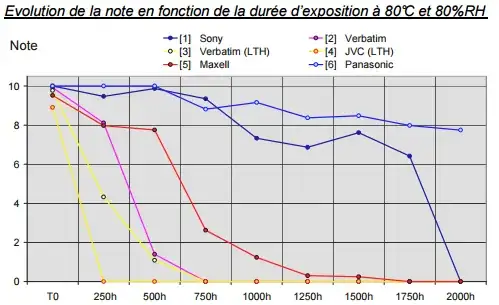
Light accelerated ageing on several BluRays brands, same parameters:

Translated from this study of Archives de France, 2012.
Two summaries of all findings (in french) here and here.
In fine, the best Blu-ray disc (from Panasonic) performed similarly to the best archival grade DVD in humidity+temperature test, while being virtually insensible to light! And this Blu-ray disc isn't even archival grade. Furthermore, Blu-ray discs use an enhanced error correcting code than DVDs (themselves using an enhanced version relatively to CDs), which further minimizes the risks of losing data. Thus, it seems that some BluRay discs may be a very good choice for cold storage.
And indeed, some companies are starting to work on archival grade, high density storage Blu-ray discs like Panasonic and Sony, announcing that they will be able to offer 300 GB to 1TB of storage with an average life span of 50 years. Also, big companies are turning themselves towards optical mediums for cold storage (because it consumes a lot less resources since you can cold store them without any electrical supply), such as Facebook which developed a robotic system to use Blu-ray discs as "cold storage" for data their system rarely access.
Long Now archival initiative: There are other interesting leads such as the Rosetta Disc project by the Long Now museum, which is a project to write microscopically scaled pages of the Genesis in every languages on earth the Genesis got translated to. This is a great project, which is the first to offer a medium that allows to store 50 MB for really very long term cold storage (since it's written in carbon), and with future-proof access since you only need a magnifier to access the data (no weird format specifications nor technological hassle to handle such as the violet beam of the Blu-ray , just need a magnifier!). However, these are still manually made and thus estimated to cost about $20K, which is a bit too much for a personal archival scheme I guess.
Internet-based solutions: Yet another medium to cold store your data is over the net. However, cloud backup solutions are not a good fit, for the primary concern than the cloud hosting companies may not live as long as you would like to keep your data. Other reasons include the fact that it is horribly slow to backup (since it transfers via internet) and most providers require that the files also exist on your system to keep them online. For example, both CrashPlan and Backblaze will permanently delete files that are not at least seen once on your computer in the last 30 days, so if you want to upload backup data that you store only on external hard drives, you will have to plug your USB HDD at least once per month and sync with your cloud to reset the countdown. However, some cloud services offer to keep your files indefinitely (as long as you pay of course) without a countdown, such as SpiderOak. So be very careful of the conditions and usage of the cloud based backup solution you choose.
An alternative to cloud backup providers is to rent your own private server online, and if possible, choose one with automatic mirroring/backup of your data in case of hardware failure on their side (a few ones even guarantee you against data lost in their contracts, but of course it's more expensive). This is a great solution, first because you still own your data, and secondly because you won't have to manage the hardware's failures, this is the responsibility of your host. And if one day your host goes out of business, you can still get your data back (choose a serious host so that they don't shutdown over the night but notify you beforehand, maybe you can ask to put that onto the contract), and rehost elsewhere.
If you don't want to hassle of setting up your own private online server, and if you can afford it, Amazon offers a new data archiving service, called Glacier. The purpose is exactly to cold store your data for the long-term. It offers 11 9s of durability per year per archive which is the same as their other S3 offers, but at a much lower price. The catch is that the retrieval isn't free and can take anywhere from a few minutes (Standard retrieval from Glacier Archive) to 48 hours (Bulk retrieval from Glacier Deep Archive).
Shortcomings of cold storage: However, there is a big flaw in any cold storage medium: there's no integrity checking, because cold storage mediums CANNOT automatically check the integrity of the data (they can merely implement error correcting schemes to "heal" a bit of the damage after corruption happened, but it cannot be prevented nor automatically managed!) because, contrariwise to a computer, there's no processing unit to compute/journalize/check and correct the filesystem. Whereas with a computer and multiple storage units, you could automatically check the integrity of your archives and automatically mirror onto another unit if necessary if some corruption happened in an data archive (as long as you have multiple copies of the same archive).
Long-Term Archival
Even with the best currently available technologies, digital data can only be cold stored for a few decades (about 20 years). Thus, in the long run, you cannot just rely on cold storage: you need to setup a methodology for your data archiving process to ensure that your data can be retrieved in the future (even with technological changes), and that you minimize the risks of losing your data. In other words, you need to become the digital curator of your data, repairing corruptions when they happen and recreate new copies when needed.
There's no foolproof rules, but here are a few established curating strategies, and in particular a magical tool that will make your job easier:
- Redundancy/replication principle: Redundancy is the only tool that can revert the effects of entropy, which is a principle based on information theory. To keep data, you need to duplicate this data. Error codes are exactly an automatic application of the redundancy principle. However, you also need to ensure that your data is redundant: multiple copies of the same data on different discs, multiple copies on different mediums (so that if one medium fails because of intrinsic problems, there's little chances that the others on different mediums would also fail at the same time), etc. In particular, you should always have at least 3 copies of your data, also called 3-modular redundancy in engineering, so that if your copies become corrupted, you can cast a simple majority vote to repair your files from your 3 copies. Always remember the sailor's compass advice:
It is useless to bring two compasses, because if one goes wrong, you
can never know which one is correct, or if both are wrong. Always take
one compass, or more than three.
Error correcting codes: this is the magical tool that will make your life easier and your data safer. Error correcting codes (ECCs) are a mathematical construct that will generate data that can be used to repair your data. This is more efficient, because ECCs can repair a lot more of your data using a lot less of the storage space than simple replication (ie, making multiple copies of your files), and they can even be used to check if your file has any corruption, and even locate where are those corruptions. In fact, this is exactly an application of the redundancy principle, but in a cleverer way than replication. This technique is extensively used in any long range communication nowadays, such as 4G, WiMax, and even NASA's space communications. Unluckily, although ECCs are omnipresent in telecommunications, they are not in file repair, maybe because it's a bit complex. However, some software are available, such as the well-known (but now old) PAR2, DVD Disaster (which offers to add error correction codes on optical disks) and pyFileFixity (which I develop in part to overcome PAR2 limitations and issues). There are also file systems that optionally implement Reed-Solomon such as ZFS for Linux or ReFS for Windows, which are technically a generalization of RAID5.
Check files integrity regularly: Hash your files, and check regularly (ie, once per year, but depends on the storage medium and environmental conditions). When you see that your files suffered of corruption, it's time to repair using the ECCs you generated if you have done so, and/or to make a new fresh copy of your data on a new storage medium. Checking data, repairing corruption and making new fresh copies is a very good curation cycle which will ensure that your data is safe. Checking is very important because your files copies can get silently corrupted, and if you then copy the copies that have been tampered, you will end up with totally corrupted files. This is even more important with cold storage mediums, such as optical disks, which CANNOT automatically check the integrity of the data (they already implement ECCs to heal a bit, but they cannot check nor create new fresh copies automatically, that's your job!). To monitor files changes, you can use the rfigc.py script of pyFileFixity or other UNIX tools such as md5deep. You can also check the health status of some storage mediums like hard drives using tools such as Hard Drive Sentinel or the open source smartmontools.
Store your archives mediums on different locations (with at least one copy outside of your house!) to avoid for real life catastrophic events like flood or fire. For example, one optical disc at your work, or a cloud-based backup can be a good idea to meed this requirement (even if cloud providers can be shut down at any moment, as long as you have other copies, you will be safe, the cloud providers will only serve as an offsite archive in case of emergency).
Store in specific containers with controlled environmental parameters: for optical mediums, store away from light and in a water-tight box to avoid humidity. For hard drives and sd cards, store in anti-magnetic sleeves to avoid residual electricity to tamper the drive. You can also store in air-tight and water-tight bag/box and store in a freezer: slow temperatures will slow entropy, and you can extend quite a lot the life duration of any storage medium like that (just make sure that water won't enter inside, else your medium will die quickly).
Use good quality hardware and check them beforehand (eg: when you buy a SD card, test the whole card with software such as HDD Scan to check that everything is alright before writing your data). This is particularly important for optical drives, because their quality can drastically change the quality of your burnt discs, as demonstrated by the Archives de France study (a bad DVD burner will produce DVDs that will last a lot less).
Choose carefully your file formats: not all files formats are resilient against corruption, some are even clearly weak. For example, .jpg images can be totally broken and unreadable by tampering only one or two bytes. Same for 7zip archives. This is ridiculous, so be careful about the file format of the files you archive. As a rule of thumb, simple clear text is the best, but if you need to compress, use non-solid zip and for images, use JPEG2 (not open-source yet...). More info and reviews of pro digital curators here, here, and here.
Store alongside your data archives every software and specifications that are needed to read the data. Remember that specifications change rapidly, and thus in the future your data may not be readable anymore, even if you can access the file. Thus, you should prefer open source formats and software, and store the program's source code along your data so that you can always adapt the program from source code to launch from a new OS or computer.
Lots of other methods and approaches are available here, here and in various parts of the Internet.
Conclusion
I advise to use what you can have, but always respect the redundancy principle (make 4 copies!), and always check regularly the integrity (so you need to pre-generate a database of MD5/SHA1 hashes beforehand), and create fresh new copies in case of corruption. If you do that, you can technically keep your data for as long as you want whatever your storage medium is. The time between each check depends on the reliability of your storage mediums: if it's a floppy disk, check every 2 months, if it's a Blu-ray HTL, check every 2/3 years.
Now in the optimal, I advise for cold storage to use Blu-ray HTL discs or archival grade DVD discs stored in water-tight opaque boxes and stored in a fresh place. In addition, you can use SD cards and cloud-based providers such as SpiderOak to store the redundant copies of your data, or even hard drives if it's more accessible to you.
Use lots of error correcting codes, they will save your day. Also you can make multiple copies of these ECCs files (but multiple copies of your data is more important than multiple copies of ECCs because ECCs files can repair themselves!).
These strategies can all be implemented using the set of tools I am developing (open source): pyFileFixity. This tool was in fact started by this discussion, after finding that there were no free tool to completely manage file fixity. Also, please refer to the project's readme and wiki for more info on file fixity and digital curation.
On a final note, I really do hope that more R&D will be put on this problem. This is a major issue for our current society, having more and more data digitized, but without any guarantee that this mass of information will survive more than a few years. That's quite depressing, and I really do think that this issue should be put a lot more on the front, so that this becomes a marketing point for constructors and companies to make storage devices that can last for future generations.
/EDIT: read below for a practical curation routine.


