2

I'm having some screen/video issues with my new Lenovo X200s, running Windows 7 64-bit. You can see the problem here:
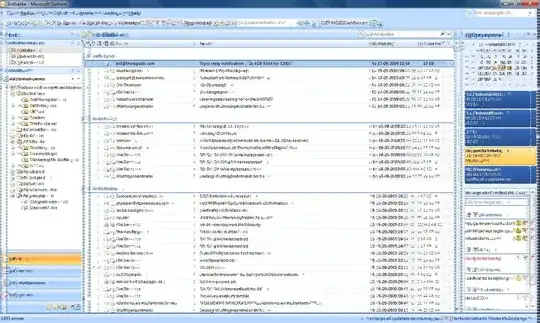
enter image description here

I've installed the latest Intel GS45 chipset drivers, and the latest graphic drivers (updated with windows update).

Turning off Aero fixes the problem, but I would really like to fix this issue, and if it's a hardware problem, I need to return it.

Hennes
  • 65,142

2 Answers2

1

This is a hardware video chip fault. You can see the same thing on a desktop computer with a video card having a clogged fan or having a faulty chip.

soandos
  • 24,404
  • 28
  • 103
  • 134
1

Most probably it is a driver issue. Have you tried downloading the official driver from Intel direct yet?

caliban
  • 20,153
  • Yes I tried those. Same problem. – Tommy Jakobsen Sep 18 '09 at 05:04
  • You probably might want to try a Vista based driver then, just to confirm it is not a hardware issue before you send it in to the manufacturer. By the way, a manufacturer might not support the fact that you tried installing a yet-to-be-officially-released Windows version on your notebook. Best to go back with the original OS installed (and problem still there of course). – caliban Sep 18 '09 at 07:49
  • I will try installing Vista. Thanks for your advice. – Tommy Jakobsen Sep 20 '09 at 15:25