8

Middle click and drag in Adobe Reader scrolls the page, as it does in most Windows applications. However, middle click and release (without dragging) shows a page thumbnail.
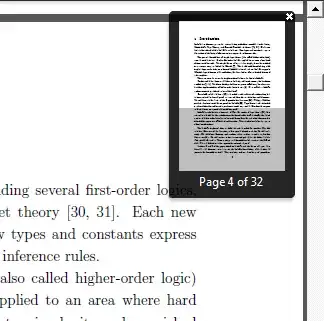
thumbnail

Is there any way to turn off the thumbnail-showing behavior? It's annoying when I just try to scroll the page and suddenly a box pops up, obstructing the text.

hmp
  • 416
  • Can you add a screenshot? I ask because I can not duplicate the same issue with my Adobe Reader. – SgtOJ May 27 '12 at 22:54
  • Which version u use? – Alfred May 28 '12 at 07:51
  • This is what the thumbnail looks like: http://i.imgur.com/K6AQY.png I'm using Reader 10.1.13, but it has been happening in previous versions as well. – hmp May 28 '12 at 11:10
  • Do you still want to scroll with middle-click? If not, then your mouse drivers should have capability to outright disable middle-click for acrobat reader. – Mxx May 31 '12 at 19:44
  • 1
    Well, if I didn't want to scroll with middle click, I just wouldn't use it... – hmp Jun 01 '12 at 20:41

1 Answers1

1

AFAIK there is not a direct way to do this so you have to use some trick like AutoHotkey. There is another question I found where user is using mouse wheel as hand in Adobe reader.

The best way to set the keys according to your wish and do whatever you want to. But I think this will cause to not scroll down through the mouse wheel after this.

avirk
  • 15,777