3

I am trying to print each report on just a single page but have no idea as to how should I proceed. Let me explain:-
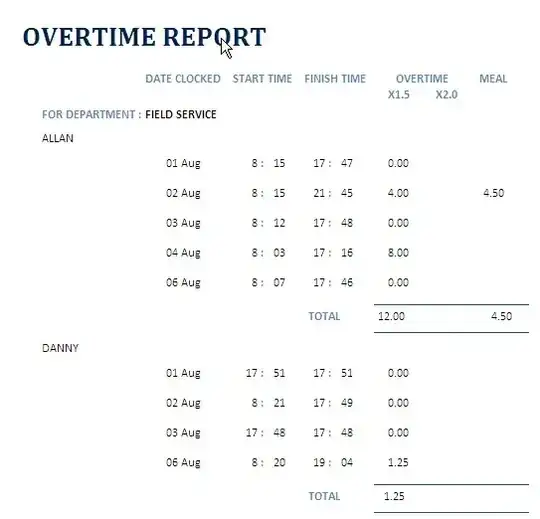
enter image description here

As seen from the report, Allan and Danny is now appearing in a single page but my requirement is only for one individual to appear in a page (i.e. Allan in 1 page and Danny in the other).

I am attaching the Design page for your vieiwing.

enter image description here

Thank you for your assistance.

Chris
  • 123
  • +1 for clear question. However, you may need to show your actual query (the SQL would be great). I would imagine you're missing a where clause (eg, where personName = 'xxxxx') – Dave Aug 30 '12 at 08:08

1 Answers1

2
  1. Go into the properties of your Name Footer.
  2. Navigate to the Format tab.
  3. Find the option called Force New Page.
  4. Change the value from None to After Section.
Daniel
  • 664
  • Hi! Daniel, thank you very much for your help. It works. May I know how do I set the header to appear on every page? – Chris Aug 31 '12 at 00:35
  • The report header only shows once on the first page. The page header will show on every page. The same analysis can be done with the footers. – wbeard52 Oct 22 '15 at 02:08