9

I am no longer using the trackpad on my MacBook and using a separate wired Apple keyboard instead. I miss the scrolling functionality on my trackpad, I'm having to make do with the keyboard (the mouse is too far away for efficient scrolling).

Is there a way to map a key combination (such as cmd+pagedown) such that I scroll up/down half a page instead of a full page?

Even better, is there a way to map key combinations to arbitrary scrolling distances?

Giacomo1968
  • 55,001
Eddy
  • 3,397
  • 11
  • 43
  • 51
  • For a long time, I had Vimium installed (Chrome Extension - https://chromewebstore.google.com/detail/vimium/dbepggeogbaibhgnhhndojpepiihcmeb?pli= ), because in Vim you can scroll down half a page with d and up half a page with u. But I recently uninstalled it, since it comes with so much other functionality, that gets in the way of my normal days. I still miss the d and u scrolling, though. I also tried setting it up using BetterTouchTool, but didn't find it in there. – Zeth Jan 02 '24 at 13:45

2 Answers2

2

I have no idea why it hasn't been answered for so long, but there is a way - you can do it using ControllerMate. It's an overkill, that's for sure (and it costs $25), but it does do the job.

In a nutshell: Open ControllerMate, create a new page in "Programming items" section. In Palette, open "Controllers" (⌥⌘1), choose your keyboard and press the key you want to bind the action to (for example, Cmd key). It will highlight there.
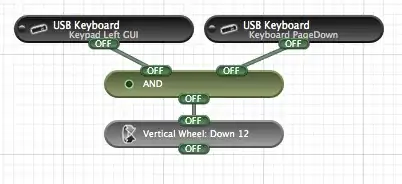
If you want to group several keys (such as Cmd+Pagedown), drag the second (third... nth...) key there too and connect them using "AND" operator in "Logic" (⌥⌘4) palette. Then use the "Scroll Wheel Building Block" in an "Output" (⌥⌘2) palette. You can customize the scrolling step in the "Inspector" window.

You will end with something like that:
enter image description here

Do the same for the Cmd+PageUp hotkey (don't forget to change the direction of scrolling).

0

I am using Keyboard Maestro to do this.

There is a system macro called "Simulate Scroll Wheel Down X pixel" where you can define X for how much you wanted one key press to scroll. I use 720 which is about half a page.

Keyboard Maestro can let you make this system wide or, in my case, I limited this to just Safari and Chrome.

Giacomo1968
  • 55,001