2

I would like to know the MAC address of a running computer which is directly connected to my own laptop with a wired cable (ethernet to ethernet).

It has no DHCP server on it and I don't know its network configuration. Is this possible?

Needled to say that I can't login on this machine (I need a Linux live CD to boot it on but I only have DVD so I can't get access to it right now)

Hennes
  • 65,142
Mat
  • 123
  • 1
    You should try to see if it's in the arp table of the connected host. Try to perform this command: arp -a it will list all the mac-address of the directly connected devices on all his interfaces. – MrLightBulp Dec 17 '12 at 20:39
  • I already tried to:
    1. launch Wireshark (and let it run on eth0)
    2. ping 255.255.255.255; ping 192.168.255.255;
    3. arp -a

    But neither in Wireshark nor through arp could I get the mac address of the foreign host.

    – Mat Dec 19 '12 at 14:10

5 Answers5

2

You should try to see if it's in the arp table of the connected host. Try to perform this command: arp -a it will list all the mac-address of the directly connected devices on all his interfaces.

  • Arp entries may time-out. Try accessing it (or ping it) in the minute before your use the arp -a command. – Hennes Dec 18 '12 at 01:46
1

You could try the program named arp-scan:

arp-scan  --localnet

In a further step, you could try to find the assigned name of the host, asking the nameserver in charge of the subnet

host 192.168.178.27 fritz.box

... as an exemple

nixda
  • 27,268
0

Another thing to try would be sudo tcpdump.

Indrek
  • 24,424
0

It will not be in the ARP table until it has been pinged/contacted in some way... so...

If you have a Windows machine available and a little time, I would download angry ip scanner (version 2), set the options to the following:
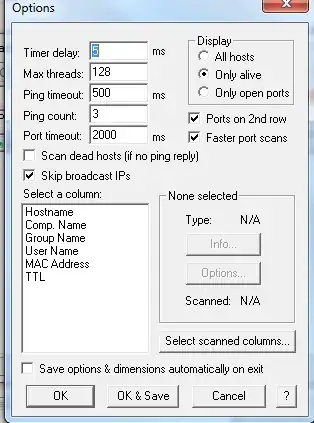
enter image description here (FYI, this was an old picture of mine... put threads to 1000! - if you find nothing or set this too high, your cpu may not be able to handle all the threads before the timeout is being hit.)

I would then hope I can guess the IP slightly... lets say I "think" the 192 range, I would change my machine's ip to 192.168.0.1, subnet 255.0.0.0, gateway/dns blank and put 192.168.0.2 - 192.168.255.255 as the ip range and start scanning.

Next, try 10.0.0.1 as your machines ip and scan to 10.255.255.255

This will take quite a bit of time, but, as long as ping isn't blocked on the machine - you are guaranteed this will work eventually.

You will have a single host listed when it is finished... and, all you need to do is ping the ip, followed by arp -a - you will then have the mac address.

I know this isn't the fastest... pretty sure there is something you can do with nmap... but, that isn't my speciality and despite being slow, I guarantee this will work... have a few sessions open, you will be done in no time!

William Hilsum
  • 116,736
0

If the remote machine is configured to look for a DHCP server, it will send DHCP discovery packets to your machine. The MAC address is included in this packet. You can use a packet sniffer (e.g. Wireshark) to have a look at this packet.

ChrisiPK
  • 196