2

Sometimes in the Windows Event Log you may see an error or warning about disk problems regarding something like:

\Device\Harddisk0\D.

Presumably, the Harddisk0 refers to the first physical drive as reported by the Disk Management MMC snap-in (though I have personally never seen anything other than disk 0 being reported even with different drives and even when the drive in question was definitely a different one—like the SD card in the card-reader).

But what is the D?

It definitely isn’t a partition. Physical problems affect the whole drive, not a single volume, plus the System\Disk event log entries logs physical problems; filesystem issues are logged to Application\Winlogon.

So what does the D refer to? Has anyone ever seen a different letter? Googling for \Device\Harddisk0\C returns a small handful of results which are most likely just a typos. I managed to find one person who asked this question but got no answer.

Synetech
  • 68,827
  • See http://superuser.com/questions/307955/how-do-windows-nt-based-operating-systems-address-devices – user2313067 May 27 '13 at 19:22
  • I think that may be related, but it doesn’t look like it’s the same thing. – Synetech May 27 '13 at 19:24
  • 1
    Are you sure it wasn't \Device\Harddisk0\DR0? Maybe the code reporting the error had a bug and chopped off the last two letters... – user541686 May 27 '13 at 19:33
  • @Mehrdad, No, it’s always \D, this weekend with the SD card, last year with an old Maxtor, every time I’ve ever seen that warning, it’s always Harddisk0\D (even the number never varies). – Synetech May 27 '13 at 20:13

1 Answers1

0

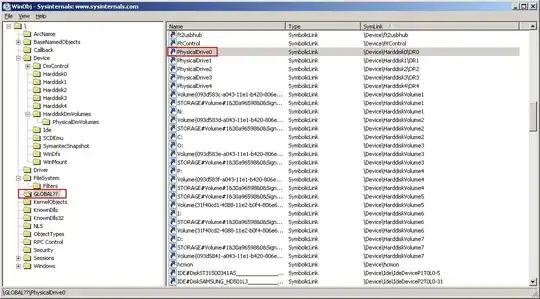
Use WinObj Sysinternals Suite

\Device\Harddisk0\D

That is, in this case, the problem entirely with HDD. Harddisk0.

Windows DDK 2003 SP1 ISO (230 MB) 3790.1830, objdir.exe:

objdir \GLOBAL?? | find /I "harddisk" | more

Get device info:

wmic DISKDRIVE get Caption, DeviceID, Index, PNPDeviceID, Partitions, SCSIPort, Size

Output:

Caption              DeviceID            Index  Partitions  PNPDeviceID                                                                                        SCSIPort  Size
SAMSUNG HD501LJ      \\.\PHYSICALDRIVE4  4      1           IDE\DISKSAMSUNG_HD501LJ_________________________CR100-13\3053554D314A5143304236343639202020202020  5         500105249280
ST31500341AS         \\.\PHYSICALDRIVE0  0      1           IDE\DISKST31500341AS____________________________CC1H____\6&162587C5&0&0.0.0                        1         1500299297280
ST32000542AS         \\.\PHYSICALDRIVE1  1      2           IDE\DISKST32000542AS____________________________CC34____\5&5C6CFD6&0&0.0.0                         2         2000396321280
WDC WD5000KS-00MNB0  \\.\PHYSICALDRIVE3  3      1           IDE\DISKWDC_WD5000KS-00MNB0_____________________07.02E07\5&1841A32E&0&0.0.0                        4         500105249280
WDC WD5000KS-00MNB0  \\.\PHYSICALDRIVE2  2      2           IDE\DISKWDC_WD5000KS-00MNB0_____________________07.02E07\5&2AFB53D3&0&0.0.0                        3         500106332160

D is shorter alias DRx.

WinObj

Symbolink \Device\HarddiskX\ - unique.

winObj

STTR
  • 6,775
  • I don’t think that’s the same thing; I see nothing ending in \D. Can you figure out if there is some sort of mapping or something? – Synetech May 27 '13 at 19:25
  • D is shorter alias DRx.   Actually it’s not, DR—supposedly—means removable drive. – Synetech May 27 '13 at 20:14
  • @Synetech Well I have all the hard drives and removable), at least for now) I'll go look in the pantry). DR - Hard Drives. It real screen WinObj at my system. – STTR May 27 '13 at 20:20
  • I’m inclined to believe that Moab has a reason to say that. :-\ I’d guess that \D means “drive”, but that doesn’t mean much since there are so many types (~5 or 6 from what I remember). – Synetech May 27 '13 at 21:30