When you have unknown hardware which is 20 years or less old you usually can get the PCI device ID. This will help you indentify which hardware it is, rather than a generic PCI Simple Communication Controller or similar.
For unix like OS'ses such as FreeBSd, Linux or OS X use lspci or pciconf.
For windows you can use the hardware ID tab in the device manager.
To start the device manager either go to [start] [run] and type devmgmt.msc or right click on the [my computer] icon on your desktop, select "manage" and click on the device manager option.
(Screenshots from win 7. It is similar in XP).
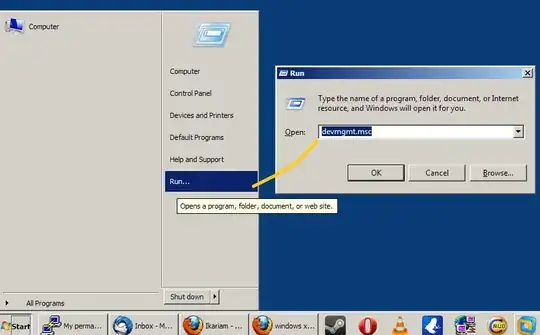

From device manager:
- Go to the device you want to find the hardware ID from.
- Right click on it and select "properties".
- Go to the tab "Details" and change "Device description" to "Hardware ID".
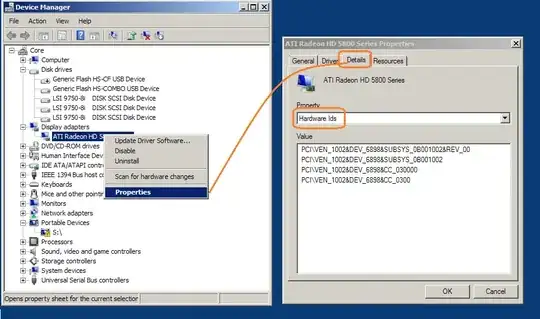
Note the value with the lines like this one: PCI\ven1002&dev_6898&subsyst_0b...
Search for that in the internet or use a site like http://www.pcidatabase.com/.
Note that these IDs have a fixed format. The first number will always indicate the manufacturer. In this case that is ATI/AMD (ATI was bought out by AMD).

The remaining numbers indicate all the detaiils, often down to the revision number.


( From device manager, go to the failed device. Right click, properties (now at the page with "Device status, this device is ... (code..)". Go to the tab "Details" and change "Device description" to "Hardware ID". Post those. ) – Hennes Jun 15 '13 at 14:04