7

I am looking for a quiet, low-power, budget video card that supports two 24" monitors (1900 x 1280?) for a Windows XP system (PCI and PCIe slots).

In particular, I find it hard to tell whether a graphics card supports two monitors. Apparently "dual-link DVI" is not for two monitors, rather it's two cables to support one big monitor? A lot of the cards I am looking at have 1 DVI, 1 HDMI, and 1 D-SUB (VGA??) slot. It's unclear if I can hook up one monitor with DVI and one with HDMI or not.

How can I tell if a card supports dual monitors?

Examples I've been looking at:

  • SAPPHIRE Radeon HD 6450
  • GeForce GT 610
  • XFX Radeon HD 5450
dfrankow
  • 619

2 Answers2

2

Google is your friend.

http://www.geforce.com/hardware/desktop-gpus/geforce-gt-610/specifications

This shows "MultiMonitor: Yes"

Don't let "Dual-link" confuse you -- that just means the connection supports higher bandwidth, it doesn't have to do with multiple displays. Be aware of the different DVI connections though, you may need a specific type to make higher resolutions possible.

http://www.datapro.net/techinfo/dvi_info.html

trpt4him
  • 1,650
  • MultiMonitor: Yes will not say you can connect DVI and HDMI. Most cheap cards only let you connect DVI+VGA or HDMI+VGA. So yes, they support multimonitor, but it doesn't say the exact combinations. – Koen van der Linden Dec 23 '17 at 11:09
-1

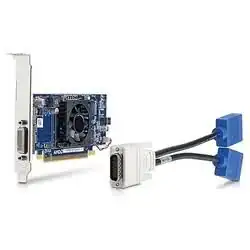
Dual Link DVI can be for two monitors,

Dell has used this for years:

enter image description here

Or

enter image description here

But, generally if the card has two or more output ports than dual monitors are possible.

With AMD cards you can see if the card supports Eyefinity, this means the card supports 2-6 monitors (2 - 3 per card, with 2 cards up to 6).

Also, you can check reference cards for supported outputs, and some sites will let you sort by number of outputs supported. Although, to my knowledge just about every card sold now supports dual monitors. Even integrated GPUs generally support two or more as long as the physical port was added to the board.

  • 2
    The card on the picture is using DMS-59 and not DVI. Dual Link DVI doesn't support two screens per one connector. – user555 Jul 21 '13 at 19:40
  • That looks like a DMS 59 connector with a DMS59 to DVI cable. – Hennes Jul 21 '13 at 19:41
  • @user555 You may be right, blurry picture... but http://en.community.dell.com/support-forums/desktop/w/desktop/optiplex-usff-dvi-dual-monitors-and-why-you-can-39-t-connect-2-vga-monitors-in-extended-desktop-mode.aspx is describes what I mentioned with Dell. – Austin T French Jul 21 '13 at 19:48
  • "Dell Magic: Two Signals from a Single DVI Port" can be confusing. Especially since that "single DVI port" is not a "DVI port". – Hennes Jul 21 '13 at 19:53
  • @Hennes It is a regular DVI port though on say the Optiplex 745 USFF, you can bypass the splitter adapter that comes with the desktop and use a normal DVI cable without issue. – Austin T French Jul 21 '13 at 19:54
  • What your are describing and used on the Optiplex is one DVI and one VGA out of a DVI port, not as in the picture where the same interface is doubled. – user555 Jul 21 '13 at 21:02
  • @user555 You are correct there, although it is sold as DVI. – Austin T French Jul 21 '13 at 21:03