My current technique is to right-click in the command prompt and then click paste. This bugs me - is there a better way?
Asked
Active
Viewed 1.0k times
17

-
Just out of curiosity, does anyone know why they didn't just add support for a control-v paste command? – Shane Wealti Nov 02 '11 at 13:59
5 Answers

6
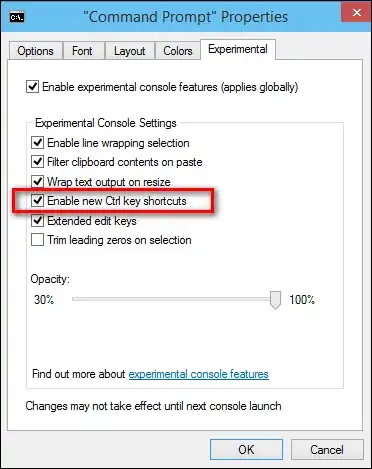
This was solved on Server Fault:
I personally use a little AutoHotkey script to remap certain keyboard functions, for the console window (CMD) I use:>
; Redefine only when the active window is a console window #IfWinActive ahk_class ConsoleWindowClass>; Close Command Window with Ctrl+w $^w:: WinGetTitle sTitle If (InStr(sTitle, "-")=0) { Send EXIT{Enter} } else { Send ^w }
return
; Ctrl+up / Down to scroll command window back and forward ^Up:: Send {WheelUp} return
^Down:: Send {WheelDown} return
; Paste in command window ^V:: ; Spanish menu (Editar->Pegar, I suppose English version is the same, Edit->Paste) Send !{Space}ep return
#IfWinActive


1


Franck Dernoncourt
- 21,280
- 51
- 203
- 349
-
Your screenshots are incorrect, you don't seem to be in windows 10, it seems to be windows 8/8.1. – Wasif Sep 17 '20 at 01:43
-
0
Control and V, like the rest of the OS :P
#IfWinActive, ahk_class ConsoleWindowClass
^v:: Send !{Space}ep
#IfWinActive
(Yep, that's just automating the previous answers, but automating them it is. Autohotkey! :))

Phoshi
- 23,383