Evertime I open google drive I get the following error msg.
I tried copying and pasting the dll file into system32 and sysWOW64. But the problem still persists. 
Asked
Active
Viewed 1.2e+01k times
15

stderr
- 10,394
- 2
- 32
- 49

Rene Duchamp
- 322
-
2looks like googleDrive uses pyInstaller, interestinng. – Naib Nov 02 '13 at 23:13
-
And in case anyone is wondering: Don’t even think about copying this DLL anywhere. It does not belong in the Windows folder. – Daniel B Mar 19 '16 at 19:50
5 Answers
13
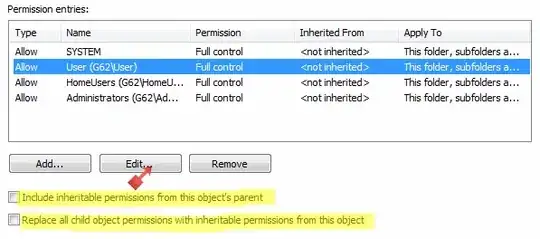
May be a problem related to permissions (look for System Error Codes). Try the following.
- Open the Windows Explorer.
- Paste this(
%UserProfile%\AppData\Local\) in address bar. - Right click on folder
TempthenProperties-Securitytab -Advancedbutton. - Click on button
Change Permissions. - Remove all permissions.
- Select the entry for your user name and click
Edit.- Include inheritable permissions from this object's parent.
- Replace all child object permissions with inheritable permissions from this object.
- Click
OK.
stderr
- 10,394
- 2
- 32
- 49
5
One fix is to set GoogleDriveSync.exe (generally located in : C:\Program Files\Google\Drive) in compatibility mode :
- Right-click on the executable -> Properties -> Compatiblity -> Run this program in compatibility mode for : Windows 7 (I assume you're running Windows 8, otherwise try setting an older OS version)

Michaël Polla
- 382
2
For windows 8 system, follow the steps bellow:
- Open the Windows Explorer.
- Paste this(%UserProfile%\AppData\Local) in address bar.
- Right click on folder Temp then Properties - Security tab - Advanced button.
- Click in Everyone, Mark Change Permission and later click Edit
- Mark all permissions
- Press Ok (continue) in all windows questions.

user286682
- 21
1
The option Run as administrator worked for me. (I'm using windows 8.1)

Mangesh Ghotage
- 256
-
This worked for me. Plus, to avoid doing this every time, right click it > Properties > Compatibility > Check
Run as administrator– Alaa M. Feb 03 '18 at 15:52
0
On Windows 10, going to %UserProfile%\AppData\Local\ and deleting the Temp directory entirely, and then recreating it, fixed the error and allowed Google Drive to start up and sync normally.
This is a crude solution, but it worked, unlike the accepted answer, which got permission denied, even as admin. It may need to be updated for Windows 10.

Aardappel
- 58
-
Did not work ! I am running windows 10 anniversary. Only running the software as administrator works. And this is not the only application I have with issues on opening. – Nuno Aniceto Dec 02 '16 at 19:46