1

I have a strange problem (Windows Server 2012). I am trying to delete a file, and when I press delete I am prompted with...
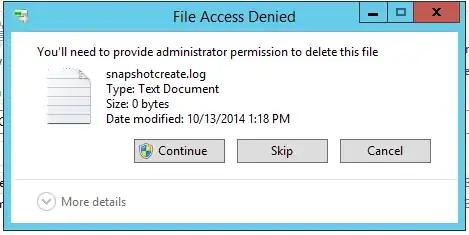
enter image description here

Then pressing Continue I get...

enter image description here

But then the file doesn't delete. Can someone tell me why this is happening or how it might happen? If there was a process that had the file locked, I think I would get a different error message. I used Process Explorer and Resource Monitor to try and find a process that locked the file, but neither of those turned up anything.

Also, I rebooted the server and then was able to delete the file without any of the above dialogs. The file just deleted and went away as expected.

  • 1
    Next time I would suggest using Handle.exe (http://technet.microsoft.com/en-us/sysinternals/bb896655.aspx) to look for a lock. The fact that a reboot removed the issue makes me think that there was a lock on the file. – EBGreen Oct 13 '14 at 19:35
  • Thanks. It turns out Process Explorer (which has yielded no results) is a GUI version of Handle.exe. So while I am inclined to think something has it open as well, the OS doesn't tell me another process has it locked (which is the normal message), and Process Explorer doesn't find it in the list of locked files. Still wondering what the issue is? – John Livermore Oct 13 '14 at 19:46

0 Answers0