I have an HP Laptop (Core i5, 8GB RAM, 320GB HDD) running Windows 8.1 (x64), that recently got the Sality.AU Virus. The OS had only just been installed, and a friend downloaded the drivers and put them on a USB for me. As it would turn out, the USB had the Sality.AU Virus, and my PC went crazy with Windows Defender warnings as soon as I plugged it in.
After cleaning the virus with Windows Defender, my HDD constantly spins at 100%, even though I have almost no programs (only Torch Browser, Rainmeter and the default OS programs) open.
I have tried the solutions at these two pages on this site
to no avail.
I have also searched the Internet with my problem, and had some pages tell me that my HDD is faulty, some tell me that my Windows is faulty, and others tell me that I installed bad programs, which I can't have, since I have installed all the same programs on my other Toshiba laptop.
My Task Manager gives me the following information:

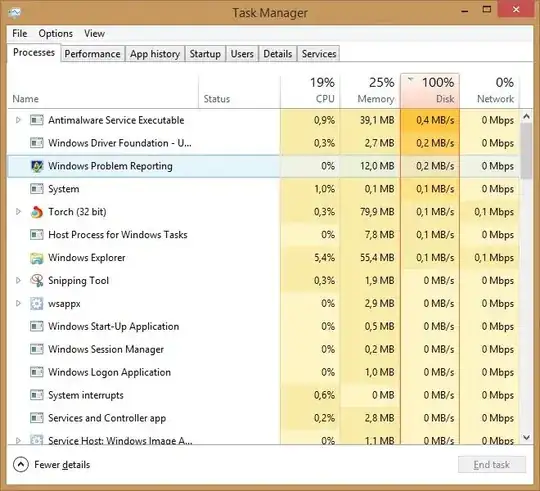
and Speccy also says that my HDD is "Good"

[The above image, and this text, link to a complete copy of the same image.]
I have no idea what is going on here, as my HDD was fine when I was on my previous (but VERY SLOW due to many installed programs) installation of Windows 8.1 (also x64), and never went over maybe 80% usage when running a copy, and 20% when loading a program or game.
I cannot reinstall the OS, as I do not have the install disks for some of the programs that I use regularly anymore.
Please advise on what to do with my PC. I can only think of one option, which is to buy a new HDD, and ghost the old HDD's partitions onto the new HDD.


wuaueng.dll (960) SUS20ClientDataStore: A request to read from the file "C:\Windows\SoftwareDistribution\DataStore\DataStore.edb" at offset 56000512 (0x0000000003568000) for 32768 (0x00008000) bytes succeeded, but took an abnormally long time (43 seconds) to be serviced by the OS. In addition, 0 other I/O requests to this file have also taken an abnormally long time to be serviced since the last message regarding this problem was posted 7 seconds ago. This problem is likely due to faulty hardware.– Riccorbypro Oct 17 '14 at 18:04LiveComm (2924) C:\Users\Richard\AppData\Local\Packages\microsoft.windowscommunicationsapps_8wekyb3d8bbwe\LocalState\LiveComm\58e72693e6453dba\120712-0049\: A request to read from the file "C:\Users\Richard\AppData\Local\Packages\microsoft.windowscommunicationsapps_8wekyb3d8bbwe\LocalState\LiveComm\58e72693e6453dba\120712-0049\DBStore\livecomm.edb" at offset 7716864 (0x000000000075c000) for 8192 (0x00002000) bytes succeeded, but took an abnormally long time (21 seconds) to be serviced by the OS. This problem is likely due to faulty hardware.– Riccorbypro Oct 17 '14 at 18:05