0

I had non-updated version of Firefox I have been working with and had ~25 or so tabs opened. I had also Chrome opened with a dozen of tabs and I always keep them both running.

As time goes, Firefox gets slower and slower. Delays become longer when switching tabs and scrolling on webpages. YouTube videos start lagging and CPU usage spikes. This goes on until browser crashes or sometimes BSOD happens and the only way to prevent this is to ocassionally restart Firefox. I have tried new profile without plugins and situation repeats but disabling 3D acceleration helped at least to playback videos smoother.

Yesterday I was working in Firefox and screen got blank for a moment and then Chrome and Firefox both crashed. I was able to take snapshot of Task Manager and physical memory spike you will see has never happened before:
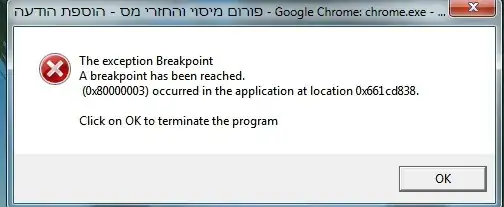
enter image description here

enter image description here

In real-time I saw as memory usage gone up to 6 - 7GBs in a matter of a short seconds and gone back to what it was before. Reminded me of sports watch counting in seconds and miliseconds. Let me show you what VMMap shows about Firefox (you can zoom-in your screen or open screenshot in new tab)
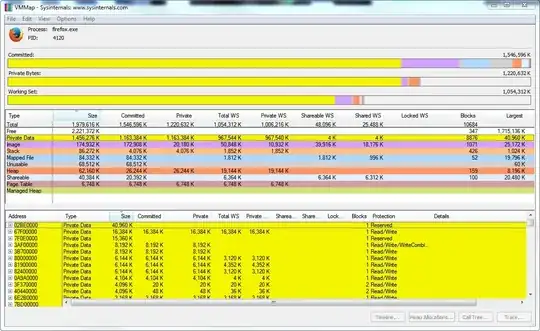
enter image description here

If I leave Firefox running for long time , Standby's after Standby's without restarting it it's memory usage hits 1.5GB.

The last crash rendered Firefox non-usable but Chrome works. I start Firefox and nothing happens. I see 2 processes firefox.exe running in Task Manager. One is 70MB and another is a few kilobytes.

Tried "Safe-Mode", tried creating new profile, tried checking everything for Firefox CCleaner has and all to no avail. How do I proceed from here to recover Firefox?

Thanks.


Specs:
Windows 7 64-bit
8GB of RAM

Boris_yo
  • 5,874
  • Does a clean profile work? – Ramhound Dec 07 '14 at 06:14
  • It does not as I mentioned this at the bottom. – Boris_yo Dec 07 '14 at 06:24
  • Seems that can happen when x64 loads an x86 dll (and maybe vice versa) – marsh-wiggle Dec 07 '14 at 10:23
  • @boboes Please expand. – Boris_yo Dec 07 '14 at 10:56
  • I googled for that error. It happens in several applications. In two cases the error was caused by an x64 process loading an x86 dll. – marsh-wiggle Dec 07 '14 at 11:05
  • @boboes And I have to narrow down to such process that uses x86 dll from 159 processes that I have in Windows Task Manager? – Boris_yo Dec 07 '14 at 11:31
  • @Boris_yo - Yes; So boot into a minimal boot configuration then try launching Firefox. – Ramhound Dec 07 '14 at 14:17
  • @Ramhound I think it would be better to reinstall Firefox. – Boris_yo Dec 07 '14 at 15:06
  • If there is a third-party program causing the problem that wouldn't solve it. You came here for help, thats my suggestion, I can't suggest something else till thats been tried. – Ramhound Dec 07 '14 at 17:21
  • @Ramhound You mean that to isolate issue, it can be that 3rd party program is somehow affecting Firefox and to narrow down to it, Safe-Mode is the way to go? – Boris_yo Dec 07 '14 at 18:33
  • You: "I have 159 processes is there a better way to determine which one is the cause of my problems"; Me: "Boot into a minimal configuration and determine if the problem happens there in order to decrease the number of processes you have to go through" – Ramhound Dec 07 '14 at 18:52
  • @Ramhound Let's say that once I am in Safe-Mode and find that problem is no longer the case, how I am to narrow down to 1 process out of 159 to determine which causes issue? – Boris_yo Dec 07 '14 at 19:08
  • 1
    You can eliminate all the processes that are running while in safe mode at that point. That will make the process significantly easier. – Ramhound Dec 07 '14 at 19:51

0 Answers0