1

I want to do the same thing as showed in this link explaining microsoft outlook 2010. There is a superuser question similar to this, but the answer explains how to "always expand selected conversation" and I want them expanded even when NOT selected.

http://blogs.office.com/2010/03/05/customizing-your-conversations-experience-plus-video/#comments

Appreciate the help. Thanks.

Andre
  • 11

2 Answers2

1

I achieved this by turning off the official Conversation mode, and in view settings:

  • Group By: Conversation (ascending), image
  • Sort by: Conversation (ascending), image
  • Then Sort by: Received (descending)

This way you basically get conversation mode (tho it looks a bit different), and it's always expanded.

-1

What you want is not possible because it is a bad idea to expand every conversation by default.

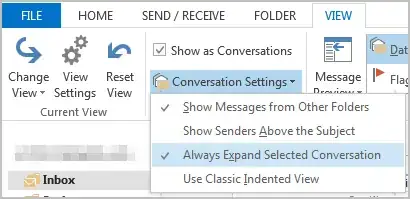
The only Conversation Settings are listed below:

enter image description here

Sun
  • 6,318
  • Please explain why it should be a bad idea. It was there in Outlook 2010 and people are used to it. – user228505 Dec 09 '16 at 10:33
  • Matter of opinion. Explain why it is a good idea. Because it existed in 2010 doesn't mean it should continue to exist. – Sun Dec 09 '16 at 20:30