I'm using windows 7, and I'd like to create menus, progress bars, etc. with special characters like this. How to do this?
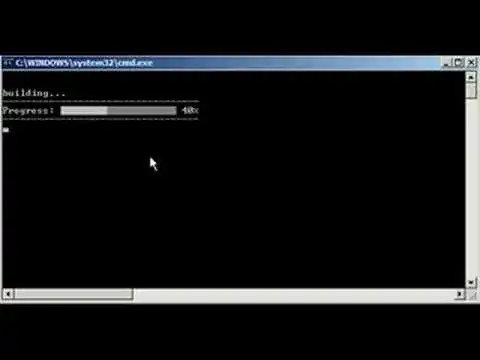
I'm using windows 7, and I'd like to create menus, progress bars, etc. with special characters like this. How to do this?


The point is - you need to use the UTF-8 Format, take a look:
Step 1] Create a new CMD script in the "UTF 8" format. (PsPad or Notepad++ editors can do this)
Step 2] Leave an empty blank line on the very first line. The UTF 8 header is stored there.
Step 3] Copy paste the code below:
@echo off
CHCP 65001
:: *****************************************************************************
:: * Author: Gustaaf von Pickartz.                                             *
:: * Date Created: 22nd July, 2012.                                            *
:: * ------------------------------------------------------------------------- *
:: * This program is provided as is and for fair use distribution.             *
:: * Give credit where credit is due to the author in your own script.         *
:: * ------------------------------------------------------------------------- *
:: *****************************************************************************
SETLOCAL ENABLEDELAYEDEXPANSION

:: Progress Bar
 SET PRG0=[░░░░░░░░░░]
 SET PRG1=[▓░░░░░░░░░]
 SET PRG2=[▓▓░░░░░░░░]
 SET PRG3=[▓▓▓░░░░░░░]
 SET PRG4=[▓▓▓▓░░░░░░]
 SET PRG5=[▓▓▓▓▓░░░░░]
 SET PRG6=[▓▓▓▓▓▓░░░░]
 SET PRG7=[▓▓▓▓▓▓▓░░░]
 SET PRG8=[▓▓▓▓▓▓▓▓░░]
 SET PRG9=[▓▓▓▓▓▓▓▓▓░]
SET PRG10=[▓▓▓▓▓▓▓▓▓▓]

:: Star
 SET STR1=/
 SET STR2=--
 SET STR3=\
 SET STR4=^|

:: Please note there are special ASCII insertions in the SET BKSPC= declaration below. 80x backspace characters are inserted. ASCII Value 08=[BS]
:: Be sure to verify they are still there when you cut and paste from the web with your text editor (Notepad++ or PsPad). Insert them if missing, otherwise this script will not work...
SET BKSPC=


:Begin_Main
echo.
echo.
Echo Simple Animated star.
FOR /L %%I IN (1,1,400) DO (
<NUL (SET/P Z= PROGRESS: │)
<NUL (SET/P Z=%BKSPC%)
<NUL (SET/P Z= PROGRESS: /)
<NUL (SET/P Z=%BKSPC%)
<NUL (SET/P Z= PROGRESS: ─)
<NUL (SET/P Z=%BKSPC%)
<NUL (SET/P Z= PROGRESS: \)
<NUL (SET/P Z=%BKSPC%)
)

echo.
echo.
Echo Simple Progress bar indicator
FOR /L %%I IN (0,1,10) DO (
IF %%I LEQ 9 (SET TIC=0%%I) ELSE (SET TIC=%%I)
<NUL (SET/P Z=[!TIC!/10] PROGRESS: !PRG%%I!)
>NUL PING -n 2 localhost
<NUL (SET/P Z=%BKSPC%)
)

echo.
echo.
Echo Combined Progress bar and animated star...
FOR /L %%I IN (0,1,10) DO (
IF %%I LEQ 9 (SET TIC=0%%I) ELSE (SET TIC=%%I)
<NUL (SET/P Z=[!TIC!/10] PROGRESS: !PRG%%I!)
<NUL (SET/P Z=%BKSPC%)
    FOR /L %%J IN (1,1,400) DO (
    <NUL (SET/P Z=[!TIC!/10] PROGRESS: !PRG%%I! │)
    <NUL (SET/P Z=%BKSPC%)
    <NUL (SET/P Z=[!TIC!/10] PROGRESS: !PRG%%I! /)
    <NUL (SET/P Z=%BKSPC%)
    <NUL (SET/P Z=[!TIC!/10] PROGRESS: !PRG%%I! ─)
    <NUL (SET/P Z=%BKSPC%)
    <NUL (SET/P Z=[!TIC!/10] PROGRESS: !PRG%%I! \)
    <NUL (SET/P Z=%BKSPC%)
    )
<NUL (SET/P Z=%BKSPC%)
)
Step 4] Be sure to "insert" 80x backspace ASCII characters at the SET BKSPC= (http://columbia.edu/kermit/ascii.html)
Step 5] Be sure you set your CMD console font to the True Type font, not the raster.
