0

I just got a new laptop and it is my first experience with Windows 8.1. During the initial setup, it asked for my Microsoft account info (Hotmail/OneDrive). Since I don't mind synching with that, I gave it. However, I now find that it requires me to use that login/password to access my computer. I want to have a different password for my computer login. I have looked up how to create a local password, but that requires me to change to a different user account. First, I don't want multiple accounts on my new machine, and second, I want to use that username without creating a new one (some of the scripts I use between computers rely on having the same user name).

The main question is this: Can I create and use a local password for this computer without changing the password on my Microsoft account? If not, can I separate my Microsoft account from the Windows one so they can have separate accounts, without having to change my user name or create a new account?

techturtle
  • 9,186

2 Answers2

1

What you can do is disconnect your Microsoft account. There is no way to change the password, but disconnecting from the Microsoft account will allow you to change your password. The consequences: you cannot use XBOX Live (Very easily) and you cannot use the windows store.

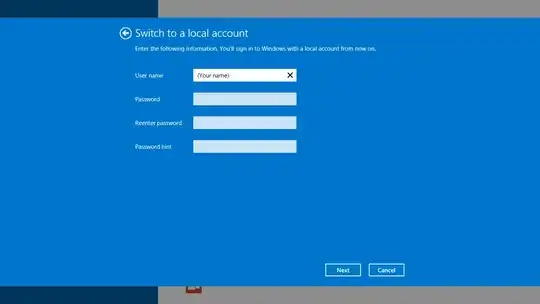
To do this, go to PC Settings (Charms bar (Start + C) > Settings > Change PC Settings > Accounts > Your account.

At the top of the right pane, there will be your name, your live email, and a link that says disconnect. Click this and follow the instructions. Your apps will not be removed nor your data, and you can now change your password without changing your Microsoft account password.

Alternatively, you can set a PIN (Like a password, but with numbers and only 4 digits long) or a Picture password (Uses gestures to unlock).

Windows 8.1 disconnect microsoft account

  • That's pretty much what I tried to do, but it requires me to create a new account when I hit disconnect. Wouldn't be such a big deal except it won't let me use the user name I want because it says it's already in use. – techturtle Feb 02 '15 at 20:26
  • Hmm... It should say "Create a local account" and then prompt you to enter a password... See the photo I have added to the post – harry_p_6 Feb 02 '15 at 20:28
  • Yes, that's exactly what it's doing. The problem is that the user name I pick is already in use because it tied that to my Microsoft acct. – techturtle Feb 02 '15 at 20:42
  • Ok. Try to make an account with a different name and then possibly change it back later? – harry_p_6 Feb 02 '15 at 20:43
  • This happens if you don't create a local account then connect it to a Microsoft Account. – Ramhound Feb 02 '15 at 20:59
  • @Ramhound Apparently, but they don't really tell you that up front. So how can I undo this? Is a format/reinstall the only option if I want to have just one account on the computer and not use my online password every time I log in to my computer? – techturtle Feb 02 '15 at 21:20
  • Your best option is to create a new local account then transfer the data you want over to that. Your only option is to change the username, the profile that is created if you do link it afterwords, is different from the non-linked profile name – Ramhound Feb 02 '15 at 22:14
-1

Disconnect from wifi using function key. On my layout it would be function key + the number 2 key. Computer is disconnected from internet now. It can no longer attempt to download your settings from the microsoft acct you lost your password to. It will then attempt to use the user account you are working under currently