2

I'm using a template on Libre Office. It has various boxes that I need to enter text in.

Things were going fine, but then for some reason, it stopped allowing me to enter text. It seems to think that I want to edit the template. When mouse hovers over the table, a box pops up that says "adjustable table". But I can't get the cursor to show up and let me type new text.

How can I get it to let me enter text?

David
  • 21

2 Answers2

1

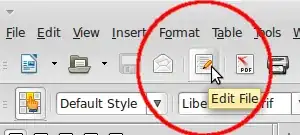
Maybe you've disabled "Edit mode" accidentally? Check the fifth button from the left in the default toolbar:

enter image description here

Make sure it’s enabled.

EDIT:

Another cause may be the Form's "Design mode". If the form is in design mode, you can edit form controls, but you can't enter any content in text fields, for example:

enter image description here

tohuwawohu
  • 10,678
  • Thanks. When I click it, I get a message that says, "Save changes to document before closing?" If I say yes, it gives me a read only version. If I click it again, it goes back to the first version and I can enter text. So it does work, but it's not very efficient, and I still have the problem of losing the ability to edit when I try to select text but it thinks I want to select the boxes. How can I get it to not do this? Surely there's a mode where it knows that I'm not editing the form, only the contents? – David Feb 08 '15 at 19:43
  • Without a way to examine the document directly and without even any screenshots, one can only guess about the cause. I've edited my answer covering toggling forms design mode on/off. – tohuwawohu Feb 08 '15 at 20:01
0

I had the same problem with LibreOffice writer and I just restarted the laptop and the problem is fixed.