I log on to a producution windows-2012-r2-server as administrator via remote desktop.
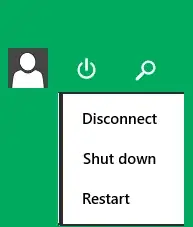 I log off via the disconnect option above in the top-right corner.
I would like the remove the 'shut down' option from that menu, to prevent me from accidentally clicking on it. I have to remain an administrator.
I can access the 'shut down' command in other ways, so that is ok.
This should not have an affect for other administrators accessing the machine.
Can it be done?
Asked
Active
Viewed 3,436 times
1

Gerard
- 113
1 Answers
0
Depending on what the Server role is you should be able to achieve this by setting a local Group Policy. (You probably will not be able to do this on a Domain Controller)
You can launch gpedit.msc from an administrator command prompt..
Then drill down as below:
Computer Configuration > Windows Settings > Security Settings > Local Policies > Security Options >
Under here you should see a number of options I believe you one you want is:
Shutdown: Allow system to be shut down without having to log on.
Change this to Disable.
Check if that works, you may need to log off and back on for it to take affect.

CharlesH
- 2,193
-
This has also an affect for other administrators accessing the machine. Plus: I want to be able to shut down, I just want to remove the menu item. – Gerard Apr 13 '15 at 10:49
-
OK do you have your own Admin account that only you use or do you all login using Administrator or whatever? You should still have a shutdown option if your right click on the bottom left (the start orb) I believe this just removes the ones from the Metro, haven't got a 2012 R2 machine in front of right now to test for you.... – CharlesH Apr 13 '15 at 10:55
-
I have my own admin account. Of course I would still have the other shut down option, therefore I would like to remove the other one. – Gerard Apr 13 '15 at 12:01
-
If you was to load MMC from command prompt, press Ctrl + M, select Group Policy Object and Add, then Browse under local computer then click on Users and see if your account exists. This is local users only (as its local Group Policy) if you would like this to apply to a Domain user you would need to create a Domain Group Policy filtered to your account & that Server. As far as I'm aware there is no other way to do it. – CharlesH Apr 13 '15 at 12:26