8

Why does Dropbox show sync of files that are not mine ?

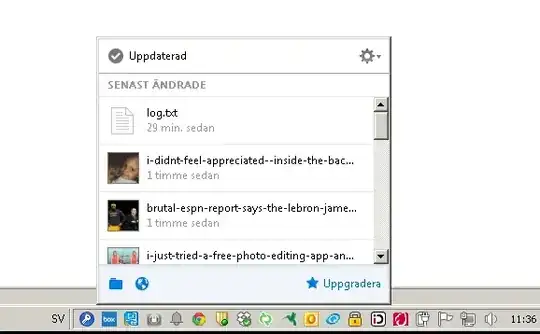
In the image below, the top item is my file,
the others ex. i-didnt-feel-appreciated--blabla, etc are not mine.

However when checking my Dropbox folder, the spam files are not there,
they only appear in my sync list.
My concern is that it displayed sync of ca 2000 spam files that are not mine.

Is this a known bug or some new issue with Dropbox ?
enter image description here

user19496
  • 1,490
  • Are they present on the Dropbox website? Also try enabling showing of hidden folders and check in your local Dropbox folder again. – shea Jun 27 '15 at 06:57
  • They are not on Dropbox website. Seeing hidden files already enabled. – user19496 Jun 27 '15 at 09:36
  • 1
    I would think it could be a folder that you shared with a friend and they uploaded those images to the folder and then deleted them again before you could view them. So go to share on dropbox.com and remove any strange or unknown shared folders. – Llewellyn Aug 24 '15 at 21:34
  • This is a strictly personal Dropbox. I have nothing shared. – user19496 Sep 16 '15 at 12:38
  • 1
    Could it be a virus? do you have av installed? also I suggest to change the password and delete the files... – Energ888 Sep 23 '15 at 21:18
  • The files are not physically in my folders,
    only the notification bar contains these files.
    This occures intermittently
    – user19496 Sep 24 '15 at 08:51
  • I suspect an infection, mostly because of the filenames. Does anything happen if you click on those 'files' / 'links'? Does it open a browser or take you somewhere? – Don King Sep 26 '15 at 19:39
  • Will try next time it occurs.
    It's intermittent so may take a while. Sofar it has happend on 3 separate occasions.
    – user19496 Sep 27 '15 at 10:37
  • Looks like its pulling news headlines and images and naming the files after the headlines. This sounds REALLY like malware. – Linef4ult Sep 29 '15 at 10:31

1 Answers1

1

A common cause of this is Unlinking a Dropbox account with a system, and then linking it with another. When doing this, the user is prompted if they wish to reuse the existing folder. If this is done, any remaining content from the older user is merged into the new user's account.

Since the comments suggest you cannot actually find any files and they don't show on the Dropbox website, there's the possibility that stray metadata or other hidden information is throwing off Dropbox with these files. An easy to way rule this out is to simply uninstall Dropbox and reinstall, as well as ensure the folder it uses is deleted and created fresh (make sure to back up anything of yours there first).