I installed the anti-virus - Quickheal trial version and then uninstalled it in order to install another anti-virus. Quickheal seemed to have left this program which runs in the background and simply wont die. I am on windows 7 - 32 bit. I am the sole administrator of the computer. I tried to kill the process-tree via the taskmanager. It says "operation could not be completed - access denied". I tried the services.exe method.
In services.exe this one is defined as CoreBrowsing Protection. On right-click I found that I do not have any option to stop the process. Neither I was able to control its auto-start options. The path to the program is "C:\Program Files\Quick Heal\Quick Heal Total Security\ScSecSvc.exe".
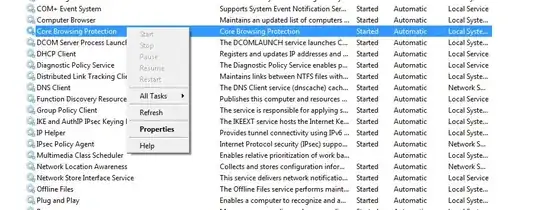
I have googled it and could not find a solution. I also scanned the [quickheal support][2] forum but there is no mention of this problem at all. The I tried some process-killer software listed below.
I tried process-explorer which returns the same "access-denied" message. I tried process-hacker which was able to kill the process but then immediately returns back into the task manager.
I tried the cmd method with taskkill /IM "scsecsvc.exe" /T /F , again says access denied.
Could there be an alternative method which I am missing that could delete this persistent program or my only way out is to format my system ?


