1

My goal is to be able to reselect words after I've pressed Enter or space (evaluating them to kanji or kana, depending on the situation). But let's say I have typed in a word. I typed two ideographic characters instead of the intended りょうしん. Is there a way to highlight a piece of that phrase and get Google IME to re-evaluate it?

I'm trying to figure out how to use tip number 4 from 12 Japanese IME Tips. Seems like I should be able to use Ctrl+Backspace to reconvert words.

  • Ctrl + Backspace works for me. –  Jul 20 '15 at 01:53
  • Please edit your question to replace the system tag "untagged" (eg by the "ime" tag). Also note that because of these 2 special characters in your question (following the "I typed ..."), because it causes some validation error if somebody tries to suggest an edit to your question (it is a not alowed character) ... they are even not allowed in comments either ... – Pierre.Vriens Jul 29 '15 at 07:19
  • Do you mean Tip 2 or Tip 4?  Tip 2: Reconverting is the only one that mentions Ctrl+Backspace. – G-Man Says 'Reinstate Monica' Jul 30 '15 at 23:10

1 Answers1

2

enter image description here

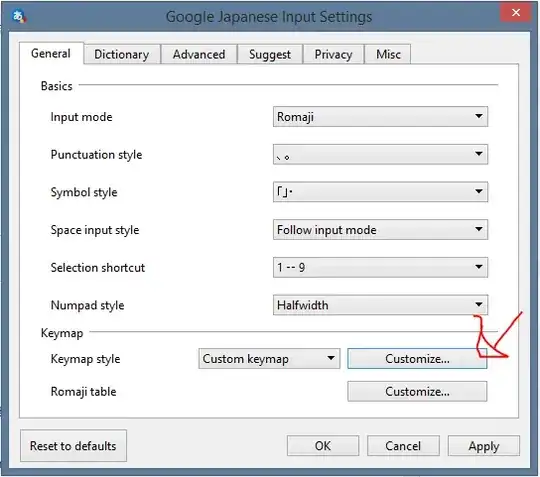
By default Google's IME sets it to the 'henkan' key. Unless you're using a Japanese keyboard, you won't have that, so let's change it. Get into Google's IME properties (the exact steps to doing this will differ depending on OS, but try looking for a 'A', 'あ', or 'ア' right clicking on it and choose 'Properties'. In the general tab look for the button 'Customize' on the 'Keymap style' row.

enter image description here

Sort by 'Command' and change the 'Reconvert' commands to the desired setting by double clicking on the key column, and then clicking on it once more, and then you'll get a dialog that lets you set it.

Bernard
  • 666