Questions tagged [microsoft-powerpoint-2007]

PowerPoint 2007 is the presentation graphics software program element of Microsoft’s 2007 Office Suite for facilitating the creation of dynamic presentations through predefined layouts and templates.

Released in 2007, and sometimes known as ‘version 12’, for Windows systems is the successor to PowerPoint 2003. It shares new features such as QAT (the Quick Access Toolbar, at the very top), the Microsoft Office button (top left) and the Ribbon (tool bar of icons logically grouped by tabs):
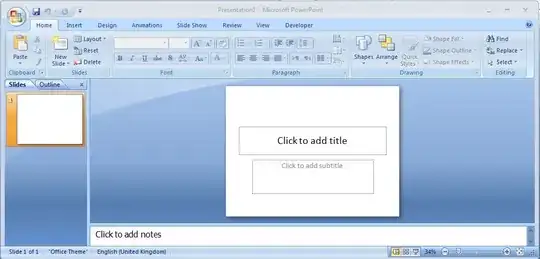
microsoft-powerpoint-2007 example

97 questions
42
votes
7 answers

How to draw truly vertical or horizontal lines in PowerPoint

I use PowerPoint for drawings and diagrams. When I try to add a vertical straight line, it is always slightly tilted (~2 degrees). I have the same problem when I am trying to draw a horizontal line (88 or 92 degrees rather than 90 degrees) I would…
KAE
  • 1,869
27
votes
6 answers

Insert total number of slides in PowerPoint 2007

Is it possible to insert the total amount of slides in a PowerPoint presentation into a footnote? I'm looking for an automated way. Of course I could edit the footer and put it in manually, but if I increase/decrease slides, it would be necessary to…
14
votes
3 answers

Stop PowerPoint from cropping images that I drag into placeholders

I am making Master Slides in PowerPoint with place holders in a custom layout. However, when I create new slides with that layout, images I insert into the placeholders are cropped off. I want my image scaled to fit the placeholder while maintaing…
Sam
  • 141
12
votes
3 answers

How can I break external links in PowerPoint 2007?

In a PowerPoint 2007 presentation I have many external links. These are updated when the document is opened. However, the source documents are now missing so I want to remove the external links, i.e. keep the existing information and not update. How…
5
votes
1 answer

Page number in PowerPoint slide not appearing

I try to add a page number in PowerPoint 2007, but it doesn't appear. I go to Insert » Slide Number, tick the "Slide Number", and then apply to all. Nothing happens, and if I reopen the slide number option, it is still unticked.
user46338
  • 151
4
votes
1 answer

How to Creat Multi-level numbering in PowerPoint 2007

How do I Create Multi-level numbering in PowerPoint 2007 (1.0 >> 1.1 >> 1.1.1 >> Etc.)
3
votes
1 answer

Default Textbox Colors in Powerpoint 2007

How do i change defalut colors for a new Textbox in PowerPoint 2007? I am using a custom themed presentation template that someone gave me and every time I create a new text box it is white text on white background.
1
vote
1 answer

Can you change the tab referenced on an excel file imbedded into a powerpoint presentation?

I am having difficulty referencing specific tabs of an imbedded excel file to separate slides in a powerpoint. Is this even possible?
Becky
  • 13
1
vote
1 answer

where is the best place to learn about doing intra slide transitions within powerpoint

i want it where some of the elements of the slide show up first and after i click, others show up.
leora
  • 6,123
1
vote
1 answer

The path or file name for \\...\filename.pptx is invalid. Please check that the path and file name are correct

Yesterday I saved my work in my Powerpoint presentation (2007), today the MS Powerpoint shows me this message: ! The path or file name for \...\filename.pptx is invalid. Please check that the path or file name are correct. File name is correct. Path…
Tine
  • 63
0
votes
2 answers

Hitting 'start' from current slide it starts the slide show from the beginning instead of current slide?

Every time I hit start from current slide it starts the slide show from the beginning. I'm only trying to edit this one slide so I don't want to have to watch the entire show multiple times. Why won't it start from the current slide?
0
votes
1 answer

Background image: all-visible, original dimensions?

When I add a background image to Powerpoint, it always scales such that the dimension are perfect, but a part of the image is cut off. How can I get the background to be the correct dimensions but also completely visible? I want to create a…
Wolfpack'08
  • 1,233
  • 3
  • 17
  • 38
0
votes
1 answer

formatting powerpoint slide with master page

i have a powerpoint presentation and i just copied a slide into it from another presentation. i want this new slide to have the same background (master page) as the rest of the presentation. how do i do that?
leora
  • 6,123
0
votes
2 answers

Common header/title for all slides in power point 2007

I would like to create a common header/title for all the slides in my presentation so that if i decide to make a change at a later point to the title/hearder of the slider i do not need to go to each slide and make it but will make it at one place…
np.
0
votes
0 answers

Add audio to Powerpoint - make playback stable against user actions

I have a Powerpoint 2007 presentation to which I've added an audio file. I embedded the .wav file in the ppt, selected 'play across slides', then used the Rehearse Presentation feature to time the slides to the audio. This works to a degree - users…