Questions tagged [windows-8-preview]

Developer/Consumer/Release Preview of Windows 8. For non-preview questions, use [windows-8] instead as this tag will gradually fade out when the preview time-bombs.

Windows 8 is the name for Microsoft's 2012 version of the Windows operating system. During the //build/ conference in September 2011, Microsoft released a developer preview version of to let developers come up to speed with the new Metro UI look and design philosophy (previously seen in Windows Phone 7, Zune HD, the Xbox Dashboard, and Media Center) and its new underlying runtime: .

The main feature that was shown is the extensively redesigned user interface, optimized for touch as well as for use with mice and keyboards. A new "Start Screen", similar to the one in Windows Phone 7, includes live application tiles. It replaces the Start Menu, being triggered by the Start button, Charms bar, or click in the lower-left-hand corner, and is also the first screen shown on startup. The user can go to the regular desktop by choosing the "Desktop" tile, opening a traditional desktop-based application, or pressing Windows+D.
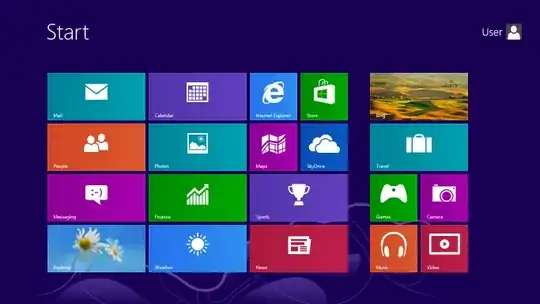
the Windows 8 Start Screen, from the Release Preview

Windows 8 has a new developer platform, which allows Metro (aka "Windows 8 Style" or "Modern UI") apps to be developed in .NET languages or JavaScript and HTML, through use of the new Windows Runtime (WinRT).

The new applications run in full-screen, but two of them can be displayed side-by-side using "Snap". Examples of new applications that include a Twitter client, a weather application, a stock-tracking application, an RSS news feeder, and a virtual piano.

The new interface is primarily designed for 16:9 screen resolutions, with 1366×768 and larger screens able to display two Windows 8 applications. 1024×768 screens can display one Windows 8 application in full-screen, and 1024×600 screens can only use the traditional Windows desktop.

Windows 8 also adds support for the first time for ARM processors (through the new Windows RT edition), in addition to continuing support for traditional x86 processors.

Mike Angiulo confirmed at Computex 2011 that Windows 8 will use OEM Activation 3.0 instead of Windows 7 OEM Activation 2.1, which will make it less prone to cracks.


Since the Developer/Consumer/Release Preview is pre-release code and not necessarily representative of the the questions people with ask about the release version, any questions specific to the Windows 8 preview should be tagged as .

Helpful Links:

389 questions
16
votes
3 answers

Can I delete Windows 8 ESD file?

I've just installed Windows 8 Consumer Preview and runned diskcleanup in order to delete windows.OLD file and everything is OK, but now want I delete the remaining WindowsESD file. Is there a way? If so, how do I do this?
11
votes
4 answers

How to shutdown Windows 8 remotely without the Start button?

I'm using Windows 8 CP, the latest one. No Start button, well, okay. But I can't find the way to shutdown it through Remote Desktop Connection. Anyone succeeded? Or do I have to use a command/shell script?
9
votes
1 answer

Why are half of my Metro apps in Japanese?

I set up an account of Windows 8 for my girl friend only to come to the shocking conclusion that it thinks its from Japan (or well somewhere strange): I noticed she had filled in Swaziland as her location on her Windows Live profile, but I don't…
Ivo Flipse
  • 24,776
8
votes
2 answers

Where does the Windows 8 Mail App store data?

I was wondering if the Mail App in Windows 8 stores data (E-Mails, Contacts, etc) on local machine? much like WinMail and Windows Live Mail.. If so how can I determine its storage path?
Zaid Amir
  • 207
7
votes
4 answers

How do I enable Hybrid Boot in Windows 8?

Why is my "Enable Hybrid Boot" option grayed out in Windows 8, and how can I enable it? Performing a powercfg /a results in the following error being reported: Hybrid Sleep: The hypervisor does not support this standby state.
user541686
  • 23,918
5
votes
5 answers

Where does the Windows 8 Consumer Preview setup store its files?

Windows 8 Consumer Preview has been launched and I wanted to test it out. So I downloaded Windows 8 Consumer Preview Setup from http://windows.microsoft.com/en-US/windows-8/download. But then I found that Win 8 is also available in .iso format. So…
4
votes
1 answer

Can I use the default metro apps in Windows 8 with a local account?

I have installed the Windows 8 Release Preview, however I did not connect a Live ID, I am using a Local Account. I'd like to test out the metro Mail and Calendar apps with my Google account. The steps to do this according to the interwebs…
4
votes
3 answers

How to resolve "we're having trouble determining your PC Windows Consumer Preview"?

I have been trying to install windows 8 consumer preview on my PC. I created a bootable Windows 8 flash drive using Windows 7 USB tool(downloaded from internet). When i click the setup icon, i recieve the following error: Something…
4
votes
3 answers

Where did the folder option dialog go in Windows 8 preview?

Did anyone find out a way to invoke the folder options dialog in Windows 8 preview. I want to start my programs by single click and I always want to see file extensions. Edit: For hidden files and extensions this link helps. But I want to get rid…
bernd_k
  • 1,221
4
votes
3 answers

Are there any touchscreen devices out there that will run Windows Developer Preview?

I'm guessing that a touch based all-in-one would do the trick, but I'm not sure. I, like most folks, have a traditional PC and am itching to try Win8 on a touch device. Something tells me that an iPad won't cut it... Are there any touchscreen…
Moshe
  • 5,828
4
votes
3 answers

Should I install the Windows 8 Developer Preview on top of Windows 7?

I've installed the Windows 8 Developer Preview on a separate partition, and it seems fine enough to keep. Now I'm wondering if it's worth installing on top of my original installation. I really don't want to mess up my original installation, so I…
user541686
  • 23,918
4
votes
4 answers

Windows 8 -- Blank desktop after installing NVIDIA drivers

I just installed my mobile NVIDIA drivers, and ever since the usual flicker, my desktop goes blank. I can start Task Manager and log off/log on, but any other window which I try to bring up automatically hides behind a blank screen. The animations…
user541686
  • 23,918
3
votes
1 answer

Getting rid of Metro interface

Possible Duplicate: How to disable the start screen on Windows 8 Release Preview? The company I work for primarily runs Windows XP machine. These machines are getting old and need to be replaced. I wanted to wait until Windows 8 was released…
Linger
  • 3,284
3
votes
1 answer

Unable to paste passwords into Metro application password field

I am running Windows 8 Consumer Preview under VMWare Fusion Technology Preview and am unable to paste passwords into Mail Metro application password field. Also saw similar behavior in other metro application password fields. Do all Metro apps not…
3
votes
4 answers

Installing Win8 in VHD: "could not load \Windows\system32\winload.exe"

I'm trying the install Win8 in a VHD using the Hanselman Guide All went well until the PC rebooted and Windows shows me this error: Your PC needs to be repaired The application or operating system couldn't be loaded because a required file is…
1
2 3 4