8

Everything is all right before I updated all my MiKTeX package to latest version. But after that, I find that all .eps file generated by Matlab cannot be shown correctly.

For example. I use Matlab to plot sin(n)

n = 1:0.1:50;
plot(n, sin(n));

And I got the figure like this.
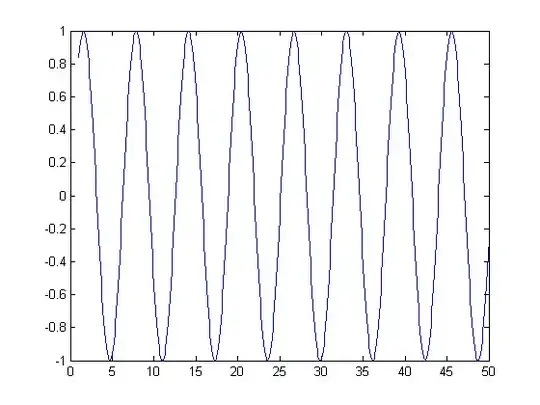
matlab figure

I use Matlab 2013a(tested in 2011b as well).

I save this figure by File-> Save As...-> test.eps. But when I use LaTeX to generate .pdf file with this piece of code

\documentclass[a4paper]{article}
\usepackage{graphicx}
\begin{document}
test1
\begin{figure}
 \begin{center}
  \includegraphics[height=140mm]{test.eps}
 \end{center}
\end{figure}
test2
\end{document}

I use xelatex to compile my .tex file, and got a pdf like this
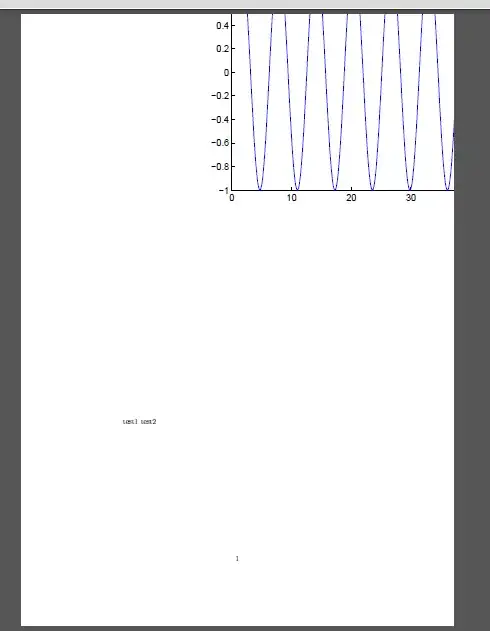
.eps shown at wrong position

The .eps file is shown at wrong position. "center" seems to be useless. I have done other tests, which prove that .eps file generated by other software(Word, Adobe Acrobat) can be shown correctly. Therefore, I think the problem may lie in Matlab. Perhaps the .eps file generated by Matlab is not compatible with some tex package.

This subtle problem has wasted me much time. Does anybody know why and how to solve the problem ? Thanks!

1 Answers1

1

I will just try to give you a quick push. If I recall correctly \begin{center} puts the center of the coordinate system which is left lower corner of your picture (think of picture being in the first quadrant) at the center of the page. That is exactly what I see on your figure. Did you play with moving things left down etc? I do not have now to check right now but I would be very, very surprised to see that MATLAB doesn't produce correct eps file (that it does not compute correct Bounding Boxes). You can always export figure as PostScript and then use something ps2eps to produce correct Bounding Boxes for those eps files and filters some special postscript command sequences that can produce erroneous results.

  • 1
    You can be very very surprised. It's been like that since matlab 6.5 and I've reported it a few times. – percusse May 29 '13 at 21:23
  • @percusse I would be damned!!! That thing is so expensive! I can not believe. These days I moved almost 100% to Python so I do not use it often. What happen if you export figure in PostScript and then use ps2eps to convert? It might be just those stupid Bounding Boxes. – Predrag Punosevac May 29 '13 at 21:29
  • 1
    Exactly. I moved to Python too. – percusse May 29 '13 at 21:29
  • Spyder: Interesting Python IDE similar to MATLAB – texenthusiast May 29 '13 at 21:38
  • 1
    @percusse I third the move to Python! – dustin May 29 '13 at 21:41
  • @texenthusiast I do not like IDEs! They tend to try to shield users from having to learn about the work flow. I like to know what I am doing. For Python I use IPython as a shell and just my beloved nvi editor. I tried IPython workbook and didn't like a bit. I think I tested Canvas on my daughter's MAC (I use OpenBSD). It didn't work for me. – Predrag Punosevac May 29 '13 at 21:52
  • scipy here , it's for interesting folks – texenthusiast May 29 '13 at 21:59
  • I have used scipy and numpy a few days ago, but they are so slow...I tested python and matlab with exactly same program, and it turned out that python need 10 times more time than matlab. – user31469 May 30 '13 at 03:47
  • @user31469 Comparing apples and oranges. Python is general purpose programming language vs MATLAB task oriented language. Sure MATLAB is well optimized (Fortran under the hood) for some things but for somethings not even usable. However the cost of MATLAB and few tool boxes is prohibitive for most but corporate customers. – Predrag Punosevac May 30 '13 at 04:20
  • Adding captions is really irritating.. Sometimes i would overwrite the matlab generated eps with inkscape to fix the problems with the files. But it distorts the imagesc figures: they become blurry. I am beginning to loathe matlab – WYSIWYG Aug 12 '14 at 14:08