12

My goal is to visualize damped magnetic precession.

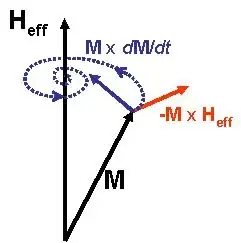
Wikipedia features an image, but it doesn't quite capture one essential constraint. Namely, that the magnetization M should be normalized. So the curve shown in the following picture should lie on the sphere.
damped precession

So what I want to show is:

  • The vectors M and H_eff with M on the sphere.
  • A spiral lying on a sphere.
  • -M x H_eff being orthogonal to M and H_eff
  • M x dM/dt pointing towards H_eff (This is not exactly correct, but rather an approximation).

The tangent of the spiral at the endpoint of M should be a linear combination of MxdM/dt and -MxH_eff (to be more exact: alpha MxdM/dt - MxH_eff for some positive alpha), so the picture on Wikipedia looks fine concerning this requirement.

I have found a similar picture in the following answer: https://tex.stackexchange.com/a/56617/50081

How can this be achieved with any of the modern plotting tools for LaTeX?

Edit: As Christian pointed out one could start by generating the spiral via projection of a flat spiral. This is my first try using pgfplots.

\documentclass{minimal}
\usepackage{tikz}
\usepackage{pgfplots}
\begin{document}
\begin{tikzpicture}
\xdef\w{10}

\begin{axis}[%
    axis equal,
    axis lines = none,
    xlabel = {$x$},
    ylabel = {$y$},
    zlabel = {$z$},
    enlargelimits = 0.5,
    ticks=none,
]
    \addplot3[%
        opacity = 0.2,
        surf,
        z buffer = sort,
        samples = 21,
        variable = \u,
        variable y = \v,
        domain = 0:180,
        y domain = 0:360,
    ]
    ({cos(u)*sin(v)}, {sin(u)*sin(v)}, {cos(v)});

    \addplot3+[color=blue,domain=0:4*pi, samples=100, samples y=0,no marks, smooth](
        {x*cos(deg(x))/sqrt(\w*\w+x*x)},
        {x*-sin(deg(x))/sqrt(\w*\w+x*x)},
        {\w/sqrt(\w*\w+x*x)}
        );
\end{axis}
\end{tikzpicture}
\end{document}
knedlsepp
  • 245
  • 1
  • 11
  • Welcome to TeX.SX! We would appreciate a minimaly working example as frame to start with! -- You need the curve vector, probably. A curve within a surface with curvature. Is the solution known? –  Apr 30 '14 at 12:20
  • It is the solution to the Landau-Lifshitz-Gilbert-PDE, but I think generating the solution would be too much of an effort, so I would be content with any spirally shape... – knedlsepp Apr 30 '14 at 12:25
  • Do you know some differential geometry? –  Apr 30 '14 at 12:26
  • To some extent: yes. – knedlsepp Apr 30 '14 at 12:28
  • Basically it is a widening spiral mapped onto the surface of the sphere. (or a narrowing one, depending on the direction of the curve parameter) –  Apr 30 '14 at 12:31
  • Ok, I guess I could start projecting a spiral onto the sphere using MATLAB and then plot the saved data using pgfplots. – knedlsepp Apr 30 '14 at 12:35
  • Ok, I try to do it in gnuplot –  Apr 30 '14 at 12:37
  • 1
    As far as I know, Matlab allows for export to tikz. –  Apr 30 '14 at 12:58

3 Answers3

17

Here's an attempt using Asymptote. I took literally your statement that "any spirally shape" would be okay. To compile it, save the code below in a file called (e.g.) filename.tex and then run pdflatex --shell-escape filename. (Also, make sure you have Asymptote installed.)

\documentclass[margin=10pt,convert]{standalone}
\usepackage{asypictureB}
\begin{document}
\begin{asypicture}{name=sphere_spiral}
    settings.outformat = "png";
    settings.render = 16;
    import graph3;
    size(10cm);

    triple eye = (5,2,3);
    currentprojection=orthographic(eye);

    surface hemisphere = surface(Arc(X,-X,c=O,normal=Z,n=16), c=O, axis=X, angle1=0, angle2=180);
    draw(shift(-5 eye)*hemisphere, material(white + opacity(0.5), emissivepen=0.2 white));

    usepackage("amsmath");  //for \text command
    draw(O -- 1.6Z, arrow=Arrow3, L=Label("$H_{\text{eff}}$", align=W, position=EndPoint));

    real theta(real t) { return t/20; }
    real phi(real t) { return -t + 1; }
    real r(real t) { return 1; }
    triple F(real t) { return polar(r(t), theta(t), phi(t)); }

    path3 spiral = reverse(graph(F, 0, 4pi, operator ..));
    draw(spiral, blue + dotted + linewidth(1pt));

    real t = 0.1;
    triple arrowpos = point(spiral, reltime(spiral, t));
    add(arrow(arrowhead=TeXHead2(normal=arrowpos), g=spiral, p=invisible, 
        arrowheadpen=emissive(blue), FillDraw(blue), position=Relative(t)));

    t = 0.7;
    arrowpos = point(spiral, reltime(spiral, t));
    add(arrow(arrowhead=TeXHead2(normal=arrowpos), g=spiral, p=invisible, 
        arrowheadpen=emissive(blue), FillDraw(blue), position=Relative(t)));

    triple M = point(spiral, 0);
    draw(O -- M, arrow=Arrow3, L=Label("$M$", position=MidPoint));
    draw(shift(M) * (O -- 0.5 cross(-M, Z)), red, arrow=Arrow3, L=Label("$-M \times H_{\text{eff}}$", position=MidPoint));
    triple dMdt = dir(spiral,0);
    triple crossprod = cross(M, dMdt);
    draw(shift(M) * (O -- 0.5 crossprod), blue, arrow=Arrow3, L=Label("$M \times \frac{dM}{dt}$", position=MidPoint));
\end{asypicture}
\end{document}

The result:

enter image description here

  • Thanks! Exactly what I was looking for; sadly the LaTeX integration is not quite as smooth as with pgfplots. – knedlsepp Apr 30 '14 at 18:29
  • 1
    There are several packages for integrating Asymptote into LaTeX; if you state what features you would imagine for "smooth integration," I can tell you whether any of these packages currently supports those features. – Charles Staats Apr 30 '14 at 22:55
  • I guess there's nothing one can do about it, but: (Some really minor points I noticed playing around)
    • You can't simply install asymptote like a LaTeX package, (whereas pgfplots just worked out-of-the-box)
    • I have to change typesetting from LaTeX to asymptote from within TeXShop manually
    • I managed to get a vector graphic by changing the outformat, but then the sphere isn't smooth anymore. (Well, that's not really about the LaTeX integration, and generating shaded vector graphics may be somewhat difficult.)

    Nevertheless, asymptote seems to be the way to go for this kind of visualization.

    – knedlsepp May 01 '14 at 08:22
  • 1
    @knedlsepp: Most of these points can't really be fixed, as you say. However, if you're using TeXShop, and are willing to use shell-escape to make your life simpler, you can go to preferences and then, under Engine, in the pdfTeX box, in the lower of the two text boxes, append the option --shell-escape. Once you've done this, pictures created with the asypictureB package will run seamlessly with the default LaTeX typesetting engine. – Charles Staats May 01 '14 at 13:52
4

The figure is interesting, so I give another simple Asymptote solution. Starting with a spiral, I project on the Oxy plane to get the blue; and project on the sphere to get the red one.

enter image description here

Of course, the projection of the red is exactly the blue, by the construction.

enter image description here

// http://asymptote.ualberta.ca/
unitsize(2cm);
import graph3;
currentprojection=orthographic(3,1.5,1.2,zoom=.9);
//currentprojection=orthographic(Z,zoom=.9);

real r(real t) {return .01+t/30;} real x(real t) {return r(t)cos(t);} real y(real t) {return r(t)sin(t);} real z(real t) {return sqrt(1-r(t)*r(t));} real z0(real t) {return 0;}

path3 p=graph(x,y,z,0,8pi,operator..); path3 p0=graph(x,y,z0,0,8pi,operator..); draw(p,red,Arrow3); draw(p0,blue,Arrow3);

draw(unithemisphere,yellow+opacity(.5)); zaxis3("$H_{\rm{eff}}$",zmax=1.5,Arrow3);

Black Mild
  • 17,569
3

Well, I agree with Black Mild's answer, the figure is very interesting. So I'm adding a TikZ version too.

For this I defined two simple \pics, one for the spiral and another one for the sphere parts (visible and non-visible).

\documentclass[tikz,border=1.618]{standalone}
\usetikzlibrary{3d,perspective}

\tikzset { declare function={ rho(\x)=0.05\x; theta(\x)=deg(-0.5pi\x); z(\x)=sqrt(abs(1-rho(\x)^2);}, my ball/.style={shading=ball,ball color=green,fill opacity=0.5,draw=green!50!black}, % SPIRAL pics/spiral/.style n args={3}{% #1:#2 --> domain in [0:20], #3 --> 0=draw proyection, 1=draw 3d /tikz/transform shape,code=% {\draw[pic actions] plot[domain=#1:#2,samples={int(40(#2-#1))+1}] ({rho(\x)cos(theta(\x))},{rho(\x)sin(theta(\x))},{#3z(\x)});}}, % SPHERE pics/sphere/.style={% #1 --> -1=back, 1=front /tikz/transform shape,code=% {\draw[pic actions,rotate around z=-45] (1,0) arc (0:#1180:1) arc (0:180:1cm);}}, }

\begin{document} \begin{tikzpicture}[isometric view,rotate around z=180, line cap=round,line join=round,scale=2] % x,y axes \draw[-latex] (0,0,0) -- (2,0,0) node[left] {\strut$x$}; \draw[-latex] (0,0,0) -- (0,2,0) node[right] {\strut$y$}; % spiral (projection) \pic [gray] {spiral={0}{20}{0}}; % sphere (back) \pic[my ball] {sphere=-1}; % spriral (back) \pic [gray] {spiral={16.75}{18.3}{1}}; % z axis (below) \draw (0,0,0) -- (0,0,1); % sphere (front) \pic[my ball] {sphere=1}; % spiral (front) \pic[blue] {spiral={0}{16.75}{1}}; \pic[blue] {spiral={18.3}{20}{1}}; % z axis (above) \draw[-latex] (0,0,1) -- (0,0,2) node[above] {$z$}; \end{tikzpicture} \end{document}

enter image description here

Juan Castaño
  • 28,426