3

Is there a way to fit a text inside a node, without resizing the node, rather than fit a node around some text (which, of course, would resize the node)?

Output (first triangle is empty and is exactly the minimum size; second triangle is still the same size as first):
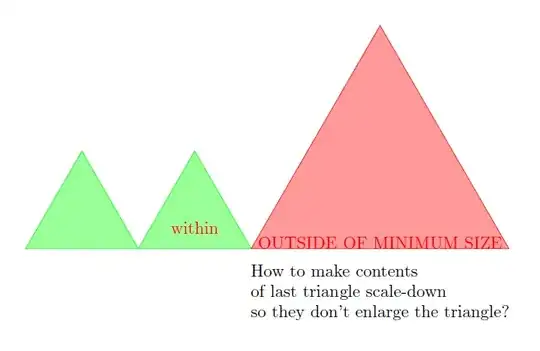
Code:

\documentclass[border=5mm]{standalone}

\usepackage{tikz}
\usetikzlibrary{shapes.geometric,positioning}

\begin{document}
    \begin{tikzpicture}

        % ORIGINAL SIZE (NO CONTENT)
        \path node
            [%
                isosceles triangle,
                shape border rotate=90,
                isosceles triangle apex angle=60,
                inner sep=0mm,
                outer sep=0mm,
                minimum size=20mm,
                draw=green,fill=green!40
            ](T1){};

        % CONTENT FITS (NO EFFECT ON SIZE)
        \path node
            [%
                isosceles triangle,
                shape border rotate=90,
                isosceles triangle apex angle=60,
                inner sep=0mm,
                outer sep=0mm,
                minimum size=20mm,
                draw=green,fill=green!40,text=red,
                right=0mm of T1.right corner,
                anchor=left corner
            ](T2){within};

        % TOO MUCH CONTENT (SIZE AFFECTED)
        \path node
            [%
                isosceles triangle,
                shape border rotate=90,
                isosceles triangle apex angle=60,
                inner sep=0mm,
                outer sep=0mm,
                minimum size=20mm,
                draw=red,fill=red!40,text=red,
                right=0mm of T2.right corner,
                anchor=left corner
            ](T3){OUTSIDE OF MINIMUM SIZE};

        % QUESTION
        \path node
            [%
                align=left,
                below=2mm of T3
            ]
            {How to make contents\\
             of last triangle scale-down\\
             so they don't enlarge the triangle?
            };

    \end{tikzpicture}
\end{document}
bp2017
  • 3,756
  • 1
  • 13
  • 33
  • Why not do the opposite and reduce the text with a scalebox? \scalebox{.4}{OUTSIDE OF MINIMUM SIZE} – AndréC Sep 04 '17 at 07:00

2 Answers2

7

I would make a separate command that scales down oversized inputs.

\documentclass[border=5mm]{standalone}

\usepackage{tikz}
\usetikzlibrary{shapes.geometric,positioning}

\newcommand\MyTextScale[2][20mm]{%
  \sbox0{#2}%
  \ifdim\wd0>#1
  \resizebox{#1}{!}{#2}%
  \else
  #2%
  \fi}

\begin{document}
\begin{tikzpicture}[
  MyTriangle/.style={%
    isosceles triangle,
    shape border rotate=90,
    isosceles triangle apex angle=60,
    inner sep=0mm,
    outer sep=0mm,
    minimum size=20mm,
    draw=green,fill=green!40,
    text=red
  }]

  % ORIGINAL SIZE (NO CONTENT)
  \path node[MyTriangle](T1){\MyTextScale{}};

  % CONTENT FITS (NO EFFECT ON SIZE)
  \path node[MyTriangle,
  right=0mm of T1.right corner,
  anchor=left corner
  ](T2){\MyTextScale{within}};

  % TOO MUCH CONTENT (SIZE AFFECTED)
  \path node[MyTriangle,
  fill=red!40,
  right=0mm of T2.right corner,
  anchor=left corner
  ](T3){\MyTextScale{OUTSIDE OF MINIMUM SIZE}};        
\end{tikzpicture}
\end{document}

enter image description here

Some explanations of the code

The command \MyTextScale is defined with one optional argument and one mandatory, i.e. the maximum width set default to 20mm and the input text. So if you write

\MyTextScale[10mm]{OUTSIDE OF MINIMUM SIZE}

the text will be of width 10mm instead of the default 20mm.

Then comes the box declaration \sbox0{#2}. Boxes are not just fun, they are also a central topic in TeX (and therefore also LaTeX). From start, in TeX, there are 256 boxes named \box0 to \box255. The first 10 are used as temporary boxes by different commands, and it is one of those I have taken. The boxes \box10 to \box25 are used for specific stuff by the LaTeX kernel.

In the first attempt I was a bit lazy and used box 0. Instead, I should have declared my own box with

\newsavebox\MyBox

Then TeX will allocate one of the boxes, or actually the number (register) of one box, to \MyBox. By doing so the command would look like this:

\newsavebox\MyBox
\newcommand\MyTextScale[2][20mm]{%
  \sbox\MyBox{#2}%
  \ifdim\wd\MyBox>#1
  \resizebox{#1}{!}{#2}%
  \else
  #2%
  \fi}

You can get the register that \MyBox is allocated to by \the\MyBox. If you don't load any packages it should be 26, but here we loaded tikz which also allocates some boxes so it will be higher. It can be tested with

\documentclass{article}
\begin{document}
\newsavebox\MyBox
What is \verb|\MyBox|: \the\MyBox 
\end{document}

that should say 26. If you add \usepackage{tikz} it will proabably be 38.

The command \sbox{#2} stores (and expands) the contents of argument #2 in the box named \MyBox. Then there are (in TeX) commands so you can get the width, height and depth of the box; \wd\MyBox, \ht\MyBox and \dp\MyBox. Again, the the first code I used 0 instead of \MyBox. So

\sbox\MyBox{Test my box}
\noindent
Width: \the\wd\MyBox\newline
Height: \the\ht\MyBox\newline
Depth: \the\dp\MyBox

should give something like

enter image description here

Now, with \wd\MyBox we have the width of the box. Then we want to comare that with the optional argument #1 and if it is less just print it, otherwise scale down to that specified width. Comparing lengths, or dimensions in TeX naming, is done with \ifdim.

Finally, to scale I use \resizebox which is defined in the graphicx package. Since I have not loaded that package, I guess it is loaded by tikz.

One more note. Above I have used the command \the to print the box number. This is a TeX command that is used to print out anything that has stored a value. It can be used on box registered, but also e.g. dimensions as for the \wd etc commands, and other parameters. For example \the\baselineskip prints out the row distance.

StefanH
  • 13,823
  • 1
    @bp2017 I have tried to give some explanaitions to the code. Please see the updated answer. If it is unclear, let me know and I will try to elaborate. – StefanH Sep 06 '17 at 09:58
3

This approach places the node content in a tcolorbox. The fitting library is used to fit the text to the size of the tcolorbox. The width of the box is fixed using width=2cm, which is passed to tcboxfit. The tcolorbox fitting library has several algorithms for fitting the text in a box. This example used fit algorithm=hybrid*.

The MWE compares insertion of 10 words in the node versus inserting 20 words. There are two variants of each. One uses a typical tcolorbox rectangular configuration. The second uses parshape to set the text in a triangle consistent with the shape of the node. These are the results:

enter image description here

This is the MWE:

\documentclass[tikz,border=5mm]{standalone}

\usepackage[most]{tcolorbox}
\usetikzlibrary{shapes.geometric,positioning}

% https://tex.stackexchange.com/a/310410
\usepackage{shapepar}

\newcommand*{\triangleshape}{%
{0}%
{0}b{0}\\%
{8.66}t{-5}{10}\\%
{17.32}t{-10}{20}\\%
{17.32}e{0}%
}   

\tcbset{tile,              % Hide the tcolorbox frame
    boxsep=0pt,top=0mm,bottom=0mm,left=0mm,right=0mm, % set margins
    valign=top,
    halign=justify,     % ragged right
    colback=red!40,        % blend tcolorbox into node background
    fit algorithm=hybrid*
}
\tikzset{
    inner sep=1mm,
    outer sep=0mm,
    isosceles triangle,
    shape border rotate=90,
    isosceles triangle apex angle=60,    
}

\begin{document}

    \begin{tikzpicture}
        \path node [%
              draw=red,
              fill=red!40,
              anchor=left corner
            ](T3){\tcboxfit[width=2cm]{\textbf{10 words --} Lorem ipsum dolor sit amet, consectetur adipiscing elit. Donec eleifend.}};
%        
        \path node [%
              draw=red,
              fill=red!40,
              right=0mm of T3.right corner,
              anchor=left corner
            ](T4){\tcboxfit[width=2cm]{\textbf{20 words --} Lorem ipsum dolor sit amet, consectetur adipiscing elit. Nulla sit amet ipsum ac purus porttitor tempor. Donec et luctus est.}};
%
        \path node [%
            draw=red,
            fill=red!40,
            right=0mm of T4.right corner,
            anchor=left corner
            ](T5){\tcboxfit[width=2cm]{\shapepar\triangleshape\textbf{10 words --} Lorem ipsum dolor sit amet, consectetur adipiscing elit. Donec eleifend.}};
%            
        \path node [%
            draw=red,
            fill=red!40,
            right=0mm of T5.right corner,
            anchor=left corner
            ](T6){\tcboxfit[width=2cm]{\shapepar\triangleshape{\textbf{20 words --} Lorem ipsum dolor sit amet, consectetur adipiscing elit. Nulla sit amet ipsum ac purus porttitor tempor. Donec et luctus est. }}};
    \end{tikzpicture}
\end{document}
Ross
  • 5,656
  • 2
  • 14
  • 38