5

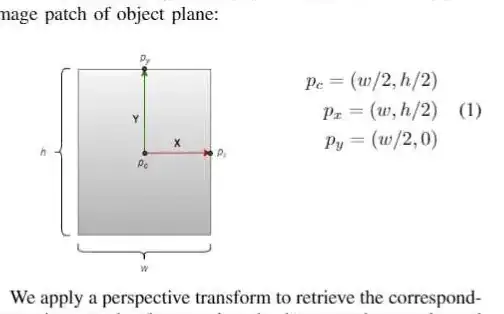
There's a similar question posted here, but I need to have it as a figure element, not just an image. Also, the equation is not left-aligned(I think). So far I've tried this

\begin{center}
\begin{minipage}[t]{.6\columnwidth}
\centering
\includegraphics[valign=t,width = 4cm]{images/box_axis.png}
\end{minipage}\hfill
\begin{minipage}[t]{.4\columnwidth}
\begin{align}
% \hfill
\begin{split}
p_c = (w/2, h/2)
\\
p_x = (w, h/2)
\\
p_y = (w/2, 0)
\end{split}
\end{align}
\end{minipage}
\end{center}

Which renders to

I want to have the figure with caption and equation on the right aligned.

2 Answers2

14

Obviously I do not have your graphics, but this is what you can do.

\documentclass{article}
\usepackage{amsmath}
\usepackage{graphicx}
\begin{document}
\begin{equation}
\vcenter{\hbox{\includegraphics[width=4cm,height=4cm]{example-image-duck}}}
\qquad\qquad
\begin{aligned}
p_c &= (w/2, h/2)
\\
p_x &= (w, h/2)
\\
p_y &= (w/2, 0)
\end{aligned}
\end{equation}
\end{document}

enter image description here

\documentclass{article}
\usepackage{amsmath}
\usepackage{graphicx}
\usepackage{caption}
\begin{document}
\begin{equation}
\vcenter{\hbox{\begin{minipage}{5cm}
\centering
\includegraphics[width=4cm,height=4cm]{example-image-duck}
\captionof{figure}{Some nice words about ducks and marmots.}
\end{minipage}}}
\qquad\qquad
\begin{aligned}
p_c &= (w/2, h/2)
\\
p_x &= (w, h/2)
\\
p_y &= (w/2, 0)
\end{aligned}
\end{equation}
\end{document}

enter image description here

If you want to align the equations vertically w.r.t. the figure without caption, you can use this.

\documentclass{article}
\usepackage{amsmath}
\usepackage{graphicx}
\usepackage{caption}
\begin{document}
\begin{align}
\vcenter{\hbox{\includegraphics[width=4cm,height=4cm]{example-image-duck}}}
&\qquad\qquad
\begin{aligned}
p_c &= (w/2, h/2)
\\
p_x &= (w, h/2)
\\
p_y &= (w/2, 0)
\end{aligned}\\
\vcenter{\hbox{\begin{minipage}{4cm}
\captionof{figure}{Some nice words about ducks and marmots.}
\end{minipage}}}
& \notag
\end{align}
Another equation.
\begin{equation}
 E=mc^2
\end{equation}
\end{document}

enter image description here

As you can see, the positions of the equation numbers match. You can also put it in a figure environment but then the system will float (unless you take drastic measures).
  • how do you add a figure caption to the image? – paul-shuvo Mar 04 '20 at 02:45
  • @paul-shuvo Your example does not have a caption, does it? What is the content of the caption? –  Mar 04 '20 at 02:48
  • That worked :). Could you tell me how can I center the equation vertically? – paul-shuvo Mar 04 '20 at 03:03
  • @paul-shuvo It is vertically centered with respect to the graphics and caption. With respect to what do you wish to center it to? –  Mar 04 '20 at 03:12
  • 3
    Nice answer ! How would you add a label for referencing the figure ? – pltrdy Jan 26 '21 at 12:32
  • @pltrdy I was looking for a way to referencing a figure too. This answers does that by essentially using two minipages inside a figure environment. – vyi Apr 26 '23 at 14:24
5

It seems that you looking for the following:

enter image description here

(red lines indicate text border)

With use of adjustbox for vertical align of image and tabularx for parallel setting of the image and equation:

\documentclass{article}
\usepackage{amsmath}
\usepackage[export]{adjustbox} % for "valing", it also load graphicx
\usepackage{tabularx}

\begin{document}
    \begin{figure}
    \renewcommand\tabularxcolumn[1]{m{#1}}
\begin{tabularx}{\linewidth}{@{} p{4cm}X @{}}
\adjustimage{width=\linewidth, height=4cm,valign=c}{example-image-duck}
    &   \begin{equation}
            \begin{aligned}
        p_c &= (w/2, h/2)   \\
        p_x &= (w, h/2)     \\
        p_y &= (w/2, 0)
            \end{aligned}
        \end{equation}              \\ 
\caption{Some nice words about ducks and marmots.}
    &
\end{tabularx}
    \end{figure}
\end{document}

Note, if you like to prevent that figure float, use figure placement option H provided by the float package.

Zarko
  • 296,517
  • If you add another equation, you will see that the equation number of the equation you produce here is a bit moved to the left. You can fix this by adding @{} after X but then the full system will still float. –  Mar 04 '20 at 07:10
  • @Schrödinger'scat, I forgot on \tabcolsep ... now corrected. About floating I do not understand you. equation numbers (if I add more equations in the second column) are still at right text border. – Zarko Mar 04 '20 at 07:20
  • 1
    The whole figure is a float. So it may move to another position. –  Mar 04 '20 at 07:22
  • @Schrödinger'scat, clear now. Well, OP can use float package and placement specifier H. I will add this note to answer (ASAP). – Zarko Mar 04 '20 at 09:16