You should use \par\addvspace rather than \vspace at the beginning.
Next, you can start a group to set the color. The default value of the optional argument is . that in xcolor stands for the current color.
\documentclass{article}
\usepackage{xcolor}
\newcommand{\Hrule}[3][.]{%
  \par\addvspace{#2}%
  \begingroup\color{#1}%
  \hrule
  \endgroup
  \addvspace{#3}%
}
\begin{document}
Some text
\Hrule{3pt}{1pt}
Some other text
\Hrule[red!40]{3pt}{1pt}
Some other text
\end{document}

If you want to add another argument to set the thickness you can do
\documentclass{article}
\usepackage{xcolor}
\newcommand{\Hrule}[4][.]{%
  \par\addvspace{#2}%
  \begingroup\color{#1}%
  \hrule height #4
  \endgroup
  \addvspace{#3}%
}
\begin{document}
Some text
\Hrule{3pt}{1pt}{0.4pt}
Some other text
\Hrule[red!40]{3pt}{1pt}{2pt}
Some other text
\end{document}

However, using four arguments is error prone, so I suggest a key-value based approach.
\documentclass{article}
\usepackage{xcolor}
\ExplSyntaxOn
\NewDocumentCommand{\Hrule}{m}
 {
  \group_begin:
  \keys_set:nn { puck/hrule } { #1 }
  \par\addvspace{\l_puck_hrule_before_skip}
  \color{\l_puck_hrule_color_tl}
  \hrule height \l_puck_hrule_thickness_dim
  \addvspace{\l_puck_hrule_after_skip}%
  \group_end:
}
\keys_define:nn { puck/hrule }
 {
  before .skip_set:N = \l_puck_hrule_before_skip,
  after  .skip_set:N = \l_puck_hrule_after_skip,
  thickness .dim_set:N = \l_puck_hrule_thickness_dim,
  thickness .initial:n = 0.4pt,
  color .tl_set:N = \l_puck_hrule_color_tl,
  color .initial:n = .,
 }
\ExplSyntaxOff
\begin{document}
Some text
\Hrule{before=3pt,after=1pt}
Some other text
\Hrule{color=red!40,before=3pt,after=1pt,thickness=2pt}
Some other text
\end{document}
The output is the same as in the previous picture.
Comparison between my solution and Sergio Llorente's
\documentclass[twocolumn]{article}
\usepackage{xcolor}
\newcommand{\HruleEgreg}[4][.]{%
  \par\addvspace{#2}%
  \begingroup\color{#1}%
  \hrule height #4
  \endgroup
  \addvspace{#3}%
}
\newcommand{\HruleSergio}[4]{%
  \par\noindent\vspace{#1}%
  {\color{#3}\rule{\columnwidth}{#4}}% \columnwidth instead of \textwidth
  \par\vspace{#2}%
}
\begin{document}
\textbf{Egreg}
\medskip
Some text
\HruleEgreg{3pt}{1pt}{0.4pt}
Some other text
\HruleEgreg[red!40]{3pt}{1pt}{2pt}
Some other text
\newpage
\textbf{Sergio}
\medskip
Some text
\HruleSergio{3pt}{1pt}{black}{0.4pt}
Some other text
\HruleSergio{3pt}{1pt}{red!40}{2pt}
Some other text
\end{document}
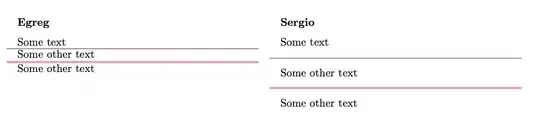
You can see that the amount of spacing with my solution is exactly what's requested.


\rule? – Sigur Sep 24 '21 at 13:38