1

I'm having trouble with getting listings to behave at line endings and respect the page margins. Consider the following code:

\documentclass{article}
\usepackage{listings}
\usepackage[showframe,margin=2cm]{geometry}
\usepackage{blindtext}
\usepackage{courier}
\lstset{
  language=[Visual]Basic,
  basicstyle=\small\ttfamily,
  breaklines=true,
  numberstyle=\small\ttfamily,
}

\begin{document}

\begin{lstlisting} Sub TEstThatLongVariableNamesDontBreakUpProperlyWithinTheLstListingEnvironmentCheckitOutForYourselfIsntThatWeird() Debug.Print("hello world") End Sub \end{lstlisting}

\blindtext

Here is a very long variable name which overflows the line and needs to not do that see what I mean \lstinline!Supercalifrcexpialidocious!

\end{document}

Here's what the result looks like:

enter image description here Neither the lstinline command nor the lstlsting are respecting the page margins despite use of the breaklines option in lstset.

I need for the verbatim lines to break up properly and automatically at the page margins. Is there anyway to do that?

user32882
  • 1,594

2 Answers2

1

With long words you have to insert an hyphenation point to suggest a break place.

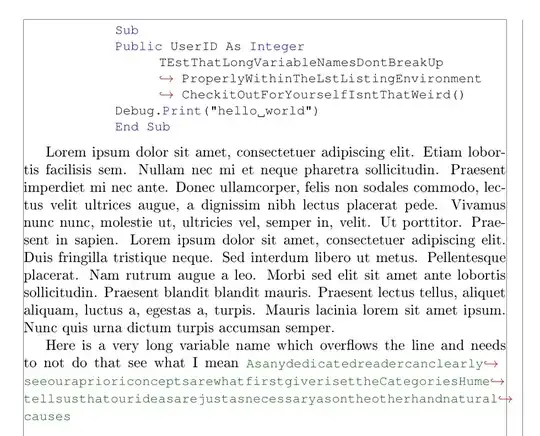
Later, with the literate keyword, each \- is replaced by the red \hookrightarrow.

breaklines=true activates the automatic line breaking of long lines of code. For example if breakatwhitespace=true allows to insert a line break only at a white space.

Note For inline listing, it is possible to add as many \- as you like (see the answer), to tell TeX where a proper line break could occur. Tex will make (mostly) a good choice.

That way changing the text of the document should not be a big problem. In the final version, like all the overflow boxes, they will need to be visually checked.

This is normal procedure with long proper names, foreign words, etc. when the hyphenation tables do not have a proper place to hyphenate.

The difference between the two styles is where the red arrow appears. For inline it is better to have it before the line break.

Related answers

hyphens in listings

listings line wrapping
b

\documentclass{article}
\usepackage{listings}

\usepackage{xcolor} \usepackage[T1]{fontenc}

\usepackage[showframe,margin=5cm]{geometry} \usepackage{blindtext} \usepackage{courier}

% https://tex.stackexchange.com/a/168532/161015 % https://tex.stackexchange.com/a/116572/161015
\lstdefinestyle{display}% displayed listings { basicstyle=\small\ttfamily, numberstyle=\small\ttfamily, language=[Visual]Basic, columns=fullflexible, xleftmargin=30pt, breaklines=true, breakatwhitespace=true, breakindent=30pt, keywordstyle=\color{blue}, literate={\-}{}{0\discretionary{}{\mbox{\textcolor{red}{$\hookrightarrow$}\space}}{}} %arrow in the new line }

\lstdefinestyle{inline} {% basicstyle=\small\ttfamily,% literate={\-}{}{0\discretionary{\mbox{\textcolor{red}{$\hookrightarrow$}\space}}{}{}} % arrow before line break }

\begin{document}

\begin{lstlisting}[style=display] Sub Public UserID As Integer TEstThatLongVariableNamesDontBreakUp-ProperlyWithin-TheLstListingEnvironment-CheckitOutForYourselfIsnt-ThatWeird() Debug.Print("hello world") End Sub \end{lstlisting}

\blindtext

Here is a very long variable name which overflows the line and needs to not do that see what I mean {\color{green!40!black} \lstinline[style=inline]!Asanydedicatedreadercanclearly-seeour-apriori-conceptsarewhatfirst-giverisetthe-Categories-Hume-tell-sus-that-our-ideasarejust-asnecessary-asontheother-hand-natural-causes!}

\end{document}

Simon Dispa
  • 39,141
  • Is there a way to get LaTeX to automatically detect where the line break should occur? This is particularly important for lstinline because the position where the line breaks will have to change as I add or delete text in my document... – user32882 Sep 25 '21 at 19:48
  • @user32882 Please see the updated answer and the Note. – Simon Dispa Sep 25 '21 at 22:21
  • I don't know if adding a ton of hyphenations inside the long variable names is actually a good solution. I found another post recommending the use of \sloppy for \lstinline elements and I think this might work better.... – user32882 Sep 26 '21 at 10:41
  • @user32882 With meaningful variable names, 3 or 4 \ - should be sufficient. You don't want TeX to cut the name in an arbitrary place and add a - which might or might not be part of the name. – Simon Dispa Sep 26 '21 at 17:36
1

enter image description here

\documentclass[UTF8]{article}
\usepackage{listings}
\usepackage{color}

\begin{document} \lstset{ language=[Visual]Basic, basicstyle=\small\ttfamily, breaklines=true, numberstyle=\small\ttfamily, literate={T}{T}{1},%here the main feature, just a small hack you know, but it can help You, I hope }

%\lstinputlisting{code/test.py} \begin{lstlisting} Sub TEstThatLongVariableNamesDontBreakUpProperlyWithinTheLstListingEnvironmentCheckitOutForYourselfIsntThatWeird() Debug.Print("hello world") End Sub \end{lstlisting}

\end{document}

WinnieNotThePooh
  • 3,008
  • 1
  • 7
  • 14