5

How I can resolve this table problem. It cut a part of vertical line.

\documentclass{article}
\usepackage{amsmath}
\usepackage{array}
\usepackage[italian]{babel}
\usepackage{float}
\begin{document}

\begin{table}[H] \centering \begin{tabular}{>{\centering}m{0.22\textwidth}|>{\centering}m{0.20\textwidth}|>{\centering}m{0.20\textwidth}|>{\centering}m{0.20\textwidth}} & $x=10$ & $x=100$ & $x=1000$\tabularnewline[0.2em] \hline \ $y=\log_{10}x$ & $1$ & $2$ & $3$\tabularnewline[0.5em] $y=x^2$ & $10^2$ & $10^4$ & $10^6$\tabularnewline[0.5em] $y=10^x$ & $10^{10}$ & $10^{100}$ & $10^{1000}$ \end{tabular} \end{table} \end{document}

Alan Munn
  • 218,180

4 Answers4

2

You should remove \\ after \hline as suggested by David Carlisle in the comment. If you want to add some vertical space after the 1st horizontal line, you can follow this answer by Mico. Combining these two, the code is as follows:

\documentclass{article}
\usepackage{amsmath}
\usepackage{array}
\newcommand\Tstrut{\rule{0pt}{2.6ex}}         % = `top' strut
\usepackage[italian]{babel}
\usepackage{float}
\begin{document}

\begin{table}[H] \centering \begin{tabular}{>{\centering}m{0.22\textwidth}|>{\centering}m{0.20\textwidth}|>{\centering}m{0.20\textwidth}|>{\centering}m{0.20\textwidth}} & $x=10$ & $x=100$ & $x=1000$\tabularnewline[0.2em] \hline $y=\log_{10}x$\Tstrut & $1$\Tstrut & $2$\Tstrut & $3$\Tstrut\tabularnewline[0.5em] $y=x^2$ & $10^2$ & $10^4$ & $10^6$\tabularnewline[0.5em] $y=10^x$ & $10^{10}$ & $10^{100}$ & $10^{1000}$ \end{tabular} \end{table} \end{document}

output

Imran
  • 3,096
2

Your problem is \hline\\ which could be

\hline &&& \\[-1.5ex]

(experiment the value). In general it's best to use ex units for vertical spacing.

I propose three realizations of the table, in decreasing order of ugliness.

\documentclass{article}
\usepackage[T1]{fontenc}
\usepackage[italian]{babel}
\usepackage{amsmath}
\usepackage{array}
\usepackage{booktabs}

\begin{document}

\begin{center}

\begin{tabular}{ w{c}{0.22\textwidth}| w{c}{0.20\textwidth}| w{c}{0.20\textwidth}| w{c}{0.20\textwidth} } & $x=10$ & $x=100$ & $x=1000$ \ \hline &&&\[-1.5ex] $y=\log_{10}x$ & $1$ & $2$ & $3$ \[1ex] $y=x^2$ & $10^2$ & $10^4$ & $10^6$ \[1ex] $y=10^x$ & $10^{10}$ & $10^{100}$ & $10^{1000}$ \end{tabular}

\end{center}

\begin{center}

\begin{tabular}{\textwidth}{@{\extracolsep{\fill}}cccc@{}} \toprule & $x=10$ & $x=100$ & $x=1000$ \ \midrule $y=\log_{10}x$ & $1$ & $2$ & $3$ \ \addlinespace $y=x^2$ & $10^2$ & $10^4$ & $10^6$ \ \addlinespace $y=10^x$ & $10^{10}$ & $10^{100}$ & $10^{1000}$ \ \bottomrule \end{tabular}

\end{center}

\begin{center}

\setlength{\tabcolsep}{1em} \begin{tabular}{@{}lccc@{}} \toprule Funzione & \multicolumn{3}{c@{}}{Valore di $x$} \ \cmidrule{2-4} & $10$ & $100$ & $1000$ \ \midrule $y=\log_{10}x$ & $1$ & $2$ & $3$ \ \addlinespace $y=x^2$ & $10^2$ & $10^4$ & $10^6$ \ \addlinespace $y=10^x$ & $10^{10}$ & $10^{100}$ & $10^{1000}$ \ \bottomrule \end{tabular}

\end{center}

\end{document}

Avoid [H]; if there is no caption, a center environment suffices. If there's a caption, let the environment float.
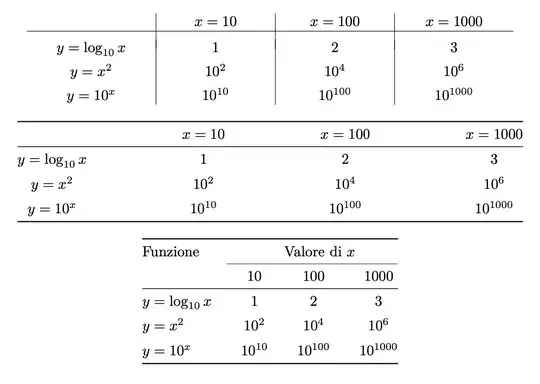
enter image description here

I left “y=”, but I consider it bad mathematical usage.
egreg
  • 1,121,712
0

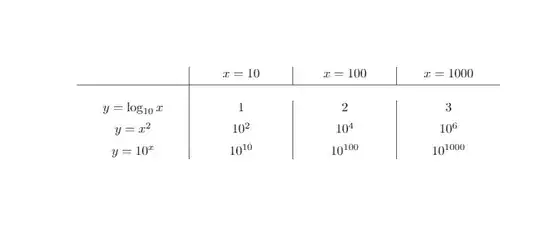
enter image description here

\documentclass{article}
\usepackage{amsmath}
\usepackage{array}
\usepackage[italian]{babel}
\usepackage{float}
\begin{document}

\begin{table}[H] \centering \begin{tabular}{>{\centering}m{0.22\textwidth}|>{\centering}m{0.20\textwidth}|>{\centering}m{0.20\textwidth}|>{\centering}m{0.20\textwidth}} & $x=10$ & $x=100$ & $x=1000$\tabularnewline[0.2em]\hline & & &\tabularnewline[0.2em] $y=\log_{10}x$ & $1$ & $2$ & $3$\tabularnewline[0.5em] $y=x^2$ & $10^2$ & $10^4$ & $10^6$\tabularnewline[0.5em] $y=10^x$ & $10^{10}$ & $10^{100}$ & $10^{1000}$ \end{tabular} \end{table} \end{document}

WinnieNotThePooh
  • 3,008
  • 1
  • 7
  • 14
0

You can't put \\ after \hline. If you want to add space after \hline, you can add \noalign{\vskip1mm}. This will break the vertical rule. However, if you use {NiceTabular} instead of {tabular}, the rules won't be broken (with nicematrix, the rules are drawn with PGF/Tikz after the construction of the array).

\documentclass{article}
\usepackage{amsmath}
\usepackage{array}
\usepackage[italian]{babel}
\usepackage{float}
\usepackage{nicematrix}

\begin{document}

\begin{table}[H] \centering \begin{NiceTabular}{>{\centering}m{0.22\textwidth}|>{\centering}m{0.20\textwidth}|>{\centering}m{0.20\textwidth}|>{\centering}m{0.20\textwidth}} & $x=10$ & $x=100$ & $x=1000$\tabularnewline[0.2em] \hline \noalign{\vskip1mm} $y=\log_{10}x$ & $1$ & $2$ & $3$\tabularnewline[0.5em] $y=x^2$ & $10^2$ & $10^4$ & $10^6$\tabularnewline[0.5em] $y=10^x$ & $10^{10}$ & $10^{100}$ & $10^{1000}$ \end{NiceTabular} \end{table} \end{document}

You need several compilations (because nicematrix uses PGF/Tikz nodes under the hood).

Output of the above code

F. Pantigny
  • 40,250