Matrices are weird
A PGF matrix uses the \halign primitive and is somewhat closer to a tabular than any other construct in PGF/TikZ.
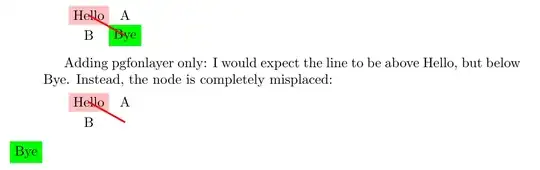
The final place of each node is only known after the matrix has been constructed and for that each node name will be collected in a big macro and twice a loop will iterate over all nodes and correct their positions. However where as the matrix itself will be placed on the correct position, with the pgfonlayer environment you place its content in a different box which will not get correctly transformed to the right place.
(The internals are weird, it's a combination of boxes, \halign, the way PGF keeps track where nodes are …)
How can we keep track of our own stuff?
Since there's no nice way to hook into this looping mechanism we're using our own coordinate as a helper into this hook system.
We can't use the original layer boxes – yes, each layer is just another TeX box that gets filled over time and at the end of the picture, the layers will be unpacked in the proper order – but we need at least one box for each cell per matrix to then insert these stored away mini-pictures in the correct layer box.
The position of the aforementioned coordinate is used to place our own TeX box with the help of PGF's \pgfqboxsynced.
Boxes
At first, I gave each box, i.e. mini-picture we store away, a unique name based on their row and column number (which is still the default for pgfmatrixlayer's optional argument). This makes sure that you can't use the same box for different cells. However, this might be wasteful since it allocates a lot of boxes you might only use once.
However, if you only need one or two boxes total (but each time they're in a different cell) or if you want to put different content of one cell on different layers, you can or must use the optional argument and give them your own name.
Don't use the same name in one matrix twice as the optional argument to pgfmatrixlayer in different cells.
The \pgfplacematrixbox places said box – hopefully correctly – and then empties the box again for the next matrix. No other “garbage collection” is done to make sure you don't accidentally use a box in two matrices without placing the content in between.
Using ext-layers with the manual approach above
I've now combined the approach above with the experimental1) ext.layers library from my tikz-ext package.
The key to use is matrix node on layer = <name>:<layer> where <name> (and the colon) is optional and will be <row>-<column> as before if it's not given. So if you want to use two nodes in one cell on different layers you will need to provide custom <name>s.
The every matrix style is set up so that a collection is reset and used after the matrix whereas the matrix node on layer key will fill that list according to its parameters.
This feels very close to what PGF describes as Deferred Node Positioning but I haven't experimented with that.
Label behind its parent node?
That said, if all you want is to put a node behind its parent, it's much easier:
Every TikZ path (i.e the whole \path … ;)2) comes with three layers already:
These layers and keys will be used with nodes, pics, edges and plotmarks: basically everything that has its own path (but not arrow tips).
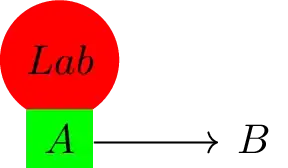
Just using label={[behind path]Lab} will place the label behind its parent unless the default has been changed.
1) It's so experimental in fact I just found two to three bugs.
2) Remember that \node is just \path node and everything is on a path even if that path is otherwise empty.
Code
\documentclass{article}
\usepackage{tikz}
\usetikzlibrary{cd, ext.layers}
\makeatletter
%%%BEGIN_FOLD manual way
\def\pgfplacematrixbox#1{%
  \pgfutil@IfUndefined{pgf@sh@nt@pgf@matrixlayer@#1}{%
    \pgfutil@packagewarning{PGF layer matrices}{No PGF matrix layer #1 known.}%
  }{%
    \pgfsys@beginscope
      \pgfsettransform{\csname pgf@sh@nt@pgf@matrixlayer@#1\endcsname}%
      \expandafter\pgfqboxsynced\csname pgf@matrixlayer@#1\endcsname
    \pgfsys@endscope
    \global\expandafter\setbox\csname pgf@matrixlayer@#1\endcsname
      \box\pgfutil@voidb@x
  }%
}
\newenvironment*{pgfmatrixlayer}[1][\the\pgfmatrixcurrentrow
                                   -\the\pgfmatrixcurrentcolumn]{%
  \edef\pgf@m{pgf@matrixlayer@#1}%
  \pgfutil@ifundefined{\pgf@m}{%
    \csname pgf@newbox\expandafter\endcsname\csname\pgf@m\endcsname
  }{}%
  \begingroup % quick version of
    % \path[name prefix=,name suffix=,reset cm]coordinate(\pgf@m);
    % the \pgf@nodecallback is called by \pgfmultipartnode
    % which is used by TikZ node and coordinate but not by \pgfcoordinate
    % this is our hook into the whole matrix node callback stuff
    % we're just using a coordinate that's handled by PGF
    % so we don't have to deal with the two (!) corrections by ourselves
    \pgftransformreset
    \pgfcoordinate{\pgf@m}{\pgfpointorigin}%
    \expandafter\pgf@nodecallback\expandafter{\pgf@m}%
  \endgroup
  % the rest is basically a clone of pgfcorelayers.code.tex's
  % implementation of \pgfonlayer
  \pgfsetlinewidth{.4pt}%
  % pgfonlayers boxes are also global,
  % we need this too because we're inside a cell inside a matrix
  \global\expandafter\setbox\csname\pgf@m\endcsname=\hbox to 0pt\bgroup
    \expandafter\box\csname\pgf@m\endcsname
    \begingroup
}{%
    \endgroup
    \hss
  \egroup
}
%%%END_FOLD
%%%BEGIN_FOLD using ext.layers and a few macros from the manual way
\tikzset{
  /tikz-ext/layers/patch=node, % enable patch (should be scoped to necessary path)
  reset matrix boxes/.code=%
    \global\let\tikzext@layers@matrixcollection\pgfutil@empty,
  every matrix/.append style={
    reset matrix boxes,
    append after command=\pgfextra{%
      \pgfinterruptpath\tikzext@layers@matrixcollection\endpgfinterruptpath}},
  @matrix node on layer/.code args={#1:#2}{%
    \edef\pgf@m{pgf@matrixlayer@#1}% same as pgfmatrixlayer environment
    \pgfutil@ifundefined{\pgf@m}{%   but uses ext.layers interface
      \csname pgf@newbox\expandafter\endcsname\csname\pgf@m\endcsname}{}%
    \begingroup\pgftransformreset\pgfcoordinate{\pgf@m}{\pgfpointorigin}%
      \expandafter\pgf@nodecallback\expandafter{\pgf@m}\endgroup
    \pgfkeysalso{/tikz-ext/layers/in box/.expand once=\csname\pgf@m\endcsname}%
    \pgfutil@g@addto@macro\tikzext@layers@matrixcollection{%
      \pgfonlayer{#2}\pgfplacematrixbox{#1}\endpgfonlayer}
  },
  matrix node on layer/.code={% <name>:<layer> or <layer>
    \pgfutil@in@{:}{#1}%
    \ifpgfutil@in@ % .expanded just to be safe
      \tikzset{@matrix node on layer/.expanded={#1}}%
    \else          % .expanded needed
      \tikzset{@matrix node on layer/.expanded=%
        \the\pgfmatrixcurrentrow-\the\pgfmatrixcurrentcolumn:{#1}}%
    \fi}}
%%%END_FOLD
\makeatother
%%% Layer seup
\pgfdeclarelayer{back}
\pgfdeclarelayer{front}
\pgfsetlayers{back, main, front}
\begin{document}
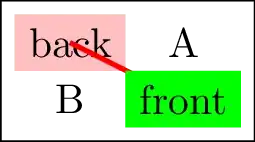
\begin{tikzpicture}
\node [matrix, draw] (my matrix) at (2,1) {
  \begin{pgfmatrixlayer}
    \node[fill=pink] (back) {back};
  \end{pgfmatrixlayer}
& \node{A}; \
  \node{B};
& \begin{pgfmatrixlayer}
    \node[fill=green] (front) {front};
  \end{pgfmatrixlayer}
\};
\begin{pgfonlayer}{front}
\pgfplacematrixbox{2-2}
\end{pgfonlayer}
% after front but should be below
% before back but should be above
\draw[very thick, red] (back.center) -- (front.center);
\begin{pgfonlayer}{back}
\pgfplacematrixbox{1-1}
\end{pgfonlayer}
\end{tikzpicture}
\tikzset{every label/.append style={fill=red, shape=circle, label distance=+-1mm}}
\begin{tikzcd} % normal
  |[fill=green, label=Lab]| A \rar & B
\end{tikzcd}
\begin{tikzcd} % one node in front (uses box 1-1)
  |[fill=green, matrix node on layer=front]| A \rar & B
\end{tikzcd}
\begin{tikzcd} % one node in front, one node in back
  |[fill=green,
    matrix node on layer=front:front,
    label={[matrix node on layer=back:back]Lab}]| A \rar & B
\end{tikzcd}
\begin{tikzcd} % label behind node is much easier
  |[fill=green, label={[behind path]Lab}]| A \rar & B
\end{tikzcd}
\end{document}
Output


labelusesappend after commandto put another node outside of the path so god knows what\tikz@tempboxis actually referring to at that point. – Henri Menke Oct 14 '21 at 10:35ext.layerslibrary … At the end of the matrix a special operation is called that corrects all nodes' positions because only then the correct position of the matrix on the canvas is known. A PGFlayer is just a TeX box that gets filled over time and only at the end the boxes get unpacked in the right order. The node will be put on its special layer before the matrix' position is correct on the main layer. I'm not sure we can relocate a box' content after it's in there. – Qrrbrbirlbel Oct 03 '23 at 15:09