I remember seeing someone's latex editing setup where the latex was rendered inline, so when you'd type \alpha in your .tex file it'd be replaced with the letter alpha for example. (but only visually, the actual .tex file would still contain \alpha) It made latex a lot easier to read and edit, but I haven't been able to find this setup again. Does anyone know where I can find something like this? (preferrably for vs code, if possible)
Asked
Active
Viewed 2,563 times
2

2 Answers
4
Emacs can easily do that. The AUCTeX plugin has the preview LaTeX feature which enables you to do what you are describing. As shown here.
Picture taken from here (Ofcourse, you can change how emacs look!)
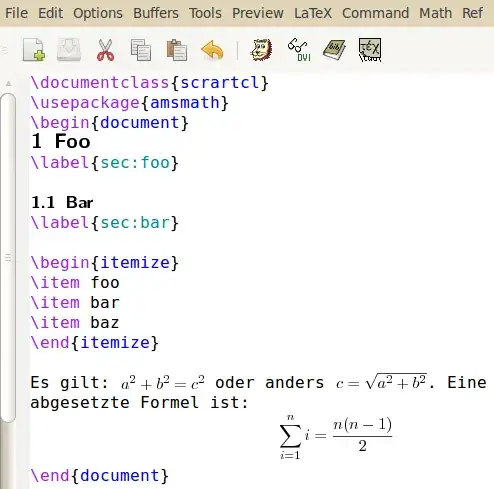
Do note that if you are on Windows, emacs might not be the best option.
In VSCode, the best contender for this sort of functionality looks to be the LaTeX.js extension. Although it is not the same thing. There is hover preview for equations however as shown here.
There seems to be some discussion regarding mimic-ing the feature how emacs does it in here however I could not find if it was implemented. It gets mentioned again in the LaTeX-Utilities plugin discussions as well so maybe it implemented that ?
The LyX editor also shows you preview as it is based on WYSIWYG as mentioned by Fran. However it might not be what you are looking for, given it is a drastic change from traditional LaTeX editors.
And for that BaKoMa TeX exists. It is same as the LaTeX.js extension in that it displays the output directly and live updating it in real time.
Needless to say, Vim can also do the same as emacs preview going by the post of Wendell (as linked here)
There is also preview inline for Atom that shows inline math. Sublime Text's LaTeX plugin also has the feature built in however it is broken as of writing this post.
IntelliJ idea has the TeXiFy-Idea plugin which does inline math preview via unicode characters utilizing code folding. It also includes a math preview panel to show equations when you write it using the jlatexmath library however it can be further extended as well using custom preambles.

Krosin
- 143
2
There is an extension in vscode called conceal that does this.
Here is the documentation : https://github.com/coq-community/vsc-conceal and an exemple of configuration for latex : https://github.com/siegebell/vsc-prettify-symbols-mode/wiki/Latex
It's not perfect, unless you are a regex pro it can only replace one word with another with (for example \sqrt{a^2+b^2} can only be displayed as √{a^2+b^2} and it can be a bit buggy sometimes (but just close/open the file to fix the problem) but at least it exists.
For example this code:
\[
  \lim_{x \to \infty} f(x) = l \iff \forall \epsilon > 0, \quad \exists A > 0 \quad \forall x > A, \quad |f(x) - l| < \epsilon
\]
\[
  \sum_{i = 1}^n i = \frac{n(n+1)}{2}
\]
Let \(x \in \mathbb{R}\). Then \(\exists n \in \mathbb{N}^*\) such as \(n - 1 \leq x < n\) and we have \(\lfloor x \rfloor = n - 1\).
can be displayed in:

We can take advantage of the fact that on a specific theme (here one dark pro), the math mode can be highlighted

Anoma
- 81
MathGreek, available from WinEdt.org. – Bernard Nov 02 '21 at 12:46\DecareUnicodeCharacterfrominputencutf8 or\newunicodecharfrom eponymous package). – Jhor May 25 '22 at 07:35