8

Picture

I would like to draw this picture by [tikz]. The elliptic and circle are easy, and I use 'control' to draw the red loop. But I do not know how to draw the arrow in the middle of the loop and do not know how to make spaces in the intersections.

Here is my codes.

\documentclass{article}

\usepackage{tikz}

\begin{document} \begin{tikzpicture} \draw (0,0) ellipse (20pt and 10pt); \draw (1,0) ellipse (20pt and 20pt); \filldraw [red] (1,-1.5) circle (1pt); \draw[draw=red] (1,-1.5) .. controls (0.2,0.2) and (1.8,0.2).. (1,-1.5); \draw[draw=red] (1,-1.5) .. controls (-0.5,0.6) and (-2,0.2) .. (1,-1.5); \end{tikzpicture} \end{document}

And here is what I got

enter image description here

I try to use 'decoration', but it does not work well for 'control'.

Sandy G
  • 42,558
  • Welcome to TeX.SX! What did you do so far? Can you provide us with some code? As for the intersections: It may be helpful to think about splitting the paths in half, and draw one half behind and the other before the other path. You could place a thicker white copy of the paths underneath for the gaps. – Jasper Habicht Nov 02 '21 at 21:28
  • 2
    The breaks at the intersections are similar to knot diagrams, so I recommend looking at packages that draw knots. There's a list at https://tex.stackexchange.com/q/17181/86 (I'd take note of the dates of the answers rather than the votes). – Andrew Stacey Nov 02 '21 at 21:39
  • For the arrows, use the markings TikZ library to place the arrows at positions on the path. – Andrew Stacey Nov 02 '21 at 21:40
  • @AndrewStacey Thank you and I will take a look at the breaks. But the 'marking' does not work well for my path generated by 'control'. –  Nov 02 '21 at 21:43

3 Answers3

9

Here's an example using the knots library for the intersections and decorations.markings for the arrows.

\documentclass{article}
%\url{https://tex.stackexchange.com/q/621085/86}
\usepackage{tikz}
\usetikzlibrary{
  knots,
  decorations.markings,
  arrows.meta
}

\begin{document}

\begin{tikzpicture} \begin{knot}[ % draft mode=crossings, flip crossing/.list={6,4,1}, end tolerance=12pt, ] \strand (0,0) ellipse[x radius=20pt, y radius=10pt]; \strand (1,0) circle[radius=20pt]; \strand[ draw=red, only when rendering/.style={ postaction=decorate, }, decoration={ markings, mark=at position .47 with {\arrowreversed{To}} } ] (1,-1.5) .. controls (0.2,0.2) and (1.8,0.2).. (1,-1.5); \strand[ draw=red, only when rendering/.style={ postaction=decorate, }, decoration={ markings, mark=at position .45 with {\arrow{To}} } ] (1,-1.5) .. controls (-0.5,0.6) and (-2,0.2) .. (1,-1.5); \end{knot} \filldraw [red] (1,-1.5) circle[radius=1pt]; \end{tikzpicture}

\end{document}

curves with arrows and gaps

Andrew Stacey
  • 153,724
  • 43
  • 389
  • 751
4

Drawing arrows in the middle of a line is addressed here. In the code below I defined the style midarr to place the arrow.

The knots library can be used as in Andrew Stacy's solution, but if you want to do this manually, you can use double=<linecolor> and double distance=<linethickness>. I defined a style overcross that will produce the desired effect:

\tikzset{overcross/.style={double, line width=1.5, white, double=#1, double distance=\knotwidth},
overcross/.default=black}

The macro \knotwidth can be set to the desired line thickness for your diagrams. You can adjust the spacing around the overcrossing by changing the 1.5.
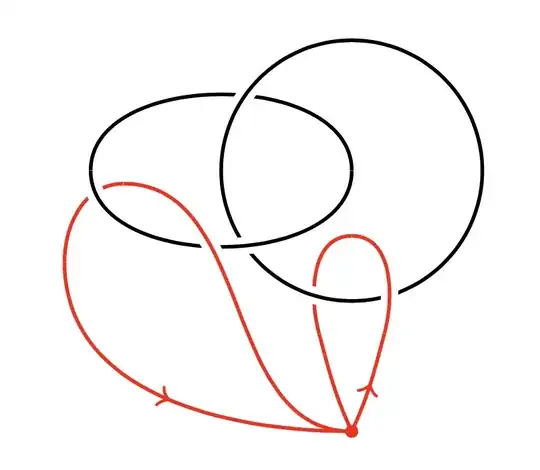
enter image description here

To make this work, draw the under-segments first. Then use \draw[overcross] or \draw[overcross, double=red] for the overcrossings. Note that this means splitting up segments into pieces. I set the in and out angles to make them look smooth.

Here is the code:

\documentclass{article}

\usepackage{tikz} \usetikzlibrary{decorations.markings}

\tikzset{overcross/.style={double, line width=1.5, white, double=#1, double distance=\knotwidth}, overcross/.default=black} \tikzset{midarr/.style={decoration={markings,mark={at position .5 with {\arrow{>}}}},postaction={decorate}}}

\newcommand{\knotwidth}{.8pt}

\begin{document}

\begin{tikzpicture}[line width=\knotwidth] \draw (0,2) to[out=90, in=90] (-2,2); \draw[red] (0,1.5) to[out=180, in=105] (-.25,.75); \draw[red, midarr] (0,0) to[out=65, in=-105] (.25,.75); \draw[overcross, double=red] (-1.75,1.9) to[out=180, in=90] (-2.2,1.3); \draw[overcross] (0,2) circle[radius=1]; \draw[overcross] (-2,2) to[out=-90, in=-90] (0,2); \draw[overcross, double=red] (.25,.75) to[out=75, in=0] (0,1.5); \draw[overcross, double=red] (0,0) to[out=180, in=0] (-1.75,1.9); \draw[red, midarr] (-2.2,1.3) to[out=-90, in=180] (0,0); \draw[red] (-.25,.75) to[out=-75, in=115] (0,0); \fill[red] (0,0) circle[radius=.05]; \end{tikzpicture}

\end{document}

Sandy G
  • 42,558
  • The overcross style is essentially what the knots package does, except that it works out which bits are the over/under strands so that you don't have to input all of the coordinates by hand. See http://tex.stackexchange.com/q/32125/86 for the original inspiration. – Andrew Stacey Nov 03 '21 at 06:46
  • Thank you, too! –  Nov 03 '21 at 08:39
3

Here is an example where to draw the arrows I just drew each loop one half at a time, and to generate the intersections I conveniently ordered the drawing of each element.

\documentclass{article}
\usepackage{tikz}

\begin{document}

\begin{tikzpicture} \coordinate (A) at (1.1,-1.4); \coordinate (B) at (-0.2,-0.1); \coordinate (C) at (1.1,-0.4); \draw (1,0) + (180:20pt) arc (180:245:20pt); \draw[red] (B) to[out=180,in=175] (A); \draw[white,line width=2.5pt] (0.3,0) ellipse (20pt and 10pt); \draw (0.3,0) ellipse (20pt and 10pt); \draw[red] (C) to[out=180, in=130] (A); \draw[white,line width=2.5pt] (1,0) + (160:20pt) arc (160:-115:20pt); \draw (1,0) + (-115:20pt) arc (-115:180:20pt); \draw[white,line width=2.5pt] (A) + (156:10pt) to[out=135,in=0] (B); \draw[->,red] (A) to[out=175,in=0] (B); \draw[white,line width=2.5pt] (A) to[out=50,in=0] (C); \draw[->,red] (A) to[out=50,in=0] (C); \filldraw [red] (A) circle (1pt); \end{tikzpicture}

\end{document}

output from the code

Sacarou
  • 31