THANKS FOR @JohnKormylo and @JasperHabicht
method from @JasperHabicht
I found a control sequence \enit@depth which show the enumerate depth. So I can use \if to test if I'm in the first level, like this:
\renewcommand{\enumerate}[1][]{%
    \@numerate[#1]%
    \ifnum\enit@depth=\@ne
        \setcounter{beginitems}{\arabic{enumi}}
    \fi
}
\renewcommand{\endenumerate}{
    \ifnum\enit@depth=\@ne
        \setcounter{enditems}{\arabic{enumi}}
        \setcounter{totalitems}{\numexpr \c@enditems - \c@beginitems \relax}
    \fi
    \end@numerate%
}
If we do this, when we aren't in the first level, \setcounters won't work. The whole codes are:
\documentclass{article}
\usepackage{enumitem}
\makeatletter
\newcounter{totalitems}
\newcounter{beginitems}
\newcounter{enditems}
\usepackage{letltxmacro}
\LetLtxMacro{@numerate}{\enumerate}
\LetLtxMacro{\end@numerate}{\endenumerate}
\renewcommand{\enumerate}[1][]{%
    @numerate[#1]%
    \ifnum\enit@depth=@ne
        \setcounter{beginitems}{\arabic{enumi}}
    \fi
}
\renewcommand{\endenumerate}{
    \ifnum\enit@depth=@ne
        \setcounter{enditems}{\arabic{enumi}}
        \setcounter{totalitems}{\numexpr \c@enditems - \c@beginitems \relax}
    \fi
    \end@numerate%
}
\makeatother
\begin{document}
\begin{enumerate}
    \item one
    \item two
\end{enumerate}
total = \thetotalitems, begin = \thebeginitems, end = \theenditems

\begin{enumerate}[resume]
    \item three
    \begin{enumerate}
        \item a nested enumerate
    \end{enumerate}
\end{enumerate}
total = \thetotalitems, begin = \thebeginitems, end = \theenditems

\begin{enumerate}
    \item one
    \item two
\end{enumerate}
total = \thetotalitems, begin = \thebeginitems, end = \theenditems


\end{document}
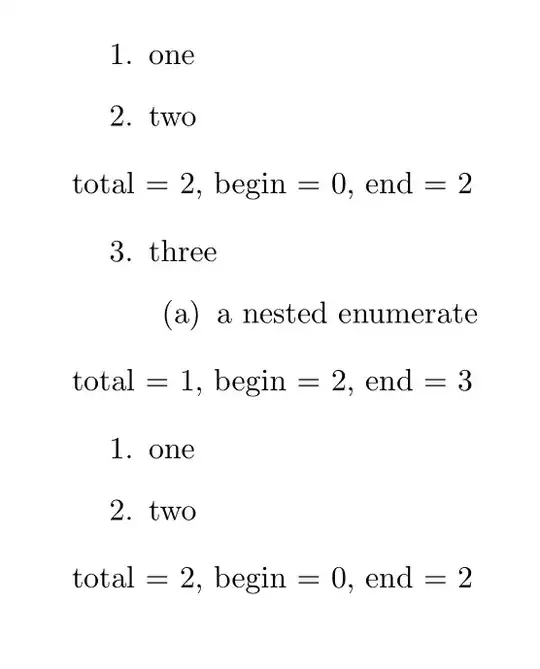
my new method
In this method, I renew the \item command, let the conter plus 1 when \item appears in the top level:
- first, we create a newif
\ifenum to test if we are in the top level, we create a counter and save the macros:
\newif\ifenum
\newcounter{totalitems}
\usepackage{letltxmacro}
\LetLtxMacro{@numerate}{\enumerate}
\LetLtxMacro{\end@numerate}{\endenumerate}
\LetLtxMacro{\it@m}{\item}
- use
xparse to renew the \item command, when this \item is in the top level, step the counter totalitems. Also we can let it have some new features, like \item* for not count, \item[<paramater>] for a user-defined label as the previous definition but also count, \item*[paramater] for a user-defined label without count:
\DeclareDocumentCommand{\item}{ s o }{
    \IfNoValueTF{#2}{\it@m}{\it@m[#2]}
    \ifenum
        \IfBooleanT{#1}{\addtocounter{totalitems}{-1}}%
        \stepcounter{totalitems}
    \fi
}
- Then we judge when should we true the
\ifenum: after \begin{enumerate}, we test if we are in the top level, if true, set totalitems to 0, and set \enumtrue, if not, set \enumfalse; before \end{enumerate} act oppositely. It doesn't matter when nested list appears, because \ifenum always truns false when the second or deeper level begins.
\renewcommand{\enumerate}[1][]{%
    \@numerate[#1]
    \ifnum\enit@depth=\@ne
        \setcounter{totalitems}{0}
        \enumtrue
    \else
        \enumfalse
    \fi
}
\renewcommand{\endenumerate}{
    \ifnum\enit@depth=\@ne
        \enumfalse
    \else
        \enumtrue
    \fi
    \end@numerate%
}
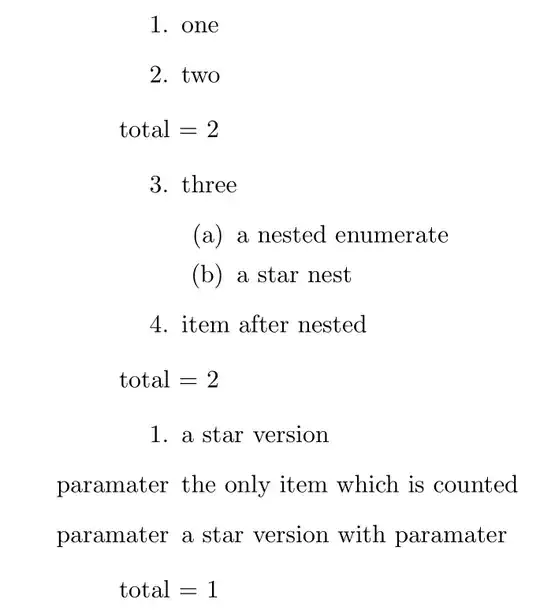
Now we can get the number of the top level items:
\documentclass{article}
\usepackage{enumitem}
\newif\ifenum
\makeatletter
\newcounter{totalitems}
\usepackage{letltxmacro}
\LetLtxMacro{@numerate}{\enumerate}
\LetLtxMacro{\end@numerate}{\endenumerate}
\LetLtxMacro{\it@m}{\item}
\DeclareDocumentCommand{\item}{ s o }{
    \IfNoValueTF{#2}{\it@m}{\it@m[#2]}
    \ifenum
        \IfBooleanT{#1}{\addtocounter{totalitems}{-1}}%
        \stepcounter{totalitems}
    \fi
}
\renewcommand{\enumerate}[1][]{%
    @numerate[#1]
    \ifnum\enit@depth=@ne
        \setcounter{totalitems}{0}
        \enumtrue
    \else
        \enumfalse
    \fi
}
\renewcommand{\endenumerate}{
    \ifnum\enit@depth=@ne
        \enumfalse
    \else
        \enumtrue
    \fi
    \end@numerate%
}
\makeatother
\begin{document}
\begin{enumerate}
    \item one
    \item two
\end{enumerate}
total = \thetotalitems

\begin{enumerate}[resume]
    \item three
    \begin{enumerate}
        \item a nested enumerate
        \item* a star nest
    \end{enumerate}
    \item item after nested
\end{enumerate}
total = \thetotalitems

\begin{enumerate}
    \item* a star version
    \item[paramater] the only item which is counted
    \item*[paramater] a star version with paramater
\end{enumerate}
total = \thetotalitems


\end{document}


\setcounter{beginitems}{\arabic{enumi}}to after theenumerateenvironment was initiated, so essentially after\begin{enumerate}or\begin{enumerate}[resume]. – Jasper Habicht Nov 10 '21 at 07:38\@numerate, but this would lead an error: I can't add optional paramaters included[resume]ofenumerateevironment, – Syvshc Nov 10 '21 at 07:41\csname enitdp@\endcsname.\enit@depthcotrol sequence to test which level is. Could you please write an answer? I'll give you the acceptance, or not I'll update my question and accept @Jasper's answer.Also a huge thanks for @JasperHabicht . – Syvshc Nov 11 '21 at 01:27