You can get close with the tikz-dependency package
\documentclass{article}
\usepackage{tikz-dependency}
\begin{document}
\sffamily
\begin{dependency}[edge below, arc edge, text only label, label style={below}]
\begin{deptext}[column sep=.5cm, row sep=.5ex]
\&\&\&\&\\\textcolor{gray}{(112:1:4)} \& \textcolor{gray}{(112:1:3)} \& \textcolor{gray}{(112:1:2)} \& \& \textcolor{gray}{(112:1:1)}\\
\textcolor{cyan}{ahadun} \& \textcolor{cyan}{l-lahu} \& \textcolor{cyan}{huwa} \&  \& \textcolor{cyan}{qul}\\
the One. \& (is) Allah, \& ``He \&  \& Say,\\[3ex]
\textcolor{cyan}{\Huge A} \& \textcolor{teal}{\Huge B} \& \textcolor{darkgray}{\Huge C} \& \textcolor{lightgray}{\Huge D} \& \textcolor{green}{\Huge E}\\
\textcolor{cyan}{$\bullet$} \& \textcolor{teal}{$\bullet$} \& \textcolor{darkgray}{$\bullet$} \& \textcolor{lightgray}{$\bullet$} \& \textcolor{green}{$\bullet$}\\
\textcolor{cyan}{\large N} \& \textcolor{teal}{\large PN} \& \textcolor{darkgray}{\large PRON} \& \textcolor{lightgray}{\large PRON} \& \textcolor{green}{\large V}\\[6ex]
\noalign{\global\arrayrulewidth=.3mm}\cline{2-5}
\& \textcolor{teal}{$\bullet$} \&  \& \& \\
\& \textcolor{teal}{\large NS} \&  \& \& \\
\end{deptext}
\wordgroup[group style={draw=none}]{7}{1}{1}{a1}
\wordgroup[group style={draw=none}]{7}{2}{2}{a2}
\wordgroup[group style={draw=none}]{7}{3}{3}{a3}
\wordgroup[group style={draw=none}]{7}{4}{4}{a4}
\wordgroup[group style={draw=none}]{7}{5}{5}{a5}
\wordgroup[group style={draw=none}]{9}{2}{2}{b1}
\groupedge[edge style={cyan, thick}, label style={cyan}]{a1}{a2}{a}{4ex}
\groupedge[edge style={darkgray, thick}, label style={darkgray}]{a2}{a3}{b}{4ex}
\groupedge[edge style={cyan, thick}, label style={cyan}]{a4}{a5}{c}{4ex}
\groupedge[edge style={darkgray, thick}, label style={darkgray}]{b1}{a5}{d}{4ex}
\end{dependency}
\end{document}
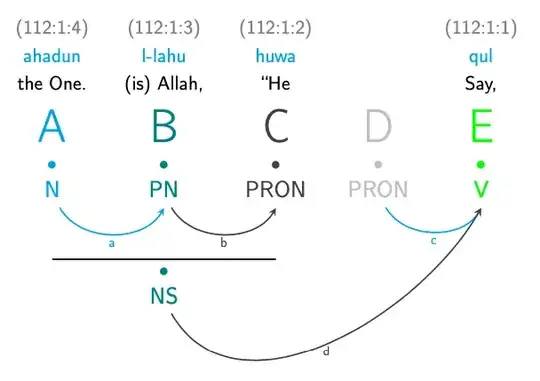
If the website generates these though, it might make more sense to simply include them as images.


tikzpackage to make nodes with text and lines to connect. – mmr Nov 15 '21 at 13:44