A combination of this and this answer seems to work:
\documentclass{amsbook}
\begin{document}
\tableofcontents
\section{section A}
\section*{%
    \for{toc}{\protect\hphantom{\numberline{\thesection}}section B}%
    \except{toc}{section B}%
}
\section{section C}
\end{document}
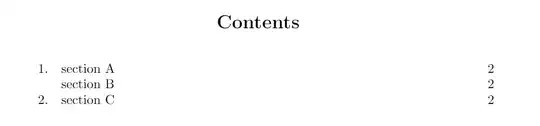
Update
After checking the documentation for amsclass I found that \tocsection (which is also used for sub- and subsubsections) is defined as \indentlabel{\@ifnotempty{#2}{\ignorespaces#1 #2.\quad}}#3}. Therefore, the following quite easy set up should actually work:
\documentclass{amsbook}
\begin{document}
\setcounter{tocdepth}{3}
\tableofcontents
\section{section A}
\section*{%
    \for{toc}{\protect\hphantom{\thesection.\quad}section B}%
    \except{toc}{section B}%
}
\subsection{subsection 1}
\subsection*{%
    \for{toc}{\protect\hphantom{\thesubsection.\quad}subsection 2}%
    \except{toc}{subsection 2}%
}
\subsubsection{subsubsection a}
\subsubsection*{%
    \for{toc}{\protect\hphantom{\thesubsubsection.\quad}subsubsection b}%
    \except{toc}{subsubsection b}%
}
\subsubsection{subsubsection c}
\end{document}
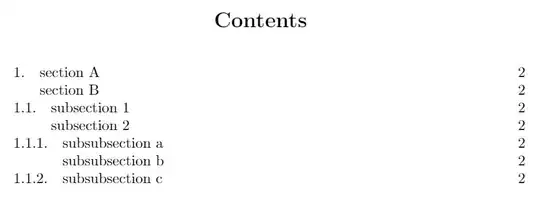
The counters \thesection, \thesubsection and \thesubsubsection hold the value of the section, subsection or subsubsection before, in case of being the first entry, it is just zero. Thus, it should work even if there the very first entry is numberless.


