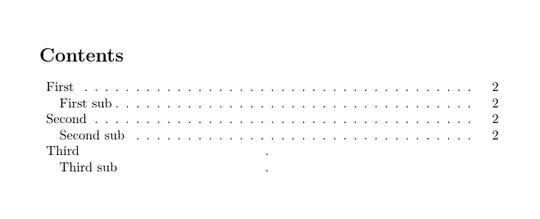
Since you are not numbering the section or subsection in the table of contents, I assumed you are adding them using \addcontentline
So you need to do 2 things for the last section and subsection
- suppress the page number, and
- delete the dots.
If you are using the book class remove \renewcommand*\l@section{...
\documentclass{article}
% adds dots for section in class article
\makeatletter
\renewcommand*\l@section{@dottedtocline{1}{0.5em}{2.3em}}
\makeatother
\begin{document}
\tableofcontents
\clearpage
\section{First}
\addcontentsline{toc}{section}{First}
\subsection{First subsec}
\addcontentsline{toc}{subsection}{First sub}
\section{Second}
\addcontentsline{toc}{section}{Second}
\subsection{Second subsec}
\addcontentsline{toc}{subsection}{Second sub}
% supress page numbers => https://tex.stackexchange.com/a/9294/161015
\renewcommand*{\addcontentsline}[3]{\addtocontents{#1}{\protect\contentsline{#2}{#3}{}}}
% supress the dots => https://tex.stackexchange.com/a/71329/161015
\makeatletter
\addtocontents{toc}{\def\string@dotsep{100}}
\makeatother
\section{Third}
\addcontentsline{toc}{section}{Third}
\subsection{Second subsec}
\addcontentsline{toc}{subsection}{Third sub}

\subsection*{Third sub}
\end{document}
NOTE
If this solution doesn't work for you, it may be because you are using another class and additional packages that modify the table of contents. If this is the case, post a minimal compilable example with its full preamble. (from \documentclass to \end{document})



'package not found'after installlingtocloft(Windows PC). – jvkloc Nov 18 '21 at 19:24tocloftpackage is included within the TeXLive distribution. – Peter Wilson Nov 18 '21 at 19:26