As mentioned @user202729 in his comment, your table is to long that can be fit in one page, so you need to use some sort of long table, for example defined by package xltabular.
Warning: Any long table can be broken between pages only between rows and never in a row!
For better spacing text into cells it is advisable to use smaller font, for example \footnotesize but this is up to you:
\documentclass[12pt]{book}
\usepackage[margin=2cm]{geometry}
\usepackage{ragged2e}
\usepackage{makecell, xltabular}
\renewcommand\theadfont{\footnotesize\bfseries}
\newcolumntype{R}{>{\RaggedRight}X}
\usepackage{enumitem}
\newlist{tabitemize}{itemize}{1}
\setlist[tabitemize]{nosep,
                     leftmargin = *,
                     label      = $\bullet$ ,
                     before     = \begin{minipage}[t]{\linewidth},
                     after      = \end{minipage}
                     }
\usepackage{blindtext}
\begin{document}
\begingroup
\footnotesize
\setlength\tabcolsep{4pt}
\setlength\LTleft{0pt}
\setlength\LTright{0pt}
    \begin{xltabular}{\textwidth}{|>{\hsize=0.6\hsize\linewidth=\hsize}R
                                  |>{\hsize=0.9\hsize\linewidth=\hsize}R
                                  |>{\hsize=1.5\hsize\linewidth=\hsize}R|}
\caption{Sample table}
\label{tab:longtable}   \
    \hline
\thead{Short\Column}   & \thead{Medium\ Column}   & \thead{Long\ Column}     \
    \hline
\endfirsthead
\caption[]{Sample table (cont.)}\
    \hline
\thead{Short\Column}   & \thead{Medium\ Column}   & \thead{Long\ Column}     \
    \hline
\endhead
\multicolumn{3}{r}{\footnotesize\itshape{Continued on the next page}}           \
\endfoot
\endlastfoot
%   table body
Not yet found the solution. The problem is the following: For a business report, the requirement is to report the data in two different tables as follows:
    \begin{tabitemize}
\item   The tables will be put side by side.
\item   The tables will span multiple pages.
\item   On each table,
    \end{tabitemize}
    & \blindtext[1]

        &       \begin{tabitemize}
        \item   Not yet found the solution. The problem is the following: For a business report, the requirement is to report the data in two different tables as follows:
        \item   The tables will be put side by side.
        \item   The tables will span multiple pages.
        \item   On each table, one of the columns will have a wrapping content (e.g. defined as p{4cm}).
            \end{tabitemize}
         As a consequence the lines of the two tables will not be aligned, so I cannot use a single table with the column doubled.I have looked in all previously related questions but I have not yet found the solution. The problem is the following: For a business report, the requirement is to                \
    \hline
Value

    & Text
        & This text is too long to fit in one line and is automatically I have looked in all previously related questions but I have not yet found the solution. The problem is the following: For a business report, the requirement is to report the data in he lines of the two tables will not be aligned, so I cannot use a single table with the column doubled.I have looked in all previously related questions but I have not yet found the solution. The problem is the following: For a business report, the requirement is to report the data in two different tables as follows:
        \begin{tabitemize}
        \item   The tables will be put side by side.
        \item   The tables will span multiple pages.
        \item   On each table, one of the columns will have a wrapping content (e.g. defined as p{4cm}).
        \end{tabitemize}
        As a consequence the lines of the two tables will not be aligned, so I cannot use a single table with the column doubled.I have looked in all  a  split into three   \
    \hline
Value

    & Text

        & have not yet found the solution. The problem is the following: For a business report, the requirement is to report the data in two different tables as follows: - The tables will be put side by side. - The tables will span multiple pages. - On each table, one of the columns will have a wrapping content (e.g. defined as p{4cm}). As a consequence the lines of the two tables will not be aligned, so I cannot use a single table with the column doubled.I have looked in all previously related questions but I have not yet  \
    \hline
    \end{xltabular}
\end{document}
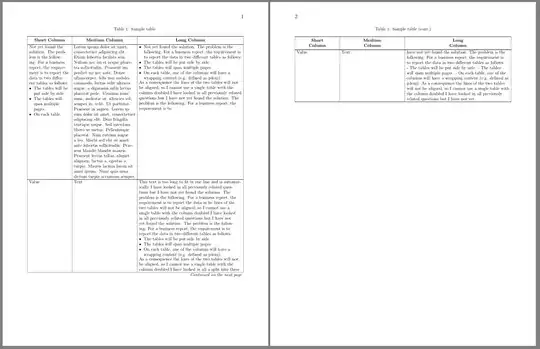
Addendum:
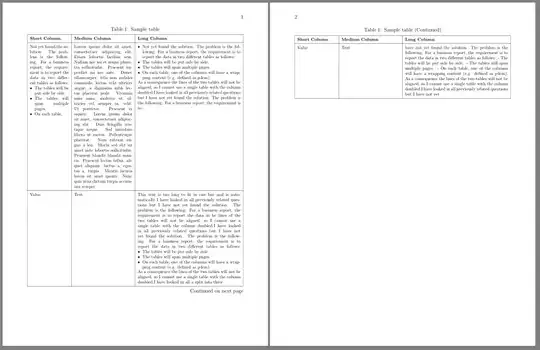
You may consider to use tabularray package and its longtblr table. Code is a bit shorter and simpler but result is (to my opinion) nicer:
\documentclass[12pt]{book}
\usepackage[margin=2cm]{geometry}
\usepackage{tabularray}
\UseTblrLibrary{varwidth}
\usepackage{enumitem}
\newlist{tabitemize}{itemize}{1}
\setlist[tabitemize]{nosep,
                     leftmargin = *,
                     label      = $\bullet$ ,
                     before     = \begin{minipage}[t]{\linewidth},
                     after      = \end{minipage}
                     }
\usepackage{blindtext}
\begin{document}
\begin{longtblr}[
  caption = {Sample table},
    label = {longtable},
                ]{rowhead=1,
                  hlines, vlines,
                  colspec = {X[0.2,j] X[0.3,j] X[0.53,j]},
                     rows = {font=\footnotesize},
                   row{1} = {font=\footnotesize\bfseries},
                  measure = vbox
                  }
%   column headers
{Short Column}   &     {Medium Column}   &   {Long Column}     \
%   table body
Not yet found the solution. The problem is the following: For a business report, the requirement is to report the data in two different tables as follows:
    \begin{tabitemize}
\item   The tables will be put side by side.
\item   The tables will span multiple pages.
\item   On each table,
    \end{tabitemize}
    & \blindtext[1]

        &       \begin{tabitemize}
        \item   Not yet found the solution. The problem is the following: For a business report, the requirement is to report the data in two different tables as follows:
        \item   The tables will be put side by side.
        \item   The tables will span multiple pages.
        \item   On each table, one of the columns will have a wrapping content (e.g. defined as p{4cm}).
            \end{tabitemize}
         As a consequence the lines of the two tables will not be aligned, so I cannot use a single table with the column doubled.I have looked in all previously related questions but I have not yet found the solution. The problem is the following: For a business report, the requirement is to                \
Value

    & Text
        & This text is too long to fit in one line and is automatically I have looked in all previously related questions but I have not yet found the solution. The problem is the following: For a business report, the requirement is to report the data in he lines of the two tables will not be aligned, so I cannot use a single table with the column doubled.I have looked in all previously related questions but I have not yet found the solution. The problem is the following: For a business report, the requirement is to report the data in two different tables as follows:
        \begin{tabitemize}
        \item   The tables will be put side by side.
        \item   The tables will span multiple pages.
        \item   On each table, one of the columns will have a wrapping content (e.g. defined as p{4cm}).
        \end{tabitemize}
        As a consequence the lines of the two tables will not be aligned, so I cannot use a single table with the column doubled.I have looked in all  a  split into three   \
Value

    & Text

        & have not yet found the solution. The problem is the following: For a business report, the requirement is to report the data in two different tables as follows: - The tables will be put side by side. - The tables will span multiple pages. - On each table, one of the columns will have a wrapping content (e.g. defined as p{4cm}). As a consequence the lines of the two tables will not be aligned, so I cannot use a single table with the column doubled.I have looked in all previously related questions but I have not yet  \
    \end{longtblr}
\end{document}
 .
.


longtable– user202729 Dec 01 '21 at 00:49