1

The not equal symbol (), has its slash from the upper-right to the bottom-left. For example:

\begin{equation}
    i  \neq  j
\end{equation}

Typesets the following:

i ≠ j

How can I obtain a similar symbol, whose slash directionality is reversed (i.e., from the upper-left to the bottom-right, as displayed below)?

A non-canonical 'not equal' symbol, with its slash directionality reversed, as described above.

Coby Viner
  • 1,939
showkey
  • 137
  • 6

3 Answers3

2

You could make use of \reflectbox (as has been pointed out in the comments), but it won't be usable in super- or subscripts:

\documentclass{article}
\usepackage{graphicx}

\newcommand{\flipneq}{\mathrel{\reflectbox{$\neq$}}}

\begin{document} $A \flipneq B \neq C$ \end{document}

enter image description here

  • 2
    \newcommand{\flipneq}{\mathrel{\mathpalette\flipneq@\relax}} and \newcommand{\flipneq@}[2]{\reflectbox{$\m@th#1{\neq}$}} (requires the usual \makeatletter and \makeatother. – egreg Dec 14 '21 at 15:19
2

You can construct this in a similar manner to the methods described in a related question.

For example, adapting a prior answer and enhanced via another, you can do the following:

\documentclass{article}

\usepackage{amssymb} \usepackage{amsmath}

\makeatletter \newcommand{\rneq}{\mathrel{\vphantom{\neq}\mathpalette\do@rneq\relax}}

\newcommand{\do@rneq}[2]{% \ooalign{% $#1\m@th=$\cr \hidewidth$#1\m@th\backslash$\hidewidth\cr }% } \makeatother

\begin{document} \Huge

\begin{align*}
    i   &   \neq j\\
    \\
    i   &   \rneq j\\
    \\
    \\
    i   &   \neq_{a} j\\
    \\
    i   &   \rneq_{a} j\\
\end{align*}

\end{document}

This yields:
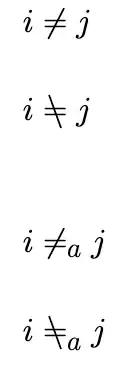
Compiled output of above: depicts i ≠ j, and then a line below with the same but the direction of the slash reversed; then a double line break, followed by the same two lines, except with both symbols having a sub-scripted 'a'

This has the advantage of working fine with most kerning and sub/super-scripting (as shown), and allowing easy adjustment, by changing the spacing within the \rneq command.

You also can view this example on Overleaf.

Coby Viner
  • 1,939
0

You can define a \flipnot symbol that can be used like \not:

\documentclass{article}
\usepackage{amsmath,graphicx}

\makeatletter \newcommand{\flipnot}{\mathrel{\mathpalette\flipnot@\relax}} \newcommand{\flipnot@}[2]{% \begingroup \sbox\z@{$#1\not$}% \raisebox{\dimexpr\depth-\dp\z@}{\scalebox{1}[-1]{$\m@th#1\not$}}% \endgroup } \makeatother \newcommand{\fneq}{\flipnot=} % \neq is \not=

\begin{document}

$\neq\fneq$

$a\neq b\fneq c^{\fneq}$

\end{document}

enter image description here

egreg
  • 1,121,712