In the argument to tabular you don't specify the number of rows, but the number of columns.
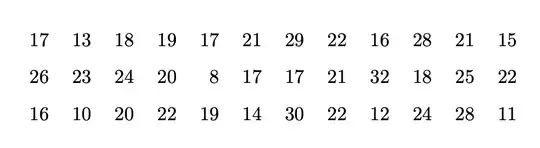
Your table should be
\begin{tabular}{@{} *{12}{r} @{}}
17 & 13 & 18 & 19 & 17 & 21 & 29 & 22 & 16 & 28 & 21 & 15 \\[0.25cm]
26 & 23 & 24 & 20 &  8 & 17 & 17 & 21 & 32 & 18 & 25 & 22 \\[0.25cm]
16 & 10 & 20 & 22 & 19 & 14 & 30 & 22 & 12 & 24 & 28 & 11
\end{tabular}
The meaning of @{} at the beginning and end is “don't add the standard padding” (they can be removed, though, if the table doesn't end up too wide).
With *{12}{r} we specify twelve columns with right alignment. You might prefer centering, but the 8 in row two, column five, would appear misaligned, to my eyes.
Full code.
\documentclass{article}
\begin{document}
\begin{center}
\begin{tabular}{@{} *{12}{r} @{}}
17 & 13 & 18 & 19 & 17 & 21 & 29 & 22 & 16 & 28 & 21 & 15 \[0.25cm]
26 & 23 & 24 & 20 &  8 & 17 & 17 & 21 & 32 & 18 & 25 & 22 \[0.25cm]
16 & 10 & 20 & 22 & 19 & 14 & 30 & 22 & 12 & 24 & 28 & 11
\end{tabular}
\end{center}
\end{document}
Alternative
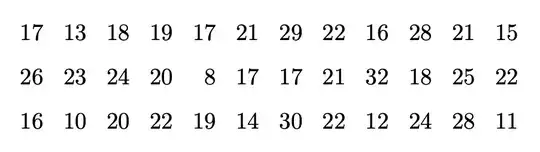
Here's a different way of handling the table. Since these are numbers, math mode would be preferable, so you could use a math display. You can also reduce the spacing to your liking.
\documentclass{article}
\begin{document}
[
\setlength{\arraycolsep}{0.15cm}
\begin{array}{@{} *{12}{r} @{}}
17 & 13 & 18 & 19 & 17 & 21 & 29 & 22 & 16 & 28 & 21 & 15 \[0.25cm]
26 & 23 & 24 & 20 &  8 & 17 & 17 & 21 & 32 & 18 & 25 & 22 \[0.25cm]
16 & 10 & 20 & 22 & 19 & 14 & 30 & 22 & 12 & 24 & 28 & 11
\end{array}
]
\end{document}
Adjust the values for the horizontal and vertical spacing until you're satisfied.


&between each number and declare more columns eg\begin{tabular}{*{15}{c}}– David Carlisle Dec 17 '21 at 21:18