2

Consider the following example, using the enumitem package.

\newlist{foolist}{itemize}{1}
\setlist[foolist]{label = \textbullet, labelindent = 1em, leftmargin = *, align = left}

...

\begin{foolist} \item[Abc] Aute esse ut qui est id veniam qui consectetur aute sit quis reprehenderit. \item[Def] Tempor qui ullamco anim nisi occaecat pariatur ullamco duis sit non occaecat exercitation qui. \item[Ghi] Ullamco consequat velit fugiat quis. \end{foolist}

(screenshot)

This does not display as one would expect:

  • the indent of the list items is not the same for each line;
  • the hanging indent is somehow less than the first line indent.

The label width should of course be the default of the maximum width of any label. Note, the label indent is correct here.

Noldorin
  • 890
  • You need to increase the leftmargin. In your example, the margin is narrower than the labels, and thus, the labels protrude into the text and push it to the right. – Jasper Habicht Dec 20 '21 at 00:10
  • @JasperHabicht I want it to be auto-determined by the maximum label width, however (which is the usual behaviour). – Noldorin Dec 20 '21 at 00:15
  • Then it is probably a duplicate of this: https://tex.stackexchange.com/q/130097/47927 – Jasper Habicht Dec 20 '21 at 00:34
  • @JasperHabicht That question is old. The answer seems to ignore the fact the functionality is built in. – Noldorin Dec 20 '21 at 01:09
  • @Noldorin You sure that there is a built in functionality? (as in, if you don't already know the answer, how can you be sure there's a nice answer?) – user202729 Dec 20 '21 at 03:23
  • I am only aware of the possibility to automatically compute the widest label of lists that do not have custom labels (which are the labels set in square brackets). Otherwise you always need to tell the widest label explicitly. – Jasper Habicht Dec 20 '21 at 08:31
  • It's true I'm not sure there is a nice solution, though I it's clear there exists in-built functionality for automatically computing the widest label. @JasperHabicht, you may well be correct in that it does not apply to custom labels — thanks for pointing that out. – Noldorin Dec 20 '21 at 15:40

2 Answers2

3

I think what you are looking for is the widest key tp ecicify the widest label used:

\begin{foolist}[widest={Abc}]

which yields:

enter image description here

Code:

\documentclass{article}

\usepackage{enumitem} \newlist{foolist}{itemize}{1} \setlist[foolist]{ label = \textbullet, labelindent = 1em, leftmargin = *, align = left, }

\begin{document} \begin{foolist}[widest={Abc}] \item[Abc] Aute esse ut qui est id veniam qui consectetur aute sit quis reprehenderit. \item[Def] Tempor qui ullamco anim nisi occaecat pariatur ullamco duis sit non occaecat exercitation qui. \item[Ghi] Ullamco consequat velit fugiat quis. \end{foolist} \end{document}

Peter Grill
  • 223,288
  • Thanks for your reply. I was hoping to utilise the in-built functionality for auto-detecting the widest label, but perhaps that only works for non-custom labels as @JasperHabicht is suggesting. – Noldorin Dec 20 '21 at 17:46
  • @Noldorin: I don't think there is a built in method. To automate it, one needs to make a two pass on the as list as JasperHabicht's suggestion. Or quivalently, you could build the list one item at a time and then typeset it. – Peter Grill Dec 20 '21 at 22:48
1

As I understand your question, you would like to automatically set the labelwidth of a certain list to the widest label of this list which is set via \item[<label>].

As it stands, this is not already implemented in the enumitem package. What you actually can do is to check the length of the last label in the list and set labelwidth to this width. Another way, as proposed by @Peter Grill, is that you use the widest option to set the length explicitly, which, however, is not as automatic as you would probably like it to be.

Possible ways to solve this, have been discussen in this question. I came up with the following alternative solution:

First of all, I used the description environment, because I think, this fits your needs better.

Then, I redefined the \item command, so that for each item in a list, the code now checks whether the the current label is wider than the previous label (or wider than 0pt for the first label) and, if yes, sets an internal length (\maxlabeltempwidth) to this value.

At the end of the list, this value is then stored (via \setwidestlabel) in the .aux file (credits go to @egreg for his great answer). In the end, for each list in the document, the .aux file stores a value with the width of the largest label.

In the list settings, this value is then finally used (via \getwidestlabel) to set the labelwidth.

\documentclass{article}
\usepackage{enumitem, calc}

\newlength{\maxlabeltempwidth} \setlength{\maxlabeltempwidth}{0pt}

\let\descItem\item \renewcommand\item[1][]{% \descItem[#1]% \setlength{\maxlabeltempwidth}{\maxof{\maxlabeltempwidth}{\widthof{\textbf{#1}}}}}

\makeatletter \newcommand{\setwidestlabel}[2]{% \immediate\write@auxout{% \string\global\string@namedef{descwidestlabel\romannumeral#1}{\the#2}% } } \makeatother

\newcommand{\getwidestlabel}[1]{% \ifcsname descwidestlabel\romannumeral#1\endcsname \csname descwidestlabel\romannumeral#1\endcsname \else 0pt% \fi }

\newlist{foolist}{description}{1} \setlist[foolist]{ after = \setwidestlabel{\EnumitemId}{\maxlabeltempwidth}, labelwidth = \getwidestlabel{\EnumitemId}, leftmargin = ! }

\begin{document}

\begin{foolist} \item[Abc] Aute esse ut qui est id veniam qui consectetur aute sit quis reprehenderit. \item[Def] Tempor qui ullamco anim nisi occaecat pariatur ullamco duis sit non occaecat exercitation qui. \item[Ghi] Ullamco consequat velit fugiat quis. \end{foolist}

\begin{foolist} \item[Abcdefghi] Aute esse ut qui est id veniam qui consectetur aute sit quis reprehenderit. \item[Def] Tempor qui ullamco anim nisi occaecat pariatur ullamco duis sit non occaecat exercitation qui.
\item[Ghi] Ullamco consequat velit fugiat quis. \end{foolist}

\begin{foolist} \item[Abc] Aute esse ut qui est id veniam qui consectetur aute sit quis reprehenderit. \item[Def] Tempor qui ullamco anim nisi occaecat pariatur ullamco duis sit non occaecat exercitation qui. \item[Ghi jkl] Ullamco consequat velit fugiat quis. \end{foolist}

\end{document}

And this is the output:
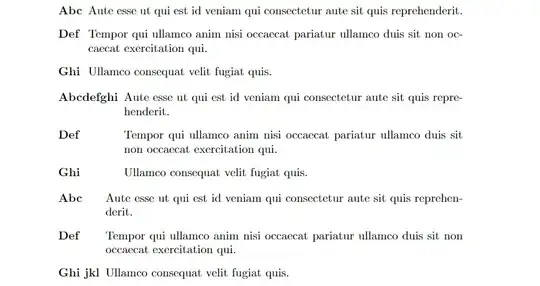
enter image description here

  • Thanks Jasper, this is a nice solution. (Given that you are correct about the enumitem package not supporting auto-detecting the widest label when custom labels are present.) – Noldorin Dec 20 '21 at 17:48