I would focus on making the expression more compact, mainly by replacing the \frac notation with "slash" notation (aka inline fraction notation). And, since you're loading the mathtools package, you could use its cases* environment instead of a plain array environment.
Oh, and by all means, do write \sin, not sin.
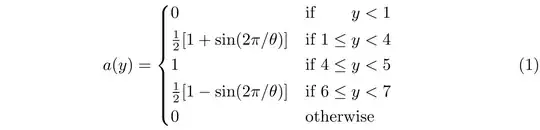
\documentclass{article}
\usepackage{mathtools} % for 'cases*' environment
\begin{document}
\begin{equation}
  a(y)=
  \begin{cases}
    0                                     & if $\hphantom{1\leq{}}y < 1$ \
    \frac{1}{2}[ 1 + \sin(2\pi/\theta) ]  & if $1 \leq y < 4$ \
    1                                     & if $4 \leq y < 5$ \
    \frac{1}{2}[ 1 - \sin(2\pi/\theta) ]  & if $6 \leq y < 7$ \
    0                                     & otherwise
  \end{cases}
\end{equation}
\end{document}
Addendum to address the OP's follow-up comment: To generate a truly elegan tall curly brace, you could download and install the mtpro2 package -- note that while the full package isn't free of charge, its 'lite' subset is free -- and use its \ccases macro. The elegant curly brace can be up to 10 cm (4 inches) tall. Observe that the mtpro2 math fonts are in the Times Roman family of fonts; this may or may not be to your liking.
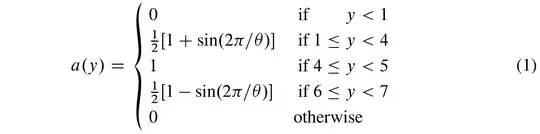
\documentclass{article}
\usepackage{amsmath}      % for '\text' macro
\usepackage{newtxtext}    % Times Roman clone text font
\usepackage[lite]{mtpro2} % for '\ccases' macro
\begin{document}
\begin{equation}
  a(y)=
  \ccases{
    0                                     & \text{ if $\phantom{1\leq{}}y < 1$} \
    \frac{1}{2}[ 1 + \sin(2\pi/\theta) ]  & \text{ if $1 \leq y < 4$} \
    1                                     & \text{ if $4 \leq y < 5$} \
    \frac{1}{2}[ 1 - \sin(2\pi/\theta) ]  & \text{ if $6 \leq y < 7$} \
    0                                     & \text{otherwise}
  }
\end{equation}
\end{document}


sinand smaller square brackets first? – Przemysław Scherwentke Dec 24 '21 at 05:00\sininstead ofsin. – Peter Grill Dec 24 '21 at 06:42