I don't know if this would be faster, but if the database is really very huge, you could probably organize it in a MySQL- or MariaDB-server.
Then you could use LuaLaTeX with "--shell-escape" and via assert call a commandline-SQL-client for retrieving values as strings from the database.
The strings in turn can be written to TeX-level. If the strings contain only things that shall be tokenized as character-tokens or if you don't mind relying on backslash having category code 0, you can probably use tex.sprint for this:
\documentclass{article}
\usepackage{verbatim}
\makeatletter
\let\percentchar=@percentchar
\makeatother
\newcommand\CallExterrnal[1]{%
  \directlua{
    function runcommand(cmd)
    local fout = assert(io.popen(cmd, 'r'))
    local str = assert(fout:read('*a'))
    fout:close()
    return str
    end
    tex.sprint (runcommand("#1"))
  }%
}%
\begin{document}
% Instead of the echo-command a commandline-SQL/MariaDB-client
% could be called for retrieving values of a database.
Let's catch the output of \verb|echo \LaTeX| between parentheses:
(\CallExterrnal{echo \string\\string\LaTeX\percentchar})
Let's catch the output of \verb|echo \LaTeX| into a macro definition:
\expandafter\expandafter\expandafter\def
\expandafter\expandafter\expandafter\test
\expandafter\expandafter\expandafter{%
  \CallExterrnal{echo \string\\string\LaTeX\percentchar}%
}
\texttt{(\string\test=\meaning\test)}
\end{document}
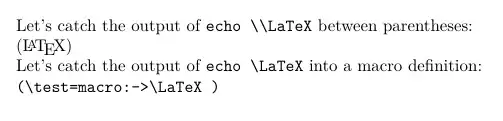
You may need to add the commandline-SQL-client to shell_escape_commands = in texmf.cnf.
Probably another approach might be having knitr create the .tex-file for you from an .rnw-file or .Rtex-file where R-code and TeX-code is merged and where you have R-code-chunks which serve the purpose of calling the local commandline-SQL-client for retrieving values from the database and placing them into the .tex-file.
(knitr works out of the box with overleaf if the file is named .Rtex.)
<<templates, include=FALSE, cache=FALSE, echo=FALSE, results='asis'>>=
knitr::opts_template$set(
  CallExternalApp = list(include=TRUE, cache=FALSE, echo=FALSE, results='asis')
)
@
<<CallExternal, include=TRUE, cache=FALSE, echo=FALSE, results='asis', >>=
CallExternalApp <- function(A) {
    return(cat(system(A, intern = TRUE), sep="", fill=FALSE))
}
@
\documentclass{article}
\begin{document}
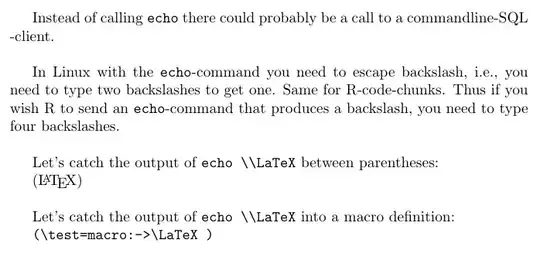
Instead of calling \verb|echo| there could probably be a call to a commandline-SQL -client.
\bigskip
In Linux with the \verb|echo|-command you need to escape backslash, i.e., you need to type
two backslashes to get one. Same for R-code-chunks. Thus if you wish R to send an
\verb|echo|-command that produces a backslash, you need to type four backslashes.
\bigskip
Let's catch the output of \verb|echo \LaTeX| between parentheses:
(%
<<, opts.label='CallExternalApp' >>=
<<CallExternal>>
CallExternalApp("echo \\LaTeX\%")
@
)
\bigskip
Let's catch the output of \verb|echo \LaTeX| into a macro definition:
\def\test{%
<<, opts.label='CallExternalApp' >>=
<<CallExternal>>
CallExternalApp("echo \\LaTeX\%")
@
}
\texttt{(\string\test=\meaning\test)}
\end{document}


propis that in the underlying implementation, everything is stored in a single macro, so every time you want to do any operation on it, you have to work on the entire thing (2200 items is huge). The other solution here would be to store each item in a\l_tobi_prop_<name>_tlvariable, which would give you minimal access time – Phelype Oleinik Jan 12 '22 at 11:04carguments to construct the variable name from the"key" in each case. This gives fast access to individual items but essentially no way to loop over all defined items unless you store the list separately, so it depends.... – David Carlisle Jan 12 '22 at 11:11TEXhackers note: This function iterates through every key–value pair in the ⟨property list⟩ and is therefore slower than using the non-expandable \prop_get:NnNTF.as I am using\prop_if_in_p:Nnat one spot. Would it actually be faster to use\prop_get:NnNand test for\q_no_value? – TobiBS Jan 12 '22 at 12:14\prop_item:Nnis slower than\prop_get:NnNTFbecause the former has to search for the labels in the prop one by one (linear time), while the latter can use a delimited macro to go directly to the desired item (constant time), so it's much faster for longer lists. Using\prop_get:NnNor\prop_get:NnNTFhas little impact on performance: it's a matter of which serves you best – Phelype Oleinik Jan 12 '22 at 12:29\prop_item:Nnand that's it. If that's not an issue, then I'd probably switch to\prop_get:NnN(TF), which has a much (much) smaller issue with large lists. I'd guess things would only start to get slow with\prop_get:NnN(TF)with hundreds of thousands of accesses, in which case I'd use a dedicated method. Otherwise I wouldn't bother changing the data type – Phelype Oleinik Jan 12 '22 at 19:31\prop_get:NnN(TF). But I do need\prop_item:Nnoccasionally. The thing is, property lists are terribly convenient, but just testing the alternative means to forgo this convenience, and if you ever "test" it, why go back? ;-) – gusbrs Jan 12 '22 at 19:39zref-clever... I'd test a document, and see if it gets noticeably slower but using/not using your package. I doubt so, but it's worth a try. If the difference is below the tenths of a second, the time saved running the document won't offset the time you spent changing the datatype (and probably inserting bugs :) – Phelype Oleinik Jan 12 '22 at 19:49\prop_get:NnN(TF)and it is actually faster than my old implementation through a\str_case:xnF. Hence I will stick with that solution and think the l3prop with the right access function is the solution for my specific problem. So thank you @UlrikeFischer @Phelype Oleinik @gusbrs it is great to have you! – TobiBS Jan 12 '22 at 21:22