For BibTeX you can use bibliography styles produced by the urlbst script. This is a script that takes an existing .bst file as input and produces a new .bst file with added url functionality. One of the features of the script is to suppress url and doi fields and make the title a hyperlink to the contents of those fields. This is done using the command line flags --hyperref --inlinelinks.
The following command modifies plain.bst into plainlinks.bst:
$ urlbst --hyperref --inlinelinks `kpsewhich plain.bst` > plainlinks.bst
The kpsewhich substitution is to find the path of the installed plain.bst and provide this path as input to urlbst, of course you can also locate the plain.bst yourself and copy it to your working directory first.
Then you can use the following MWE:
\documentclass{article}
\usepackage{hyperref}
\begin{filecontents*}{\jobname.bib}
@article{knuth1984,
  title={Literate Programming},
  author={Donald E. Knuth},
  journal={The Computer Journal},
  volume={27},
  number={2},
  pages={97--111},
  year={1984},
  publisher={Oxford University Press},
  doi={10.1093/comjnl/27.2.97}
}
\end{filecontents*}
\begin{document}
\cite{knuth1984}
\bibliographystyle{plainlinks}
\bibliography{\jobname}
\end{document}
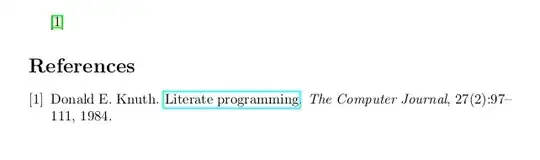
Result:
urlbst is compatible with the standard styles (plain, alpha, unsrt, abbrv) but also with Natbib, AMS styles, IEEE, and many other custom styles. It is used by big publishers like ACL for their conferences.


\href{DOI 10.1093}{https://doi.org/.....}– David Carlisle Jan 13 '22 at 16:29.bibfile? – Jona Engel Jan 13 '22 at 16:39\url{http://a/b/c}prints the url as the link and\href{link url}{link text}allows link url and text to be specified separately. But you are preumably using bibtex (or biblatex given the tags?) to generate the latex and just using a URL field hard to generate a link text, better would be a DOI field that just had doi=abcde then you could use that as the link text and generate a doi.org URL that worked from that. But that would require changes to your bib file and your bibliography style – David Carlisle Jan 13 '22 at 17:09ln -s $URL $REFwhere$DOIis the URL to the DOI and$REFis the corresponding whole entry in the References section. – Jona Engel Jan 13 '22 at 17:22urlfield instead of the (more complicated) approach there to construct the url out of the title and authors. – Marijn Jan 13 '22 at 20:22