The following provides the functionality you requested - an optional first argument that provides the answer to the question. The condition \IfValueTF{#1} checks whether an answer is supplied or not, and sets either the answer, or the answer plus a number of blank lines (in an attempt to yield a similar vertical gap that when no answer is provided.
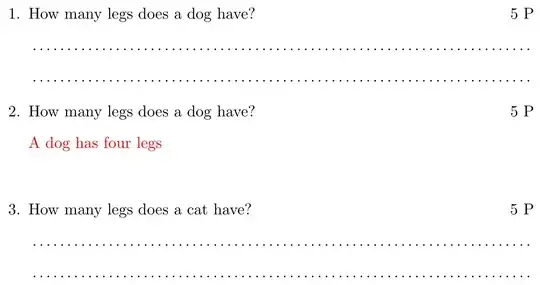
\documentclass{article}
\usepackage{multido,xcolor,xfp}
\usepackage{enumitem}
\NewDocumentCommand{\OffeneFrage}{ o m m m }{%
  \begin{enumerate}[resume]
    \begin{samepage}
      \item #2% Set question
      \unskip\hspace*{\fill}~#4~P\par% Set marks/points
      \nopagebreak
      \IfValueTF{#1}
        {\item[] {\color{red}#1}%
         \multido{}{\inteval{#3-1}}{\item[]}}% An answer is provided
        {\multido{}{#3}{\item[] \dotfill}}% No answer provided
    \end{samepage}
  \end{enumerate}
}
\begin{document}
\OffeneFrage{How many legs does a dog have?}{2}{5}
\OffeneFrage[A dog has four legs]{How many legs does a dog have?}{2}{5}
\OffeneFrage{How many legs does a cat have?}{2}{5}
\end{document}
You may need \usepackage{xparse} in the preamble if your LaTeX distribution is not up-to-date.
You might also be interested in a different, key-value interface to your questions:
\OffeneFrage{question=...,answer=..,lines=.,points=.}
The order is not important, and you can omit some values (the lines and points; they default to 4 and 1, respectively). If no question is provided, nothing is printed. And an answer is only printed when \printanswerstrue is set.
If you set \printanswerstrue, this is the output:
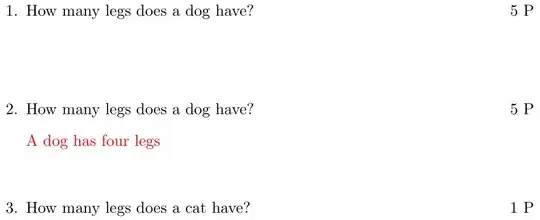
\documentclass{article}
\usepackage{multido,xcolor,xfp}
\usepackage{enumitem,xkeyval}
\makeatletter
\define@cmdkey{QA}{question}[\relax]{}
\define@cmdkey{QA}{answer}[\relax]{}
\define@cmdkey{QA}{lines}[4]{}% Default of 4 lines
\define@cmdkey{QA}{points}[1]{}% Default of 1 point
\newif\ifprintanswers
\NewDocumentCommand{\OffeneFrage}{ m }{%
  \setkeys{QA}
    {question,answer,lines,points,% Set default values
     #1}% Set user-specified values
  % Empty check: https://tex.stackexchange.com/q/53068/5764
  \if\relax\detokenize\expandafter{\cmdKV@QA@question}\relax
    % No question was supplied; do nothing
  \else
    \begin{enumerate}[resume]
      \begin{samepage}
        \item \cmdKV@QA@question% Set question
          \unskip\hspace*{\fill}%
          \ifnum\cmdKV@QA@points>0 % Print points if > 0
            ~\cmdKV@QA@points~P\par
          \fi
          % Empty check: https://tex.stackexchange.com/q/53068/5764
          \if\relax\detokenize\expandafter{\cmdKV@QA@answer}\relax
            % No answer was supplied
            \multido{}{\cmdKV@QA@lines}{\item[] \dotfill}% No answer provided; set lines
          \else
            % Answer was supplied
            \ifprintanswers
              \item[] {\color{red}\cmdKV@QA@answer}% Set answer
              \multido{}{\inteval{\cmdKV@QA@lines-1}}{\item[]}% Set additional gap
            \else
              \multido{}{\cmdKV@QA@lines}{\item[] \dotfill}% Set answer lines
            \fi
          \fi
      \end{samepage}
    \end{enumerate}
  \fi
}
\makeatother
%\printanswerstrue
\begin{document}
\OffeneFrage{
  question={How many legs does a dog have?},
  lines=2,
  points=5
}
\OffeneFrage{
  answer={A dog has four legs},
  question={How many legs does a dog have?},
  lines=2,
  points=5
}
\OffeneFrage{
  lines=3,
  question={How many legs does a cat have?},
}
\end{document}
So you can toggle the questions/answers with a boolean.


\MainFrage{...} ... \EndMainFrage.\MainFrageonly considers thequestionkey-value, although you can add the other elements there as well. They are just ignored. – Werner Jan 15 '22 at 13:23questionkey and make that one a mandatory argument. A question should always have a question, imho it doesn't make much sense keeping that one optional. – Skillmon Jan 23 '22 at 17:57